Tagged 'Cameras'

mipoll Vraycamlister

1 vote

Info :
Rightclick : select camera
Doubleclick: select target
Rightclick: change viewport to camera view

Multi Camera Renderer

7 votes

Allows to render multiple cameras from a list defined by user : -> Save/Load capabilities for list of cameras and interface parameters -> Rendering log file generation -> Optionnal user defined script can be executed before each camera rendering -> Optionnal user defined script(s) can be executed anywhere in camera rendering list -> Frame selection for each camera to be rendered -> English and Fre

MultiCamLister

50 votes

MultiCamLister is the free script for 3ds Max helps to you control cameras in a scene.

MultiCamLister Features:

Supported camera types: Standard, V-Ray, Maxwell, FRY- (just switching between cameras).
The ability to copy and paste the properties from one camera to another one.
Collapsible settings panel.
The ability to delete the selected camera from the scene through the script.
Scalable interface.

NukeOps

39 votes

A set of functions wrapped into a minimalist single-click button to help 3ds Max and Nuke artists to bring the 3ds Max 3d scene assets into Nuke's powerful 3d compositing scene.

This tool allows:

1) Copy cameras and any other objects (as points) and their animation into clipboard for an easy Copy+Paste action inside Nuke.

2) Generate .chan files from selected cameras and any other objects (as points) and save them either many at once or one at a time to selected destination.

Octane CamTools

3 votes

Red&Cyan Octane Tools

What do they do?

- Create free Octane cam:

Obviously creates a free octane cam. You can decide wether you want to use a focus plane or not.
the focus plane affects the focal depth and vice versa.

- Create octane cam from view:

Works exactly as the usual "create camera from view".
You can also add a focus plane, wich is linked to the focalDepth.

- Replace with octane cam:

Select the camera/s that you want to replace and run the script. for each selected camera an octane cam will be created.

panoVR.max

8 votes

Panoramic image generator and stitcher for 3ds max. Automates the creation of a 360 degree panoramic render - then provides a tool to stitch the images into a single file.

Photo Studio Pro+ for Vray

44 votes

Photo Studio


Photo Studio Pro (PS Pro) is a photographic exposure control tool for computer generated images. Since 3dsmax2016 physical camera is supported and new perspektive and DOF functions. The interface is designed to manage your exposure output. PSPro has some very special features like: realtime exposure or the simulation of the Av/Tv mode of a SLR camera. 


Quick Isolate Object

66 votes

With this useful and funny script, you can isolate in a ListBox, the category object in Geometry, Shape, Light, Helper, Camera and Space Warp in the viewport.  We can select, rename and count the items in the scene.  Useful in many work situation.

qio

Render 3D

211 votes

Simple script for rendering in 3D (Anaglyph / Polarized / Stereo Pair)
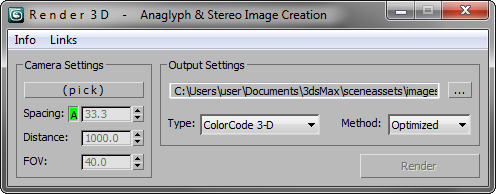
• Supports ColorCode 3-D (Amber/Blue), Red/Cyan, Green/Magenta, Polarized, Stereo Pair, and separate Left / Right

NEW Choose from various Anaglyph Methods (Color, Half Color, Optimized, and Gray)

NEW Super fast compositing process

Render Cameras

9 votes

Renders the current frame or the entire animation range from each camera in your scene.

Syndicate content
