Tagged 'select'

id_changer

7 votes

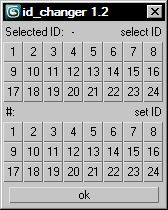
Selecting or applying material ID's with one click!

Rollout with button grid for selecting or setting material ID's of selected polys up to ID 24. Works with editable poly only. Displays selected poly's material ID if they're same.
Ctrl + click add specific IDs. Alt + click deselects specific IDs.

Examples:
Want to set some specific material ID up to 24 to selected polys? One click.
Want to select polys with same material ID's of selected poly? One click.

Material Toolbox

1 vote

Manage the Material assignment, Material ID number, and Wirecolor of scene objects.

Feature List:

+ Easily Select all objects with shared Material, Mat ID, or Wirecolor

+ Interactive Clipboard to store Materials, Mat ID's, or Wirecolors

Memento

1 vote

New MaxScript. Simple and handy as aways. Free.
It's very useful for my use. You can quickly save and recall up to 5 groups of selections. You can increment memories adding objects to them (Which is SO useful in some situations (to help in the process of organizing big and messy scenes)...
Hide and Un-Hide from Memory buttons. Isolate groups, etc.

BTW, the video says QuickSelect, but i changed the script name to Memento.;)

miauu's Select Edges by lenght

52 votes

With this script you can select edges which is less, equal or grater than the value that you want. Also, you can measure the lenght of single or multiple edges.

Instalation: Drag-n-drop mzp files in 3ds max. Go to Customize-Custumize User Interface, under "miauu" category you will find the script.

Modifier Auto-Select

51 votes

This is a tool I put together because sometimes you have to work with modifiers on multiple nodes and the modifiers aren't at the very top of the stack. You’re constantly having to select the node and then selecting the proper modifier. Prime example of this is when you have a turbosmooths on top of all of your geometry while you are either skinning or modelling. It would be much easier, and save quite a bit of time, if every time you selected a node you just automatically were on the skin modifier or edit poly modifier.

MultiSelectFilter

19 votes

Filter what you want to select. If you hold CTRL you will be able to mark multiple options.
Video preview:
www.coldfolio.info/scripts/MultiSelectFilterPreview.mp4

Orionflame 4

31 votes

Orionflame 4 is the successor of the acclaimed production-proven modeling toolset for 3ds max, featuring a completely redesigned and rewritten core architecture, along with several new powerful modeling tools.

Experience the difference yourself.

Note: this is a commercial script

Outliner

756 votes

 The Outliner 2.0 is a fast and easy to use scene management tool. It has a wide range of features, including selecting, hiding, freezing, linking and grouping objects in the "Hierarchy Mode". In the "Layer Mode" you can organize your scene by dragging&dropping objects from one layer to the other. What's more, the Outliner offers support for nested layers, to manage scenes more efficiently. The interface is nimble enough to keep it open constantly.

ProSelect

148 votes

A better way to select object in 3dsMax's viewport.

The current problem with Max's default selection method is that is cycles trough all the object underneath the mouse pointer, resulting in endless clicks to get the right object. you'll get it in the end but it's not pretty.

So what does this script do?

The existing selecting mechanism is not altered, this just adds a few things.

When you now click on a stack of objects, and keep holding the mouse button down, you can move your mouse up/down to select objects further or closer to the viewpoint.

Quick Isolate Object

66 votes

With this useful and funny script, you can isolate in a ListBox, the category object in Geometry, Shape, Light, Helper, Camera and Space Warp in the viewport.  We can select, rename and count the items in the scene.  Useful in many work situation.

qio

Syndicate content