Tagged 'maxscript'

ChineseKnot

3 votes

MAXScript for build Chinese Knot model.

3DS Max - Plugin - ZoomExtSelFix

1 vote

In this update, the script will work on sub-object selections. Also, a bug in the first version is fixed, when you switch to another mode other than the Modify Panel, the first version gives an error, this is fixed now in this 1.5 version.
To recap on why this plugin:
The default Zoom Extents Selected tool in Max has an issue when you're in a sub-object level but no sub-object element is selected, pressing Z(the default shortcut) causes Max to Zoom Extents on the whole scene instead of the selected object.

Maxscript basics #3 - building a scripted GUI

19 votes

Quick tutorial demonstrating how to build a GUI in maxscript

3DS Max - Remove Objects From Isolate Mode

1 vote

This little script will help the user in removing objects from the isolate mode.
After selecting one or more objects and choosing isolate, sometimes you want to remove one or more objects from the isolated objects group. So select one or more objects that you want to remove and click the script.
Another benefit is that when the script is grayed out and not available, the user will know
That 3DS Max is not in the Isolate Mode

Wirecolor Tools

0 votes

MaxLINQ - LINQ functions for maxScripters

5 votes

MaxLINQ tool is intended to be a way to use inside maxscript language sweet predefined functions, similar to those in C# LINQ, through an easy lambda-style expressions syntax, concatenating functions after functions.

You can query arrays, strings, maxscript enumerables (objectSet, bitArray, groups, pathnames...) and DotNet IEnumerables.Moreover, it includes  specific functions for maxObjects.

It can be used both in your own scripts or directly in the 3dsMax Listener.

Some intuitive simple examples are:

maxLINQ

Easy Spring Controller Tool

1 vote

I made this script last year , but Now i made it more usable for everyone as (Spring Controller Tool)
features:
1) Add Spring Controller to hierarchy of bones,Objects or etc...
2) Add Spring To Selection Objects (its Require The Object Hierarchy Links)
3) Add A Modifier Controller For Each Spring Controller
4) Change The Spring Values One By One
5) Change Spring Values Of Massive Group Of Objects In Hierarchy At Once , Using Offset
6) 2 Default Presets To Change Spring Values Quikly
7) Run Timeline After Every Change To Spring Value (For Catch Spring And Play Fast After)

Advanced Bend Modifier

6 votes

A maxscript that gives the user more control over the bend modifier
It lets the user input a width and the script will move the center to get the correct width

features:

- uses smart snap to snap to a custom grid
- easily choose angle and direction
- apply new bend modifier with correct offset
- auto update current bendmodifier with selected settings
- realtime update of all settings!
- support for all 4 directions and 4 angles (90 180 270 360)
- choose your final width
- modify multiple selections at same time
- snap position to grid

Time slider

2 votes

You can easily modify the frame rate in 3DMax, the start and end frames of time.

Simple and practical gadgets, hope you like

Updated:

   1.3 made a small modification to make it look more reasonable, real-time update rate and the number of frames

   Installation:

  Copy the script to the root directory of the largest

  For example:

   C: \ Program Files Files \ Autodesk \ 3ds Max 2014 \ scripts \ startup \

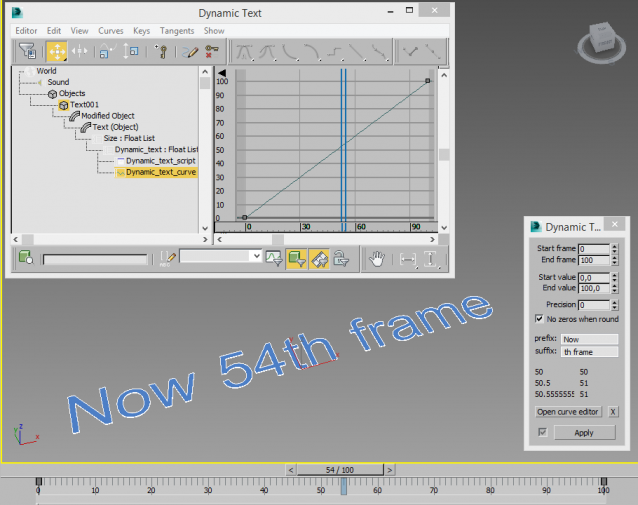
Dynamic Text

4 votes

Creates a animatable text that changes depending on time. You can use curve editor for changing dependence.

Useful for creating animated infographic labels and tags.