Tagged 'maxscript'

Batch Detach Selected Polygons

1 vote

This script will help the user to detach a large number of polygons into individual objects in one click.

The script will be available if one object only is selected, and this Object has to be from the geometry family.

Note: The script doesn't work on Editable Patch objects

Maxscript basics #2 - loops, strings etc.

20 votes

Another introductory basic maxscript tutorial

Lights Switch

0 votes

This is a small macro script I created that will search for all the lights in a 3ds max scene and will turn OFF any light that is ON. In case all lights are OFF clicking on the Button will turn them all back ON. I created this script for myself to avoid going through all the lights and turn them off in case I wanna do some tests using one or few selected lights. I know there is a light lister but it's not that practical. this script can be placed as a button on the toolbar, it's always there.
you can see a demo here: https://youtu.be/lIawffhcyVw?list=PLHpTMy1QrXbhXK3KP_Ov3XwElNlfy3hQ4

3DS Max - Plugin - [UPDATE] - CopyPaste V1.5

1 vote

This is an update for the CopyPaste plugin. This plugin allows you to copy and paste geometry between opened 3DS Max files, of course, in the same file too. This version includes a few additional features. The most important one is the ability to copy and paste using a base point. Also, there is a button that allows you to clear the cache file to save space on the hard drive. And, lastly, a Status section that gives you feedback whenever you perform an action. Please check the demo video for an in-depth explanation.

FloralStarBall

0 votes

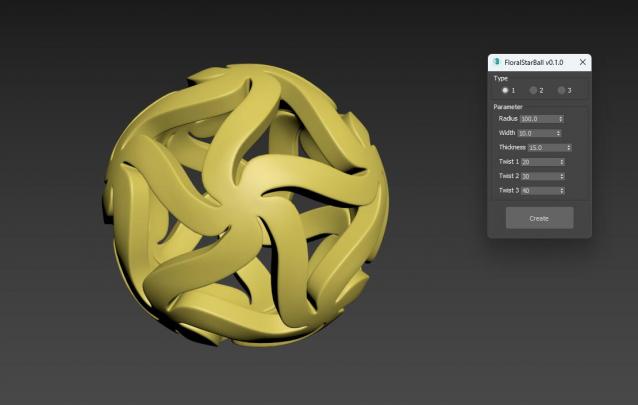
Floral Star Ball for 3ds Max plugin, A beautiful variation of the classic star shaped sphere. The star shaped pattern is arranged in a floral style, giving objects a unique visual aesthetic. It will be an excellent addition to any Math Art collection, desktop exhibit, or even stress reliever for flexible plastic printing. One click generation surprisingly effortless!

TP autojoint script

1 vote

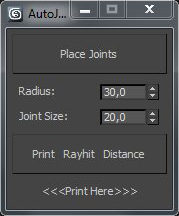
Script for placing cebas TP joint helpers(Shape collision only) between objects.

It's a fast and "dirty" way to make lot of joint helpers with auto linking to objects.

The good idea is to check distance between objects BEFORE press button "Place joints".

In other case it can freeze and create a thousand of joints.

Require a "TP easy joint script" to work with joint properties after approval placing.

 
.

Model: Same Named Copies

0 votes

Title: "Model: Same Named Copies"

Description:
-- This script creates multiple copies with same object name
-- This script works on all geometry types but it may also work on other types like lights, helpers, etc.

How to use this script:
-- First select a single object
-- Set the relative position with respect to this object in "Enter relative positions" options
-- In "No. of copies" option set the number of copies required
-- Then, press "Create copies" button

Here's the screenshot of the script -

Scale Refs

1 vote

Align to XYView

3 votes

v1.47 Added aligne just by axis X Y Z

BreadMaker

1 vote

3dsmax one click soft package modeling script plug-in.

At present, this is still a paid script. Please forgive me for not being able to download it here.