Tagged 'rigging'

OffLoader_Hotkey_Toggle.ms

3 votes

Bind this script to a hotkey to toggle between Onload and Offload for a characters rig.

LH | Auto-Rig

6 votes

Automatic quality rig for all lovers of animation on 3ds Max !

WHY ?

Maya already has a wide selection of quality rigs, but 3ds Max doesn't.

So for the animation fans looking for a quality rig for 3ds Max, without any notion of rigging required, LH | Auto-rig, an automated rig, was developed. Powerful, it works with all kinds of characters (biped, quadruped or others), with a UI for animating as well as other animation scripts.

OPERATIONS :

Scene Notes Pro @ Show Notes Only

0 votes

Scene Notes Pro Show Notes allows you to read the notes saved with Scene Notes Pro.

You can't add and/or edit the notes, only to read them in case that you do not own Scene Notes Pro.


OnLoad_From_External.ms

5 votes

Use this script to onload the deformation rig for a selected character from an external file. The character needs to be set up using the naming convention listed in the tutorial section.Required File: TiM_Lib.ms

OnLoad_Light.ms

4 votes

Use this script to onload the deformation rig for a selected character. The character needs to be set upusing the naming convention listed in the tutorial section.Required File: TiM_Lib.ms

Harry's Proxy Creator

1 vote

This script is very similar to a script Jason Schleifer wrote from Maya, it allows you to split a predefined object into several segments based on the transforms of special cutter objects, these segments can then be linked back into a skeleton hierarchy. The advantage of displaying segmented geometry in the viewport rather than the skinned mesh is that you get faster playback speeds.

When you evaluate this script it create a new "Category" in the "Customize User Interface" window called "Harry's Proxy Creator" where you'll find the tool

Rotation Order Tool

17 votes

This tool allows you to quickly change the rotation order of any object in max. You can select multiple objects and change their rotation orders all at once, or you can copy the rotation order from one object to another.

To use:
1. Select all the objects whose rotation order you would like to change. Then use the dropdown list and select which rotation order you would like to choose. The transforms for each object will be preserved as long as it has not be animated.

AutoBones: New auto-rigging tool for 3ds Max

2 votes

Hello, my name is Kevin Mackey.

During my time as an animator and technical artist, I have developed a tool called AutoBones, a system for
1) quickly creating character rigs using the Max bones system
2) allowing each chain of bones to be keyframed as a single object, and
3) switching seamlessly between IK and FK animation.

I have run a beta test in order to confirm a high degree of performance and stability, and am now making a commercial version available, including a 30-day free trial.

Dummy Resizer

4 votes

A little Tool to create a Dummy and resize it, using hided Dummy properties.

Do not affect the scale values.

Shater AutoRig

2 votes

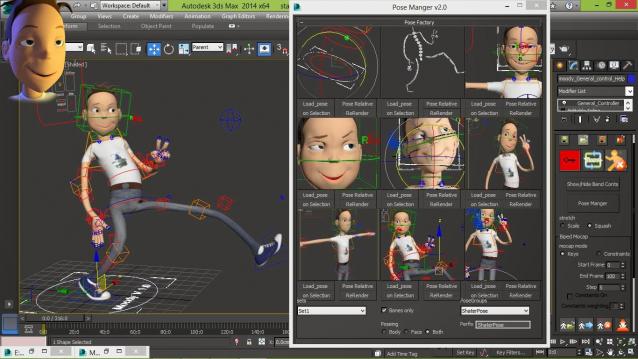
Shater Autorig is humanoid feature Animation rig creator and olso Games simple rig creator, with flexible and easy to use animation tools for production (unlimited pose manger/keying tools/reseting/ik-fk/stretching/squashing/bending limbs and spine)


check youtube vids down