Tagged 'render'

Vray Quick-Render

-1 vote

"Vray Quick-Render" the utility for creating fast preview test-renderings.
It help you make fast test-renderings for setup lights and tuning materials.
All changes for Vray will be applied only on render-time.
Your settings for Vray not will be change.

VFB+ : A Feature-rich Extension to the 3dsmax Frame Buffer

63 votes

VFB+ v2.81 is now completely free!

Click for Change Log

Render Tools

4 votes

Este pequeño script permite generar elementos de render automaticamente con solo presionar un boton. Algunos pases requieren de cierto conocimiento previo para su uso o inclusive de activar alguinas funciones ocultas de la aplicacion dependiendo de que version estemos usando. Point Position: para generar este pase van a necesitar activar una funcion que se encuentra oculta, que mas abajo explicare, este pase es recomndable guardarlo en 32 Bits al igual que el Zdepth.

Render Info Strip

13 votes

This script was created upon request as a vray frame stamp replacement, intended for mental ray and scanline rendrers.
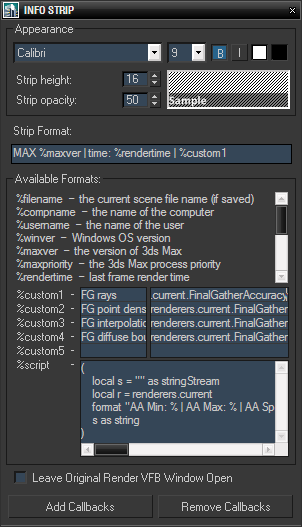
It allows custom information to be displayed in the rendered image, with user defined font size, style, colors and opacity of the strip background. In addition to predefined keywords, there are five custom expressions and one script value. Original render frame buffer can either be closed or kept open. The settings and callbacks are saved in the .max files.

IDTool

14 votes

For people who work often with Objects ID, this script may make it easier. It allows you to see which objects have ID, to select objects by ID, assign a ID and all this without entering in properties of the objects.

Version: 2.34

  • Add "Assign ID by Layers" button
  • Add Option to Assign Wirecolor by ID

Render Passes and State Sets Tool

36 votes

***JUST UPDATED TO ADD THE OPTION TO STORE THE PASSES AS STATE SETS***

A tool to render or store the following passes as State Sets:


  • Matte
  • Shadows and Reflections
  • Shadows
  •  Reflections
  • Z Depth
  • Fast Skin Subsurface Scattering
  • Ambient Occlusion
  •  Normals

Render Optimizer V5

438 votes

Bug Free !!! Wink

Hi Guys,

Welcome to Render Optimizer V4. Use this tool to activate the mental ray "secrets". Optimize your Renderings with new Light-Method, Sampling-Method and RAM-Managment. 

Swift-Switch (Includes V-Ray and Mental-Ray Presets)

76 votes

Material Layer Interface MLI

142 votes

3 new versions and reduced prices: MLI Light 2.0, MLI 2.0, MLI Pro 2.0

With the Material Layer Interface (MLI) you can create Material Layers and passes in 3D Studio Max and it’s easy to handle them!

mli_banner

Just create the layers and pick the objects. Assign materials to the objects and feel free to use different renderer or render settings for every single layer.

RTTassist

538 votes


About: