ScriptSpot is a diverse online community of artists and developers who come together to find and share scripts that empower their creativity with 3ds Max. Our users come from all parts of the world and work in everything from visual effects to gaming, architecture, students or hobbyists.
Mapping Operations is designed to help you apply various relational functions, by relating directly one set of user selected objects to another set as a mapping text file.
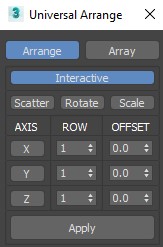
This Script for Arranging Selected Objects in 1 or 2 or 3 Axis . You Can Control the Offset on each Axis and the Number of Rows (When Using 2 or 3 Axis). Notes: Press Right Click on any Axis to Arrange the Objects on this Axis Only.
ABOUT THE SCRIPT:
It's a tool for animators to save key face poses and speed up work. It's gets the position of the selected sliders and do a snapsot on the viewport and save as a button. First you have to set the "CHR" as the charachter name and set the path where the picurates begin saved.
I was looking for a good camera shake - handheld generator for 3ds max. Couldn't find any. So I decided to write a script to make that happen. ( Didn't we all? :))
There’s already a lot of PRS randomizer tool available in maxscript, but what I found missing the most was a real time visualization of the randomized transformations applied. Video available in the full post.