Tagged 'camera'

Kenzors Previsualization tool

11 votes

This is a 3dsMax previsualization tool. It allows you to jump cameras and time to previs scenes.

Its the only tool I know that allows you to skip anywhere in time to create 'cuts' in 3dsmax like a video editing package

Installation instructions are here.

Lock Cameras or objects

3 votes

A little script to lock/unlock the movements of the cameras or objects too.
Put into your scripts directory, and under "Customize user inteface" open the category "Maico G." and assign "Lock Camera" to a menu, shortcut or toolbar.
To use, select a camera, camera target or an object and click lock or unlock.

jCamera

0 votes

This script optimize an scene´s object to render

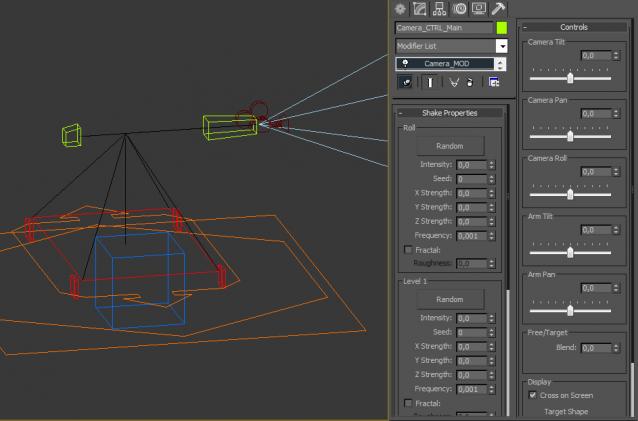
rp_CameraRig

1 vote

Qpreview

12 votes

This script will make preview renders from the viewport using the default 'make preview' dialog, when completed it renames the preview file to match the camera's name.

This makes it easier to generate preview files for a ruff edit, without having to manually rename the preview files again and again.

Camera Mixer

46 votes

Camera Mixer v0.1  Camera Mixer  is a real-time sequence editing tool.

It allows you to start editing draft sequences without starting any heavy film editing software.

Features :

- Real time playing
- File Open/Save
- Export the mix to 3dsmax’s batch renderer
- Save a preview of the whole mix
 - Usual UI controls : snap, delete/repace, mute/solo, move track up/down

Camera Z_Depth

43 votes

This script creates a new render element using a falloff shader to emulate a zdepth render element. The min and max values are added to the cameras attributes. This gives you the ability to animate the min and max values of the zdepth and to be able visualize those values in the viewport.

It installs as a macro script in the mikes scripts category.

Update 05/26/2011:
I changed the default values from 100 min and 200 max to 0 min and 0 max.

Update 02/10/2012:
I turned off filtering.

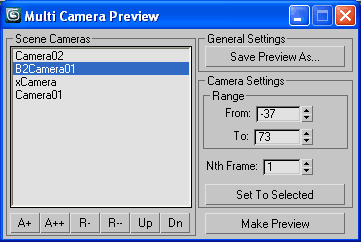
Multi Camera Preview

35 votes

A script asked in the forum.
MCP v.1

A tool with self explained interface.
Make viewport preview for multiple cameras
with separate range and Nth frame settings
and save to single video or image sequence
with desired compresion.

Material Layer Interface MLI

142 votes

3 new versions and reduced prices: MLI Light 2.0, MLI 2.0, MLI Pro 2.0

With the Material Layer Interface (MLI) you can create Material Layers and passes in 3D Studio Max and it’s easy to handle them!

mli_banner

Just create the layers and pick the objects. Assign materials to the objects and feel free to use different renderer or render settings for every single layer.

NukeOps

39 votes

A set of functions wrapped into a minimalist single-click button to help 3ds Max and Nuke artists to bring the 3ds Max 3d scene assets into Nuke's powerful 3d compositing scene.

This tool allows:

1) Copy cameras and any other objects (as points) and their animation into clipboard for an easy Copy+Paste action inside Nuke.

2) Generate .chan files from selected cameras and any other objects (as points) and save them either many at once or one at a time to selected destination.