Tagged '3dsmax'

3DS Max Plugin - Multiple Sections

1 vote

In this video, I will present you with a new plugin I created for 3DS Max that allows the user to create multiple 2D sections on the 3 axes. The script has many options to control this operation, like the number of sections, the spacing between sections, offsetting the start of the operation, flipping the axis so that, for example, if you choose the Z axis, flipping means the creation of the sections will begin from top to bottom, also you have the option to Weld the vertices.

Camera Clipping Pro

0 votes

Camera Clippping Pro 3dsMax plugin by SplineDynamics

DESCRIPTION

Camera Clipping Pro adds special controls to the camera for driving clipping planes using objects in the scene and auto-adjusting the focal length to retain the same framming while you move the camera closer or further away from the target.

BlockRender

1 vote


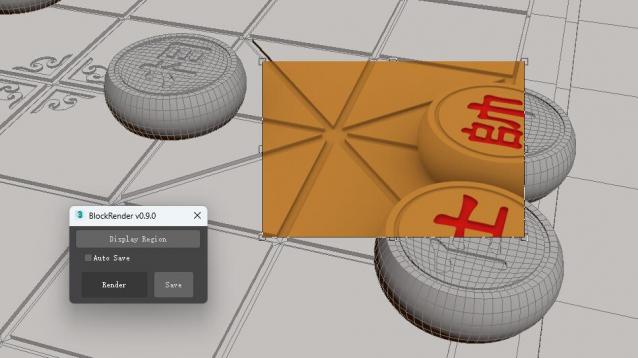
The BlockRender one click region rendering plug-in, allows you to customize region rendering and view the results directly in the viewport, and save the rendered image automatically or manually.


[Main Functions]

--Customize region rendering and view results directly in viewports

--Automatic and manual image saving

sorry!I don't know where the script of the plug-in is. It will be uploaded later.

Showcaser

0 votes

Camera Array

1 vote

DESCRIPTION

Quickly create an array of cameras from the vertex normals of a mesh or spline.

FEATURES

Showcaser

0 votes

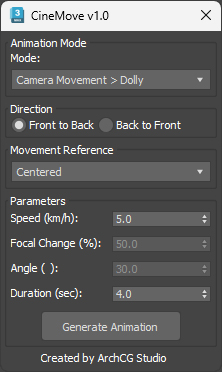
CineMove

0 votes

miauu's LayerColorizer – color-coded layers for 3ds Max

1 vote


miauu's Layer Colorizer allows you to assign custom background and text colors to any layer in the Layer or Scene Explorer.

You can also apply the same color to all child objects of a colorized layer for better visual organization.

You can save your preferred colors in a Color Palettes and reuse them anytime.

3DS Max - Plugin - ZoomExtSelFix

1 vote

In this update, the script will work on sub-object selections. Also, a bug in the first version is fixed, when you switch to another mode other than the Modify Panel, the first version gives an error, this is fixed now in this 1.5 version.
To recap on why this plugin:
The default Zoom Extents Selected tool in Max has an issue when you're in a sub-object level but no sub-object element is selected, pressing Z(the default shortcut) causes Max to Zoom Extents on the whole scene instead of the selected object.

Showcaser

0 votes

Syndicate content