Tagged 'Material'

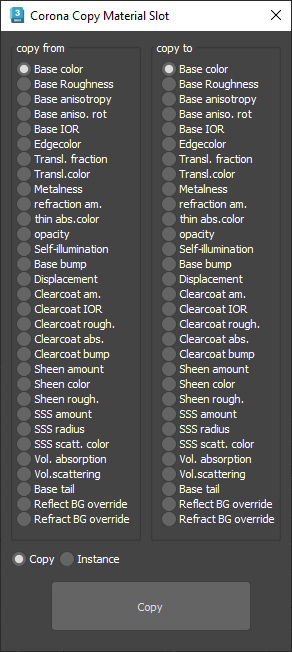
Corona Copy Material Slot

1 vote

This is only for Corona Physical Materials, i might do a legacy version later..

This script is intended to batch copy from slot to slot within the same material,

For example, you can copy a bump map to a displacement map or the diffuse map to selfillumination on multiple material at once.

you can use my other script to add some color correction with a saturation set to -1, to create bump or roughness maps from your diffuse map.

Cryengine 3 export preparation

0 votes

This script is specific for use with Cryengine 3. So if you don't intend to use this with Cryengine 3, this script will not work and be of no use for you.

It creates all the appropriate layers for the lods and main object, creates the dummy and linking the mesh to the dummy. Creating the proper material, submaterials (4 by default) for the model and the proxies, assigning the crytek shader and the physicalize (no draw) to the proxies.

Left for you is assigning the proper IDs manually to the correct submaterials (if needed).

Delete Spurious Keys

1 vote

When you have unwanted keys on Meshsmooth/Turbosmooth modifiers, it can be a pain even if the iteration value does NOT actually change. If you have hair and use Vray moblur/displacement, it may crash if you have these keys in your scene.

These keys are created when you hit the big Set Keys button and your Key Filters has Modifiers checked. Use this script to get rid of these keys (and optionally material keys as well).

As usual, back up your file before running the script. Just drag and drop the script into your Max viewport to run.

Detach by material ID

2 votes

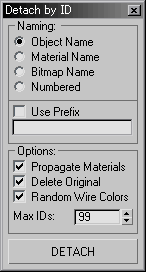
I'm working as an architectural visualizer at MIR. usually i import files from OBJs. this little script splits the single imprted obj into different parts and gives the new node/object the name of the material it originally had.

Thats what i use it for but it does the same thing for any object with sub-materials.
let me know if theres any problems

Detach by Material ID

36 votes

Detach Polygons based on its Material ID

DiffuseMapper

5 votes

This one sets the Diffuse (and/or Ambient) Color of a Material to the average color value of the texture that is applied to the Diffuse Mapping Channel

Dirtizer 2

2 votes

A very helpful plugin which can make your materials dirty in one click!
- You can control the level of dirtiness.
- You can make it dry or wet.
- Dirtizer supports Multi-materials (you can set random dirt to all materials at once)
- You can add your own textures of dirt. (Organize your textures in "Dirtizer" folder as you want)

Dirtizer 2

5 votes

A very helpful plugin which can make your materials dirty in one click!
- You can control the level of dirtiness.
- You can make it dry or wet.
- Dirtizer supports Multi-materials (you can set random dirt to all materials at once)
- You can add your own textures of dirt. (Organize your textures in "Dirtizer" folder as you want)

Most render systems are supported now! Tested with V-Ray, Mental Ray, Scanline, Corona, Redshift.

DisplayMat

4 votes

Pick an object - run the script - this will show you the material assigned to the object.

DisplayMatID

2 votes

Displays all material IDs used by the faces in a particular object.

Syndicate content