Tagged 'Material'

V-RayMax Converter PRO

168 votes

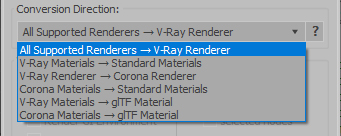
V-RayMax Converter PRO is the best tool for convert 3d scene (materials, maps, lights, cameras, proxies, modifiers, helpers, render elements, etc.) from other render engines to V-Ray and from V-Ray to Corona Renderer, and also for converting V-Ray and Corona materials to Standard/Physical/PBR/OpenPBR materials and to glTF Material.

Current version: 4.0061

Supported for conversion:

To V-Ray from:
  • Standard (Default Scanline)
  • Corona Render
  • FStorm Render
  • Octane Renderer
  • finalRender
  • Arnold
  • Brazil_Advanced (RS v 1.2) material
  • NVIDIA iray (unofficial) material.
From V-Ray to:
  • Standard / Physical / PBR / OpenPBR materials
  • Corona Renderer
  • glTF Material (3ds Max 2023 or later)
From Corona to:
  • Standard / Physical / PBR / OpenPBR materials
  • glTF Material (3ds Max 2023 or later)
Сonversion scope:

Full list of supported conversions.

Main features:

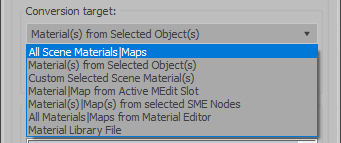
  • Converts materials, maps, lights, cameras, modifiers, helpers and GI environment from other render engines to V-Ray and from V-Ray to Corona
  • Converts clouds from CoronaSky to VRaySun and vice versa.
  • Converts Night Sky system (Moon, Stars & Milky Way) from V-Ray to Corona and vice versa
  • Converts Render Elements to V-Ray (currently supported Scanline RE, Corona RE, FStorm RE, Octane RE) and from V-Ray to Corona
  • Converts V-Ray and Corona materials to Standard (Default Scanline) materials
  • Converts VRayMtl and CoronaPhysicalMtl materials to Physical Material and OpenPBR Material
  • Converts V-Ray and Corona materials to glTF Material (which is necessary for exporting to the .glb for corresponding 3d software: Blender, Gestaltor, Babylon.JS etc).
  • Converts proxies (currently supported from Corona, FStorm, Octane) to V-Ray Proxy (static and animated)
  • Converts V-Ray Proxy to Corona Proxy (static and animated)
  • Converts standard Bitmaps to VRayBitmap and vice versa
  • Converts standard Bitmaps to CoronaBitmap and vice versa
  • Converts 3ds Max Physical cameras to V-Ray Physical cameras and vice versa
  • Automatic configure ACEScg workflow in V-Ray
  • Batch processing for multiple 3dsMax Scene (*.max) or 3dsMax Material Library (*.mat) files
  • Programmatically interact with most converter functions using built-in maxscript methods (API), which allows you to use the converter without UI and in combination with other 3rd-party scripts.
  • ...and more additional tools for fixing and adjusting the scene.

TexTools: Toolbox for the texture artist

237 votes

Documentation: http://www.renderhjs.net/textools/

Outliner

756 votes

 The Outliner 2.0 is a fast and easy to use scene management tool. It has a wide range of features, including selecting, hiding, freezing, linking and grouping objects in the "Hierarchy Mode". In the "Layer Mode" you can organize your scene by dragging&dropping objects from one layer to the other. What's more, the Outliner offers support for nested layers, to manage scenes more efficiently. The interface is nimble enough to keep it open constantly.

Project Manager

597 votes

After a long stretch of development, Project Manager 4 is officially out — the biggest release in the product's history, and now with full 3ds Max 2027 support.
The headline is AI Asset Classification.
Your library gets sorted automatically — by object type, material, and style — no manual tagging.

Project Manager 4 — What's New Since v3

Changelog · 3ds Max 2016–2027

AI-Powered Asset Classification

  • Automatic categorisation of 3D models and textures by object type, material, form, and style — no manual tagging required
  • Runs entirely on your machine — no cloud, no subscription, your assets never leave your computer
  • GPU-accelerated background processing at low priority — won't interfere with rendering or active work
  • Reclassify specific folders or categories on demand — no need to reprocess the entire library
  • Scale across a team: multiple workstations share the same database and classify in parallel

Colour Tools

  • Find assets by colour — pick from a palette and instantly see matching models or textures
  • Perceptual colour similarity search — finds visually related assets, not just exact hex matches
  • Find Similar by Colour in the right-click menu for models and textures

Find Similar

  • Find similar by content — AI matches 3D models by style, shape, and visual look
  • Find similar by colour palette — matches assets to a reference image or mood board by dominant colour proportions

Smarter Search & Filtering

  • Multi-keyword search: "Chair, Glass" finds a file named Chair.max described as "glass"
  • Category filter correctly includes all subcategories — filtering Furniture also returns Furniture → Chairs → Dining
  • Combine category and material filters: find glass-and-metal tables, or wooden ones, in one click
  • Categorised / Uncategorised quick filters — see which assets still need attention

Gallery & 3D File Browsing

  • Three gallery tabs for .max files: Models, Materials, and External Links
  • Drag materials directly from the gallery into your open 3ds Max scene
  • 3D viewport preview for FBX, 3DS, OBJ, and other formats — inspect geometry before importing
  • Edit external links inline — fix or replace missing textures without opening the .max file
  • Zoom & Pan for images — inspect textures at full resolution inside Project Manager

Migration & Compatibility

  • v3 and v4 share the same database format — point v4 at your existing library and go; no rebuild required
  • Run v3 and v4 side by side on the same team; supported from 3ds Max 2016 through 2027

Performance & Other Fixes

  • Significantly improved overall performance — faster navigation, filtering, search, and file/folder operations
  • Live sync in shared database mode — changes by colleagues appear automatically without reloading
More about new features   Project Manager version 4
 

MultyConvertor

288 votes

MultyConvertor - allow to convert any materials, lights (objects) of any renders to any materials, lights (objects) and renders!!! It is all in one.

You can simple create *.mct (edit text file in any text editors and change extension) file for new render and facilities that support this type of rendering. See any *.mct in archive

Now you start the script and setup link properties from one render type to other. You can also use expression for translate value to other value or execute any max script expression.

SolidRocks

569 votes

SolidRocks V2.4 is out !!  Support for V-Ray 6 (hotfix 2) and  MAX 2013-2023 ! 

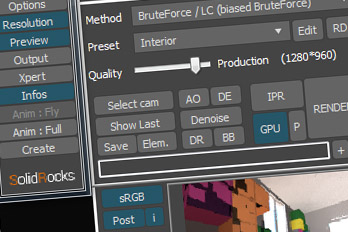
SolidRocks adjusts and optimise all needed Vray parameters to reach the best rendertime/quality ratio.

Learn Vray progressively, see in realtime changes made by SolidRocks when you change resolution/quality.

SolidRocks includes new tools for both VrayMasters and Beginners:

V-Ray Material Presets Pro

357 votes

V-Ray Material Presets Pro is a powerful material collection for 3ds Max and V-Ray. It will includes shaders like: Metal, Glass, Leather, Liquid, Ceramics, etc.
SIGERSHADERS V-Ray Material Presets Pro version 4.1.5

VRay material to Standard material

26 votes

Hi..
this script converts all scene VRay materials to max's standard material.
it keeps diffuse color and diffuse map. right now it works with multi sub-object materials if you guys found it useful ,I can add support for other maps like transparency and reflection, refraction and etc.

VMC (VRay Material Control)

69 votes

Change VRay properties en masse!

Features:

  • Sets properties on all Vray materials and maps in the Scene, Selection or Material Editor in a couple of clicks.
  • Global Subdiv Reset for getting scenes where you want them.
  • Donors get support for all Vray Cameras, Lights, Modifiers & Geometry, Bitmaps, Color Correction Map and the 3rd party maps: Color Correct, MultiTexture, MultiScatterTexture & ForestMaterial and a set of handy Power Tools:
    • Batch Mode
    • Turn all/selected lights on/off

RappaTools3

36 votes

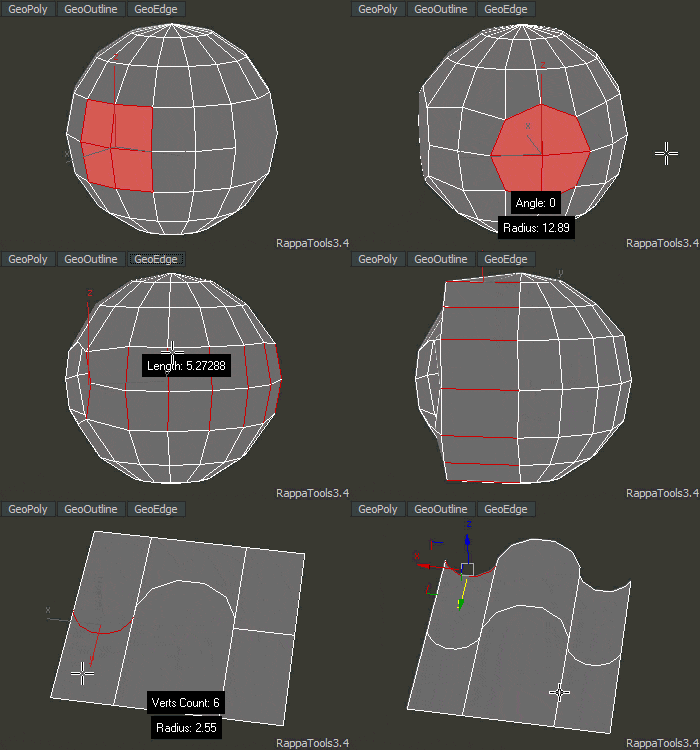
RappaTools3 is an advanced toolbox that comes with a great variety of tools for the artist working in 3ds Max. The main focus is to speed up the workflow and to reduce the click count. It offers a wide variety of tools, everything from selection tools to rendering tools. It can help you through the entire process of creating a 3D art piece.
rappatools3 bridge

Syndicate content