Tagged 'Material'

SnowEffect

3 votes

SnowEffect plugin poster

The plugin allows you to create a global snow effect for the whole scene. You can cover selected objects with snow with just a few clicks. SnowEffect supports V-Ray, Arnold, Corona, and scanline render natively. All other render engines will see it as standard material that you can modify or replace. You can also change the amount of snow and bump/displacement size.
Watch the trailer for more details.

iToo Forest Edge-Mode Boundray

3 votes

This Script will Solve the problem of Activating Edge Mode in iToo Forest Plugins .

- WORK WITH V-RAY AND CORONA ONLY (UPDATE 1.02 Support All Materials) .

How to Install :

- Drag and Drop the File or Run it from Scripting Menu\Run Script

UPDATE v1.01 :

- The 2 New Items are shown in QuadMenu  when no object is Selected , Fixed .

- Drag and Drop the File or Run it from Scripting Menu\Run Script , it will Remove the Old QuadMenu Items and Add New Ones .

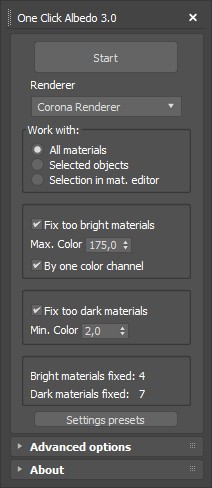
One Click Albedo for Corona render and V-ray

6 votes

Script Description:

This script is made to automatically adjust the albedo of materials in the scene. Too high albedo may slow rendering process down and make the materials look unrealistic. Especially when an object with a high albedo occupies the most part of frame area. Corona Render developers recommend to keep albedo of your materials under RGB 180 (For diffuse color or texture).

Materializer

5 votes

poster

Materializer (materials equalizer) is the fastest way to create materials mixing different templates. It works like a sound equalizer but for materials!
Example: To make glossy wood press the 'Wood' button and then add a little bit of plastic.

Every time you hit 'Set' selected material will be updated without removing of maps.

Plugin works both with Compact and Slate material editors.

Attach Selected

0 votes

3dsMax Script for Attaching Selected Objects .

- Works on Geometries and Shapes .

- The First Selected Object will be the Main Object .

Sometimes when using Other Scripts for Attaching Objects you get wrong materials when containing Multi Sub Materials , So I made this Script to solve this Problem .

- After Installing , the script will be add to QuadMenu 1 (RightClick Menu) "Attach Selected" .

Instance Material and Modifiers Tools

1 vote

This Script for Instancing the Material and Modifiers Between Objects .
The Aim of it is to Generate Aligned Modifier Like in case of UVWMap or Slice or Symmetry ..
it works with all Modifiers that have Gizmo or Mirror Sublevel (Property) and the Slice Modifier .
its Combined of 4 scripts

+ALT - Delete Materials and Modifiers of Selected Objects.
+CTRL - Instancing The Material and First Modifier from Picked Object to Selected Objects .
+SHIFT - Instance Material and All Modifiers from Picked Object to Selected Objects .

Scene Fix

4 votes


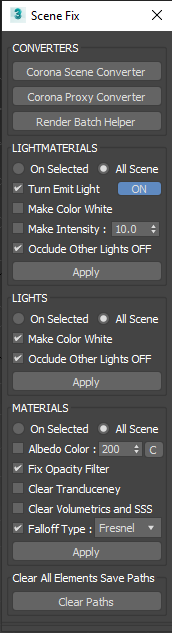
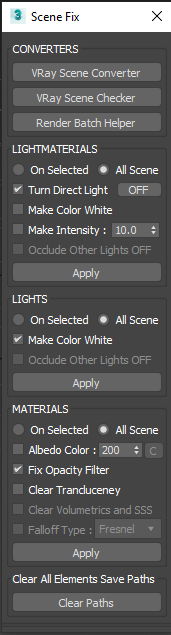
A Script for Applying Fast Changes to  All or Selected Lights and Materials in the Scene and Clearing Paths from Render Elements .

UPDATE v1.11 :

- Fixing Materials not Working in Some Cases , Fixed .

UPDATE v1.12 :

- Add Albedo Color Fix (Work with Diffuse Color Only and do nothing if DiffuseMap has a Map)

Wirecolor to Material

0 votes

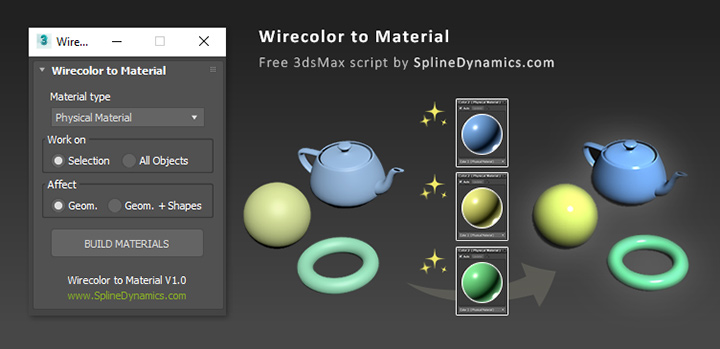
Wirecolor to Material

Description

Automatically create and assign materials from objects’ wirecolor.

Textures2materials

3 votes

poster

Textures2materials is a very handy plugin which can turn multiple textures into materials at once (into multi-material or into multiple material slots). It also checks if your textures have a bump versions and load them as bump. "Must have" plugin for any 3D designer.

Dirtizer 2

2 votes

A very helpful plugin which can make your materials dirty in one click!
- You can control the level of dirtiness.
- You can make it dry or wet.
- Dirtizer supports Multi-materials (you can set random dirt to all materials at once)
- You can add your own textures of dirt. (Organize your textures in "Dirtizer" folder as you want)

Syndicate content