Tagged 'Material'

rBCopyPaste

1 vote

rBCopyPastev0.2

Another tool for copying/pasting objects/material/modifiers from one scene to another in 3dsMax.

v0.2:

  • Redesign UI.
  • Add function to copy/paste modifiers.
  • Default path now is in autoback (getdir #autoback).

 Small help box available by shift clicking [+] button. 

Contact me or comment if you have any question. 


Hope its useful. Cheers.

Dirtizer 2

5 votes

A very helpful plugin which can make your materials dirty in one click!
- You can control the level of dirtiness.
- You can make it dry or wet.
- Dirtizer supports Multi-materials (you can set random dirt to all materials at once)
- You can add your own textures of dirt. (Organize your textures in "Dirtizer" folder as you want)

Most render systems are supported now! Tested with V-Ray, Mental Ray, Scanline, Corona, Redshift.

RappaTools3

36 votes

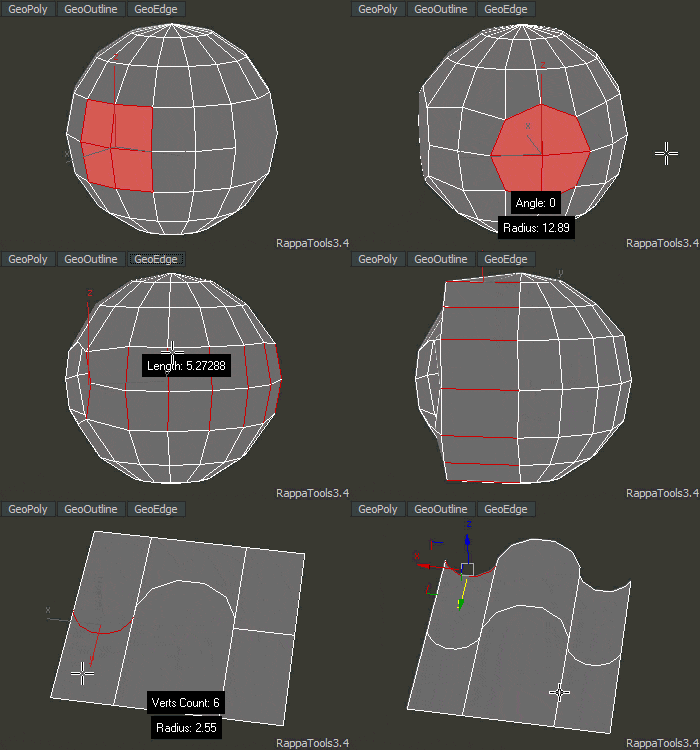
RappaTools3 is an advanced toolbox that comes with a great variety of tools for the artist working in 3ds Max. The main focus is to speed up the workflow and to reduce the click count. It offers a wide variety of tools, everything from selection tools to rendering tools. It can help you through the entire process of creating a 3D art piece.
rappatools3 bridge

Material Manager

1 vote

Material Manager gives users a one-click solution for saving out materials and also reapplying them. Users can choose to save the selected objects materials, or the entire scenes materials.

Name Checker

2 votes

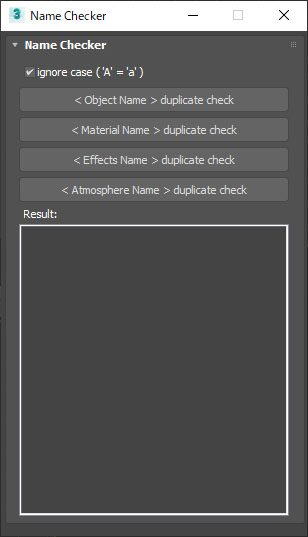
This script check duplication of name in Objects, Materials, Effects, and Atmosphere. This script can check with ignore case. If ignore case mode is on, checked as " A and a is same" Because 3dsmax often ignores case of name.

Name checker UI image, name duplication check tool for 3dsmax.


Material Name to Mat ID Name

2 votes

Material IDs are blank by default. This populates the blank names by copying the names of the current submaterial, ignoring undefined materials and slots that already have names in them.

Written in Max 2016, but should work in all other recent versions as well.

Attach by Same Material

2 votes

Attached all geometry with the same material to the currently selected object. This collapses to editable poly first, so make sure you're cool with that before you click. :)

Created for merging objects in heavy architecture scenes recieved in Max format with large numbers of individual objects.

WorldViz R4 Lightmap to R5

1 vote

This script is for users of WorldViz software to aid in the conversion of scenes using R4 materials to R5 materials. Specifically, this swaps baked maps from their old slot in Standard materials (self-illumination) to their new slot (ambient).

Strip Paths from Bitmaps

3 votes

Removes current paths from all bitmaps in the scene. Primarily for getting rid of irrelevant paths on files recieved from users on other systems.

This functions in a similar way to stripping paths manually in asset tracking, but when doing that I've found that it can lag a lot and sometimes fail to strip some of the paths until you do it multiple times.

Bad paths can cause lag when Max tries to search for the missing textures, especially when they're pointing to a nonexistent network location.

Architecture to Standard Material Converter

4 votes

This macroscript converts Architectural materials to Standard materials for use with VR exporters that require this setup.

Syndicate content