Tagged '3ds max'

RGBA Vertex Color Editor

0 votes

This script split the 3D model in 4 sub-meshes which are each vertex color Channel (R,G,B,A).

You can edit each Channel and then save the changes to the original mesh.

And bellow i put the Polycount forum thread about develop the tool and some example about how works

https://polycount.com/discussion/204662/maxscript-split-vertex-color-in-...

Content Browser

2 votes

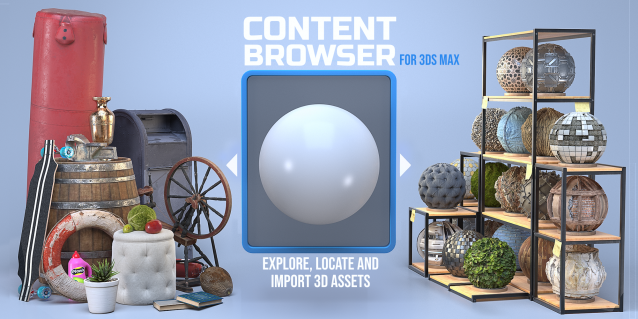
The Content Browser helps you quickly browse and import 3D assets on your computer.

Load any folder accessible on your machine and the Content Browser will find any materials, hdri’s, models, and max files. It will group, organize and display these files as assets, recognizing previews, LODs, mapping channels, resolutions and other important information automatically. 

It simplifies the importing and merging process for 3d models, max files, material creation and hdri environment maps by allowing you to directly browse, filter and drag all of your 3D assets from sources like MegaScans, PolyHaven, gameTextures, Poliigon, Arroway into 3ds max viewport or material editor. 

Main Features

  • Load any folder and find 3D models, max files, materials and hdri’s.
  • Show grouped files as assets, group matching assets and find preview images.
  • Drag and Drop asset into the 3ds max viewport or the Slate Material Editor
  • Import assets to Slate and Compact Material Editors
  • Default Merge and Import 3d files and max scenes, with automatic relinking filepaths
  • Choose LODs/resolution/variations and Import multiple assets at once
  • Folder hierarchy, File list and Preview Gallery

Ghostly trail

9 votes

Ghostly trail is a tool for creating static copies of emerging from the animated objects in the scene

3DS Max - Match Materials and Mapping - Plugin

3 votes

This script will help the user match the material of a source object to a target object
First, you need to select the source object then click the script, now start picking your target objects
When you finish picking just right-click, or press Enter, and the picked Objects will have the same material as the source
Object plus any UVW Map modifier or Unwrap UVW modifier applied to it.

Hammer Skin Tool For 3ds Max

1 vote

Hammer Skin Tool for 3ds max

Macroscript is under "Savas" Category
Script works on selected vertices on skin modifier.
It does not work as expected on first couple of button clicks, But starts to work properly after third button click.

Paid one and free variants are the same. You can grab whichever you like.

Should work after Max 2019 update 2. Tested on Max 2022

PlaceMesh

0 votes

PlaceMesh:

Directly embed single-side polygon in terrain.

The tool work on Editable polygon objects. Keep terrain being selected and pick another polygon surfaces is OK.

Note that:

Obj-Selector of obj without materials

16 votes

This short script allows the user to automatically select all objects in a scene that do not have a material or do have a 'Global Architectural' material applied to them.
This is useful especially for users who work with imported data from AutoCAD.

Simply drag and drop the script into your 3ds max viewport after the import process is finished, et voilà.

Shater AutoRig

2 votes

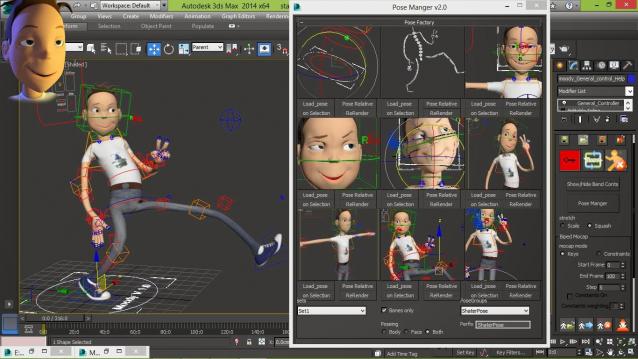
Shater Autorig is humanoid feature Animation rig creator and olso Games simple rig creator, with flexible and easy to use animation tools for production (unlimited pose manger/keying tools/reseting/ik-fk/stretching/squashing/bending limbs and spine)


check youtube vids down

Accelerate

-2 votes

This script is here to speed up our workflow. A combination of scripts put together to quickly access animation, rendering, lighting, fumefx, frost, vray, Krakatoa and other utilities. more info coming soon

3DS Max - Plugin - CopyPasteDWG

0 votes

This plugin allows the user to copy-paste objects from an opened AutoCAD file into 3DS Max.
The plugin works with multiple opened CAD files, it recognizes the last copied objects.
The script offers many filtering options for the imported objects like:
1-removing the prefix "Layer:" and this will make it easier to select objects by name
2-remove any material applied to the imported objects
3-remove the Block/Style Parent hierarchies
4-select the imported objects when importing is done
5-turn the imported objects into a group