Tagged '3ds max'

Group to EditablePoly

4 votes

This script is intended to convert group into editable Poly (It keep editable mesh as editable mesh when an editable mesh is in the group).if you have multiple groups selected it will create multiple editable poly(or mesh) objects ( one object per group). It support nested groups (group within group).the script has no interface, it's just a button, here is the default icon , once installed you just need to have one or multiple groups selected and click the button and that's it, no fancy options.

Instance Material and Modifiers Tools

1 vote

This Script for Instancing the Material and Modifiers Between Objects .
The Aim of it is to Generate Aligned Modifier Like in case of UVWMap or Slice or Symmetry ..
it works with all Modifiers that have Gizmo or Mirror Sublevel (Property) and the Slice Modifier .
its Combined of 4 scripts

+ALT - Delete Materials and Modifiers of Selected Objects.
+CTRL - Instancing The Material and First Modifier from Picked Object to Selected Objects .
+SHIFT - Instance Material and All Modifiers from Picked Object to Selected Objects .

RGBA Vertex Color Editor

0 votes

This script split the 3D model in 4 sub-meshes which are each vertex color Channel (R,G,B,A).

You can edit each Channel and then save the changes to the original mesh.

And bellow i put the Polycount forum thread about develop the tool and some example about how works

https://polycount.com/discussion/204662/maxscript-split-vertex-color-in-...

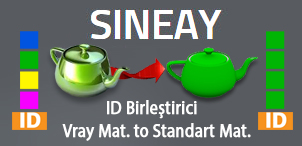
ID Birlestirici (ID Combiner)

0 votes

Obj-Selector of obj without materials

16 votes

This short script allows the user to automatically select all objects in a scene that do not have a material or do have a 'Global Architectural' material applied to them.
This is useful especially for users who work with imported data from AutoCAD.

Simply drag and drop the script into your 3ds max viewport after the import process is finished, et voilà.

Quadro buttons - hotkeys on four buttons

1 vote

Allows 4 buttons to add many features. If you are tired of running around the keyboard as a pianist and assigning a bunch of combinations, you have the opportunity to put a script and use 4 buttons for modeling (the main functions are assigned).

It works like this: Functions for Editable Polygon, Edit Poly, And some modifiers, are assigned to 4 buttons, which work in different modes in different ways, depending on which sub category you are in (or which modifier is currently selected.)
Sory for my English

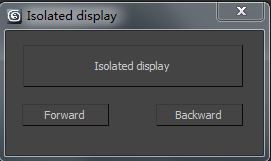
83pig's Isolated display

1 vote

Isolated display

Instructions:

1.Isolated display,Comes with 3dmax 'Select isolated' 'are different。

2.Select the isolated object, modify the model alone, then click once to select isolatedbutton. It can be repeatedly isolated objects.

jEasyRender

0 votes

FumeFX to VrayVolumeGrid miniscript

0 votes

Fumefx 2 VrayVolumeGrid -FFX2VrayVG miniscript v0.1 -- 8/9/2019
Created by David Aviles. [email protected] .

FFX2VrayVG is a small script that creates vrayvolumegrid/s from two or
more selected and already simmed FumeFX grids.
It will align the created VrayVolumeGrids to the FumeFx ones and rename
them accordingly as well as loading the cache files from the master FumeFx grids.

It was inspired by Fumefx VZim v1.4 script -- 8/5/2019 .
Created by Ronnee Swenton and Property of White Wizard Entertainment, LLC.

Accelerate

-2 votes

This script is here to speed up our workflow. A combination of scripts put together to quickly access animation, rendering, lighting, fumefx, frost, vray, Krakatoa and other utilities. more info coming soon

Syndicate content