Tagged '3ds max'

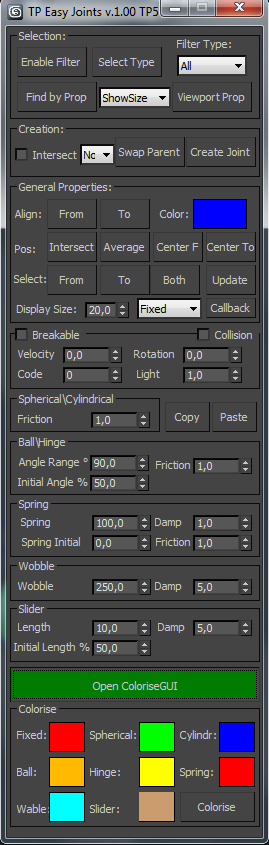
TP easy joint

3 votes

Script for easy creation cebas Thinking Particles joints between two objects and tweak their properties.

3DS Max Plugin Rename Modifiers

0 votes

In this video i will present you with two small scripts i created. one of them will reset the modifiers names to their default names. The second one will add the default names to the custom ones.
this is useful in case you have objects with many modifiers applied to them and these modifiers have custom names.

You can check my demo video on YouTube: https://youtu.be/ijK_BhxBAf8

Batch Export Any Format

1 vote

To Batch export use it script with "Batch It Max" script. "Batch It Max" can run any script on multiple files with single click.

Link for Batch It Max : http://paulneale.com/scripts/batchItMax/batchItMax.htm

3DS Max to Nuke FAG

1 vote

I did this script to easily send geometry and cameras to nuke.

Warning: Use the script only for export. Save your project before and after return.

FumeFX ModernUI

0 votes

FumeFX ModernUI is a tool for 3ds Max that helps reducing repetitive tasks when simulating with FumeFX. It has a clear interface (therefore the name) and comes with an easy to use installer.

3DS Max - Plugin - CopyPasteDWG

0 votes

This plugin allows the user to copy-paste objects from an opened AutoCAD file into 3DS Max.
The plugin works with multiple opened CAD files, it recognizes the last copied objects.
The script offers many filtering options for the imported objects like:
1-removing the prefix "Layer:" and this will make it easier to select objects by name
2-remove any material applied to the imported objects
3-remove the Block/Style Parent hierarchies
4-select the imported objects when importing is done
5-turn the imported objects into a group

3DS Max - Unhide By Pick - Plugin

5 votes

This new script I created will allow the user to unhide objects using the mouse button, by temporarily hiding the current scene and unhiding all hidden objects so you can pick the objects you like to unhide. After picking the objects you can right-click and your original scene is back again plus the objects you've picked.

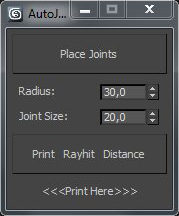
TP autojoint script

1 vote

Script for placing cebas TP joint helpers(Shape collision only) between objects.

It's a fast and "dirty" way to make lot of joint helpers with auto linking to objects.

The good idea is to check distance between objects BEFORE press button "Place joints".

In other case it can freeze and create a thousand of joints.

Require a "TP easy joint script" to work with joint properties after approval placing.
 
.

PlaceMesh

0 votes

PlaceMesh:

Directly embed single-side polygon in terrain.

The tool work on Editable polygon objects. Keep terrain being selected and pick another polygon surfaces is OK.

Note that:

Obj-Selector of obj without a UVWMap modifier

18 votes

This short script allows the user to automatically select all
objects in a scene that do not have a 'UVW Map' modifier applied to them.
This is useful especially for users who work with imported data from AutoCAD. The imported data contains uvw information, but in most cases the uvw coordinates need an overwork. This script makes it easier to isolate those objects in the scene.

Simply drag and drop the script into your 3ds max viewport after the import process is finished, et voilà.

Syndicate content