Tagged 'UVW'

Residential Roof Mapping

6 votes

This script takes each roof piece - determines it's direction - and applies a UVW map modifier based on its direction. There is one instance of the the UVW Map modifier for each direction - so modifying the Gizmo size should be simplified.

Resize UVW

5 votes

"Changes the tile size on the UVW Modifier for multiple objects.
Simply select any number of objects with a UVW modifier. Run the script. Input the new values for UVW tiling - press the button. The UVW tile values will change on all select objects/UVW modifiers. Read the header file for installation instructions and known issues. "

RotateUV

5 votes

Rotate Texture coordinates about U -V or W at arbitrary angle. Affect Face Selection or Whole Object.

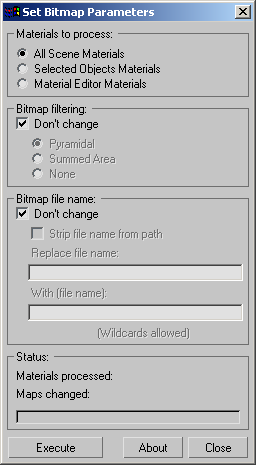
Set Bitmap Parameters

10 votes

"Batch change the bitmap parameters of all materials - selected objects' materials or material editor materials. Includes options for stripping out bitmap paths - batch path replacement - and filtering options.

Screenshot

Version History:

SGFX BoxMapper

6 votes

The one's for the Max environment artists out there!

I found myself constantly typing the same numbers over and over into the uvw map dialog - so I came up with this... Allows you to quickly apply a Box UVW map of preset or custom dimensions. Option for auto-collapse. Presets are easily editable from within the rollout and it remembers your settings.

Show All Coordinates

8 votes

Displays and sets the coordinates of the selected object in local - parent - and world coordinate systems. Updates automatically.

showMap

2 votes

This will allow you to turn on or off visibility of all diffuse maps for materials in the viewport. This only works for diffuse maps on standard - or 1st level deep of multi-subobject materials.

Simply Cool Uv Tool

22 votes

This is my first script.Made for fun. Actually i needed to move selected uv clusters exactly 1 uv tile in witch direction i choose so i made a script. And added a few things...

Uploaded with ImageShack.us

Soft Selection to Vertex Colors

7 votes

This tool allows you to use soft selections to paint grayscale vertex colors on Mesh or Poly objects. It has 4 modes: Replace - add - darken - and subtract selection.

SteamRoller

14 votes

Steamroller unwraps every objects in a selection using Max's built-in flatten function based on the specified parameters. Steamroller is mainly intended as a quick and dirty method of quickly unwrapping lightmap UVs on large sets of objects, similar to the automatic unwrap in Render to Texture.

Syndicate content