Tagged 'materials'

Not Anonther Bitmap Path Checker

13 votes

You know when you leave an animation test rendering at night so that you can see what the camera work looks like, and then the next morning you find that the scene had a bitmap with a bad path and nothing happened?

Rise your hand if that has ever happened to you!! How many times have you wished there was a way to avoid this?? WELL NOW THERE IS!!!

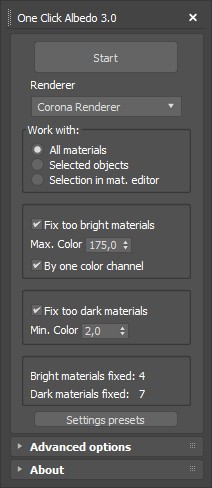
One Click Albedo for Corona render and V-ray

6 votes

Script Description:

This script is made to automatically adjust the albedo of materials in the scene. Too high albedo may slow rendering process down and make the materials look unrealistic. Especially when an object with a high albedo occupies the most part of frame area. Corona Render developers recommend to keep albedo of your materials under RGB 180 (For diffuse color or texture).

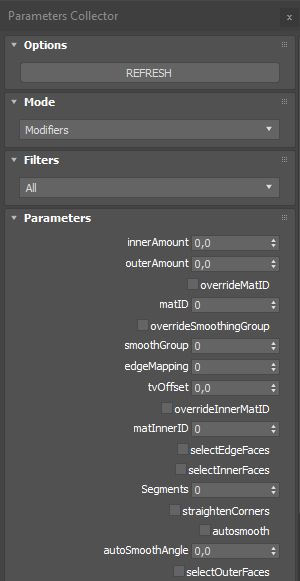
Parameters Collector

2 votes

Collects all parameters within selected objects, modifiers on objects or slate nodes (materials) so you can mass change their values.

Installation:

just drag&drop to max and the you can find the script inside ProgressiveFX category

Changelog:

v1.2.1

- added exception if nothing selected in slate material editor

Purge Unused Materials

2 votes

A simple macroscript to delete all unused materials from the Compact Editor Material Slots AND the Slate Material Editor Views.
The Compact Editor Code is from the existing Macro found under the Compact Material Editor "Utilities" menu.
I have added the code to also purge the SME at the same time.

You might want to check out the "Purge Empty Layers" macroscript as well. There are some awesome scene management tools out there but these are both small, simple tools without a lot of overhead for doing a little housekeeping before saving your file.

Render Holder Zorb

3 votes

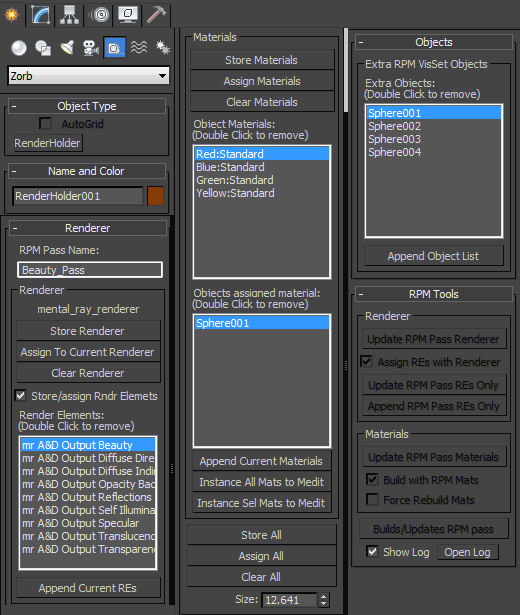
Render Holder Zorb is a max helper that is designed to help you manage, share and build render setting, render elements, material assignments and RPM passes. The main use for this is to us one or mutiple Render Holder with an asset file to store per pass render settings and materials.

You can store and restore the current Renderer, Render Elemants and object materials. Also there is a suit of RPM tools to help build and manage passes based on the settings stored on the Render Holder.  Including an object list to create the visability set with.

to install just extract to the 3dsmax root, or put the .ms file in scripts/startup or the plugins folder

For more help, hover your mouse over a button or checkbox in 3dsMax
Rhino Importer

5 votes

A tool to import and dynamically update models from Rhino into 3dsmax.

NB: This script is now replaced by the Mirza Link manager

r|shaders CZ

2 votes

r|shaders is a collection of procedural shaders for 3ds max.

-- Update 11/22 : Release 1.0.2 is out, a complete new license scheme with a standalone license tool, it comes from Deep Ocean shader development, until the end of November pricelist will continue to be discounted then it will be 129,00 USD for single license and 169,00 USD for site lisence, unlimited free render nodes for both ;

Scene Notes Pro @ Show Notes Only

0 votes

Scene Notes Pro Show Notes allows you to read the notes saved with Scene Notes Pro.

You can't add and/or edit the notes, only to read them in case that you do not own Scene Notes Pro.


Select By Material

6 votes

'SELECT BY MATERIAL'


LATEST KEY FEATURES:

- Select multiple node/s in SME.

- Unhides and hides objects on scripts second run.


    --============================================================

Script which allows easy selection of materials inside Slate Material Editor and Compact Material Editor over 3ds max standard method.

Benefits over maxes built in way:

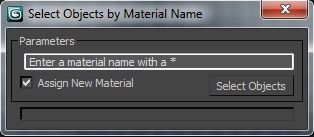
Select Object By Material Name

66 votes

Select Object By Name

Select Objects By Material Name

Syndicate content