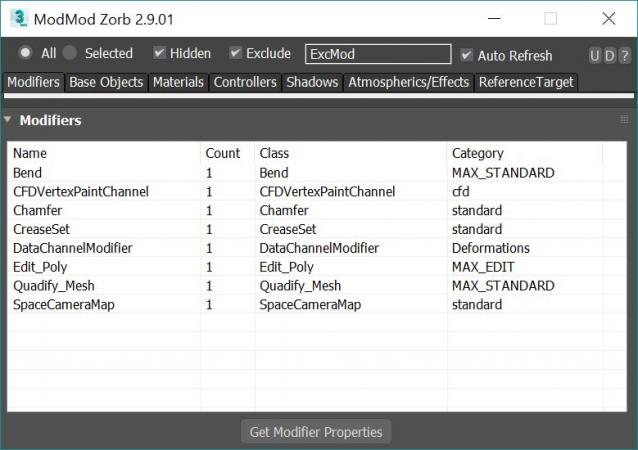
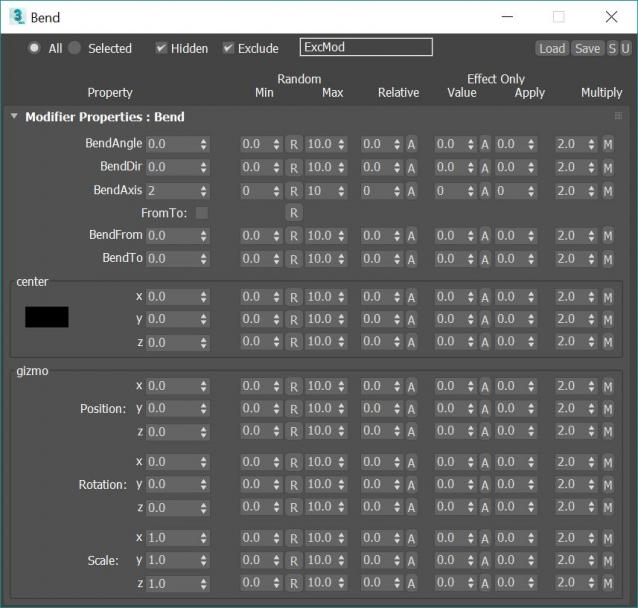
v 2.9.03, Added property dialog filters. Save Property window position and size, Changed "coorinates" prop to "coords" to fixes Vray HDRI map
v 2.9.02: Added Octane and extra Final Render Lights to On/Off and Multiply Right click Menu
v 2.9.01: Added Multiply option to ALL modify properties window. Can now multiply existing values by a chosen value
v 2.8.03 Fixed Save preset bug (for plugins like ky_trails)
v 2.8.02 Fixed ini file bug stopping wondow for opening a 2nd time
v 2.8.00 Added Exclude text field for filtering by name. Editing Refrence targets Tab now working!!! This means you can mass edit FumeFX object settings such as speed multipliers and other FumeFX and TP properties that were previously impossible to edit!
Edit ALL modifiers, ALL objects, ALL Materials, All Controllers, ALL Shadow types and ALL atmospherics/Render Effects. Work in max from a "Class-centric" way rather than a per object way. Edit thousands of object's parameters, randomize thousands of seeds, enable thousands of modifiers and more with a few clicks!
General Features (applies to all modifiers, controllers, materails, shadows, atmos and render effects):
MASS EDIT: Mass edit one property on all nodes at once, You can specify an absolute value, a relative value, apply an absolute value to modify, or multiply a value
MASS RANDOMIZE: Randomize one property on all nodes at once
SELECT/DELETE BY CLASS: Select all objects with a meshsmooth, or all spheres or all objects with a path constraint etc
FULL INSTANCE/REFRENCE TOOLS: Make all objects/modifiers of a class or selection instances. Make Base object refrences. replace base objects with another obj (eg make all selected boxes an instance of a vrax proxie.) Available for Modifiers and Base objects only ATM.
LOAD/SAVE PRESETS: Load and save presets in xml format for modifiers, objects, etc.
Specific Features (Can be done to All or selected):
Modifiers: Enable, Disable, Enable in viewport, Disable in viewport.
PointCache Modifiers: Set ranges, Set path, Flush path, Reload, Record.
FumeFX: Simulate, Load settings
Lights: Turn all, selected, selected classes on or off. Multiply all light vlaues.
Xref Object: Merge object
Materials: Show/Hide In Viewport: Shows the material in the viewport. Doesnt work with texture maps yet.
Bitmap Gamma: Mass edit the bitmap load gamma settings. Choose auto or an overide value. Max 2014+
Spring Controller: Modifyspring controller settings (Needs its own section as springs are controlled differently with maxscript).
Merge Xref Controller: Merges All/Selected controllers