Tagged 'export'

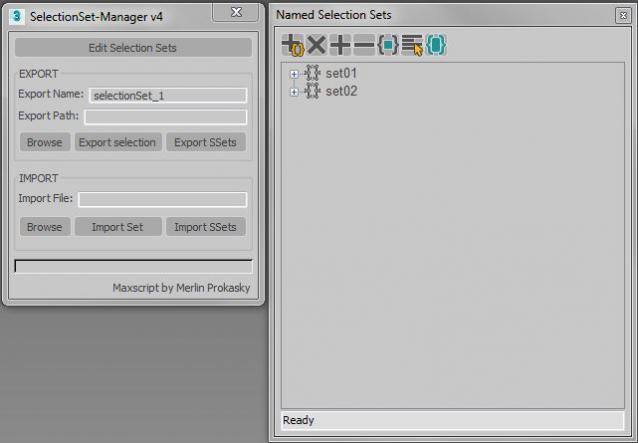
Selectionset Manager

4 votes

Tool for exporting and importing selection sets

Simple tool to transfer selection set between Max files.
Selection sets depend on the naming of scene objects.

Functions:

*export of actual selected objects as selection set
*export of all selection sets in scene
*import of exported SelectionSet files (.txt)
*import several files (.txt)

Manual:
Export:
*set name of export file
*paste or browse export path, otherwise it will choose the actual Max folder

SelectionSet Tools

3 votes

This script allows you to export and import of Selection Sets as XML file. By selecting name in list, you can select the Selection Sets in scene.

How to use:

・Save SelSets / Load SelSets Button:
Export and Import selection sets in 3dsmax. In Load Selection Set Window, you can select any sets to import.

・update list Button:
synchronize selection sets list in scene and Selection Set List below.

・Selection Set List:
select set name in list, then the objects are selected in scene.

Shockwave 3D Batch Export

10 votes

This script batch exports Shockwave 3D Files

Split Hard Edges

17 votes

It's split all edges which seems like hard. I writed it for make possible to export geometry with single smoothing group without losing information of smoothing.

Substance Painter Ultimate Bridge

1 vote

Substance Painter Ultimate Bridge is a tool allow you to export the models to substance easily and import substance textures and create the shaders for any render engine, supporting naming shaders and masking ids on export and auto import multi-shaders all textures/UDIM's to the render engine of your choise.


 Render Engines supported:

-Vray (PBR and Ref/gloss workflows)

Terragen 2 Script For Autodesk 3D Studio Max

19 votes

A script by Emecstudios that enables the user to share lights, cameras and objects with Terragen 2 from Planetside Software.

Latest build add-ons and updates (June 29, 2009):

Time Range Manager

27 votes

Allows you to edit and save a collection of named time ranges and access them via a dropdown list to change the scene time range based on their time settings.

Ranges are stored as a collection called sets. Multiple sets are then stored as a collection called projects.

The data is stored in INI files and so makes it independent of any maxfile.

There's also a compact option by clicking the thin bar above the ranges list.


See online guide in links section. 


UDK FBXporter

2 votes

This is a script the keeps track of "ExportSets" for UDK. It stores what object should be exported, and with what settings. It greatly speeds up the process of exporting to FBX for UDK, as you don't have to select anything and there's no export dialog anymore!
Right now it only supports Static Meshes and SkeletalMeshes, I might add animation in the future.

This is a macroscript that appears in the "FBX Export Sets" category. It should already have an icon if you place it on a toolbar.

Wall Worm Model Tools

61 votes

The complete pipeline toolset for Goldsrc, Source and Source 2 featuring a broad array of importers, exporters and general workflows. Added in version 7 are a new Asset Browser and Soundscape Editor and the WallWormBitmap that loads game textures without having to extract them to files on disk.

WkXmlLibrary

66 votes


The purpose of this script is to give an easy and full access to XML files: creation, reading and modifications
It is intented to be used with the same flexibility as a library: instanciate the structure where you need it
in your code and use the member functions to manipulate the XML files.

WkXmlLibrary - A WerwacK script at www.werwackfx.com

This script strongly relies on the DotNet interface.

Syndicate content