Tagged 'import'

Fixes UVW mapping imported in 3ds max from maya

38 votes

hi all

this was done for a very certain task...
i'm working with team mates who work in maya platform while most of the work is done by 3ds max and it plugins..and i work on both but better at 3ds max..

If you ever tried to export an FBX file from maya to max you will suffer from two or three basic things,
1: all materials are phong with high specular
2: some maps were defined in maya in som way that max understands them as maps with map channel != 1,then the need a uvw mapping
3: some faces problems
-----
fixing these in a very big scene could be very painful

CAD Cleaner

12 votes

A utility script to weld vertices and clean up smoothing in imported/converted CAD models. Works on Editable_Mesh objects in selection. Does not work on objects with an Edit_Mesh or Edit_Poly modifier applied. I use this to do a first-pass quick cleanup on imported SolidEdge models; it helps eliminate duplicate faces and odd smoothing groups.

IE Tool

0 votes

This tool allow the user to import/merge and export/save a lot of objects and files at once!
This is a comercial tool.
Get this tool here:
https://gum.co/rmJuE

SelectionSet Tools

3 votes

This script allows you to export and import of Selection Sets as XML file. By selecting name in list, you can select the Selection Sets in scene.

How to use:

・Save SelSets / Load SelSets Button:
Export and Import selection sets in 3dsmax. In Load Selection Set Window, you can select any sets to import.

・update list Button:
synchronize selection sets list in scene and Selection Set List below.

・Selection Set List:
select set name in list, then the objects are selected in scene.

Obj-Selector of obj without materials

16 votes

This short script allows the user to automatically select all objects in a scene that do not have a material or do have a 'Global Architectural' material applied to them.
This is useful especially for users who work with imported data from AutoCAD.

Simply drag and drop the script into your 3ds max viewport after the import process is finished, et voilà.

I/O Morpher

1 vote

Exports or imports morpher data to or from a morpher.

Useful for copying morpher information from one file to another or from one head to another.

Obj-Selector of obj without a UVWMap modifier

18 votes

This short script allows the user to automatically select all
objects in a scene that do not have a 'UVW Map' modifier applied to them.
This is useful especially for users who work with imported data from AutoCAD. The imported data contains uvw information, but in most cases the uvw coordinates need an overwork. This script makes it easier to isolate those objects in the scene.

Simply drag and drop the script into your 3ds max viewport after the import process is finished, et voilà.

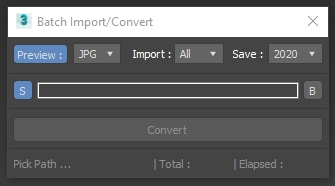
Batch Import Convert

1 vote

3DSMax Script for Importing Selected Type Files from Folder +Subfolders and Save them as Max Files +Version ,

with Option to Grab Viewport Preview .

NOTES :

Transform Unique

11 votes

Use this to collapse/remove instanced transform on imported CAD-drawings without the CAD blowing up all over the scene.

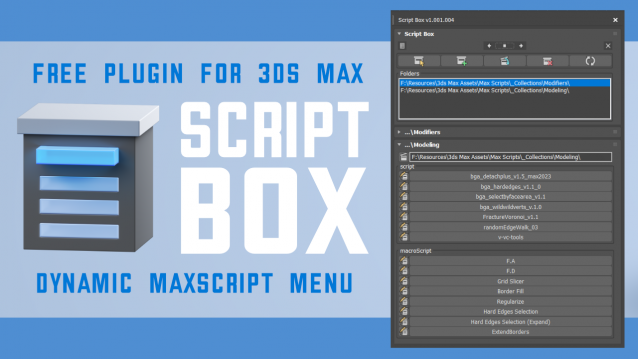
Script Box

3 votes

Script Box optimizes your scripting workflow by creating a dynamic dialog menu for Maxscript files.

Simplify installation and execution of Maxscripts by selecting any folder and get a menu that can launch external MaxScripts without adding custom buttons. Freely organize and integrate macroScripts, plugins, utilies and regular scripts inside 3ds max without going through a set of complicated steps.

The current version is free with no limitations, offering the same functionality as the paid version. Future updates are exclusive to paid users.

Main Features

  • Dynamic dialog menu 
  • Execute MaxScripts from any folder
  • Multi-threaded file loading
  • Organized by macroScript, plugin, utility and regular scripts
  • Configure buttons and minimize UI
  • Custom tooltips with aditional information
  • Create, archive and open MaxScripts
  • Dock, resize, and collapse dialogs
  • Launch on start-up