Tagged 'Scripts'

Batch Object Name Editor

13 votes

The Object Name Editor tool offers the ability to batch rename objects. The tool allows case sensitive search and replace, appending text, trimming characters and numerical incrementing.

ScriptSpot Search

14 votes

 Like 3ds Max InfoCenter but then you need to search for help in scriptspot.com

Autobackup Starter

11 votes

Info:
3dsmax needs a save to start "autobacking" .This script always does the first save.

Install:
copy the script to your 3dsmax\scripts\startup  folder

selected by wirecolor

Hi all,

I was wondering if there is already a script or you have a simple solution for the following:

I want to select some objects (A) by other object(B) that has the same color as the objects (A).
(Max file have any wirecolr objects in sceen.)

Sorry I'm not good at English.

best regards.

Material Editor Manager, MEM

26 votes

This script was developed due to a better usability of 3dsmax's material editor.

SuperPainter

10 votes

MacroScript SuperPainter v2.0 for 3ds max 2009 (also works in 3ds max 8, 9 ,2008)
Lets you distribute objects in certain areas or on the surface of another object. A variety of parameters are adjustable: number, type and weight of source objects, boundary spline, distance between clonings, random transformations and materials. It is possible to save and load script presets. The main purpose of the script, for which it was created - distribution of tree models on various surfaces and areas.


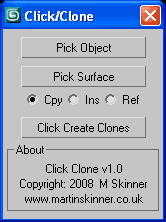
Click Clone

16 votes

User InterfaceClick Clone v1.0.ms

Create clones of an object on the surface of another simply with a click of the mouse.

viewportControl

8 votes

Lets you control the view you're currently seeing in the viewport in a handy dialog box.

Local LightsV1.0

6 votes

A local lighting system. Most light parameters are included in this lighting system.
*Build Key 、Back and Fill lights at a time.
*Only lighting included objects.
*Lighting model can be copied.
*Put the file in "Scripts\Startup" , then restart 3DS MAX
*It is in [Create>Lights>Standard].

Image Plane V1.4

3 votes

To create a standing Plane, and load image to this plane directly.
new feature
*Set alpha file name format. If image name is "bird.jpg", you can set "bird_alpha.jpg" as alpha file name.
---------------------
*Functions are based on Standard Primitive Plane.
*can load PNG、TGA、 TIF file format with alpha channel , and JPG format.
*If exist a alpha channel file in same folder, It'll be loaded automatically.
*It is in [Create>Geometry>Scripted Primitives].
*Put the file in "Scripts\Startup" , then restart 3DS MAX

Syndicate content