Tagged 'selection'

Auto_Keep_Named_Selection_Sets

4 votes

Keep the named selection sets when you merge objects! Once you will install this script - it will automatically save the named selection sets of your scene - and it will automatically merge them when you will merge objects.

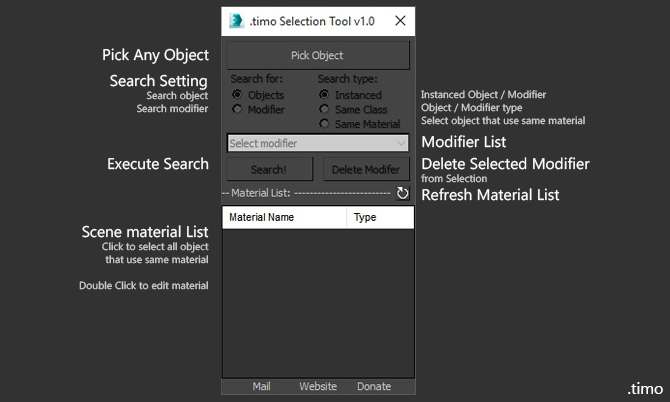
.timo - Selection Tools

0 votes

Selection tools for 3dsMax
Selection tools allow you to quick Select one or multiple object using custom settings that is provided

How to use:

CustomOutliner

3 votes

This is a tool designed to give the user more control than the default Select-By-Name dialog that ships with 3d Studio Max. It allows users access into grouped objects (searching through closed groups for objects - opening groups in scene on selection - etc.) along with multi-object renaming - moving - scaling - etc. A powerful object lister - and organizer.

QTO (Quick Tools Object) v.0.1

10 votes

This simple script, allows to accelerate the workflow in 3DSMax.
It assembles the normals tools of Selection, cloning, Hide, Freeze, Color, Rendering and Convert object in an only window allowing a fast search. Very useful for all the uses.

Select By Name V3

4 votes

This script will create a rollout very similar to the default 'Select By Name' tool however with a few key features:
1) Non-Modal - so it can be left open and will update/sync with the selection.
2) Added Hide - Freeze and Delete to the rollout.

selectionHighlighter

9 votes

This script simulates the Selection Highlighting mode from Silo in max. The idea is if you hover over an object, the object is selected, if you hover over a vertex, it selects the vertex, if you hover over an edge, the edge is selected, etc. No need for extra mouseclicks. Autodesk has half added this feature, this script goes all the way to adding full silo style selection highlighting. Note: This only works in max 2008.

Select by Color and Move objects to Layer

1 vote

This simple script lets you choose a wirecolor by an object (like "Select by Color") and select all objects with the same color. You can move the selection to levels we have chosen.


QuickSelection

9 votes

"Assigned to a hotkey - this will allow you to quickly select and unhide any named selections through shortcuts based on the first character of each selection.New: Alphabetical sorting and memory optimization."

instanceTrimmer

9 votes

Takes a selection and reduces the selection to include only a single instance from each set of instances.

Tutorial:

Make a sphere and instance it once. Make a 3rd sphere, copy it once. Select all 4 spheres. Run the script in UI mode. Hit Do. Now your 3rd, 4th and either the 1st or 2nd sphere is selected.

ToggleSelection

8 votes

Walks through the list of selection types. Like All - geometry - lights etc.. I have it binded to alt+- (cycle down) and alt++ (cycle up).

Syndicate content