Tagged 'render'

Quick Batch Render

0 votes

A simple and powerful script to quickly render multiple ready '.max' files successively on a single computer.

Options: set a percentage of the file’s render resolution (width/height); ignore/suppress warning dialogs; render First frame only (to test render files with animated sequences).

V-Ray Irradiance Map Pre Calc

27 votes

This is a script I created to automatically setup your Irradiance Map for V-Ray. Basically you select what camera you want to render from, select what frame range, the path where you want your Irradience Maps to Generate to and the information automatically goes into your Irradiance settings. It will even create the file for you.

This is useful for companies that send many animations via network rendering by saving time in setting up your irradiances.

If you have any questions please contact me at [email protected]

Updated -
Version 1.1

Render Still Cameras

1 vote

VERY QUICK & SIMPLE BATCH RENDERER for STILL IMAGES. Just 2 clicks and ready to go!

This script is very useful to render many views from a single model or scene when you have already placed still cameras.

It combines many still cameras into one single animated camera that shows all those views sequentially, one per frame.

Then you just need to render the new camera to a sequence of images.


HOW IT WORKS:

The script lets you first select the still cameras to combine into one.

Delete Bad Frames on Backburner

12 votes

This script allows you to delete bad frames that were rendered by a given
node on backburner. This happens if the render farm is heterogeneous
(= different software or hardware configuration on the render nodes). Instead
of manually deleting the frames, it will delete all frames that were rendered
by a certain machine for a certain job. To find out which frames need to be
deleted it connects to the manager and fetches information about every
rendered frame. If the frame was rendered by the machine that has the name

Update Shader Utilities for 3dsmax2015

72 votes

Hi Guys,

Shader Utilities Pro for 3dsmax2015 is released. Update and Bug Fix!

New Tutorial  in english !!!

- support Vray 2.x to mental ray
- support Iray Material  & MILA Layering Shader from NVidia
- Global Shader Optimizing: Reflection/Refraction, AO, CutOff´s, Bitmap Blur/Filtering ...
- Cleaner ( incompatible Maps, DWG, Revit import)
- Global Settings Optimizer (Sample Curve Technology only by Infinity Vision)

have fun!

Octane CamTools

3 votes

Red&Cyan Octane Tools

What do they do?

- Create free Octane cam:

Obviously creates a free octane cam. You can decide wether you want to use a focus plane or not.
the focus plane affects the focal depth and vice versa.

- Create octane cam from view:

Works exactly as the usual "create camera from view".
You can also add a focus plane, wich is linked to the focalDepth.

- Replace with octane cam:

Select the camera/s that you want to replace and run the script. for each selected camera an octane cam will be created.

NiezRender

18 votes

still learning ...
im to lazy to go to render setup (F10) and scroll down to assign renderer so i make this script to change renderer for just click. for this time it just for scanline, mentalray and vray, for vray you have to install the vray plugin first.

cheers

Dennis WK

Pictor ver 2.0.0

6 votes

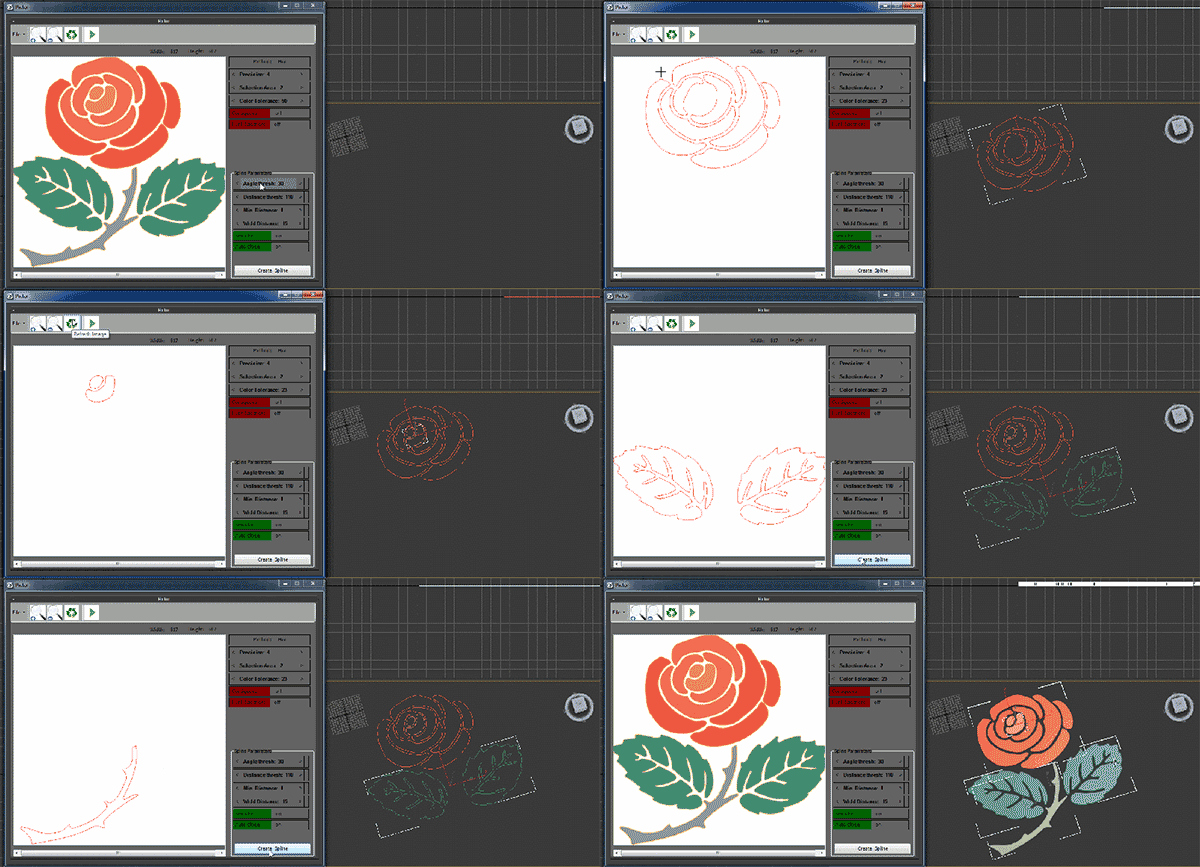
Pictor plugin is creating three-dimensional objects from two dimensional images. This plug-in works with Max and has the ability to read and convert images to three-dimensional files. General features of the software are as follows

Vray_Material_subdiv_lister

4 votes

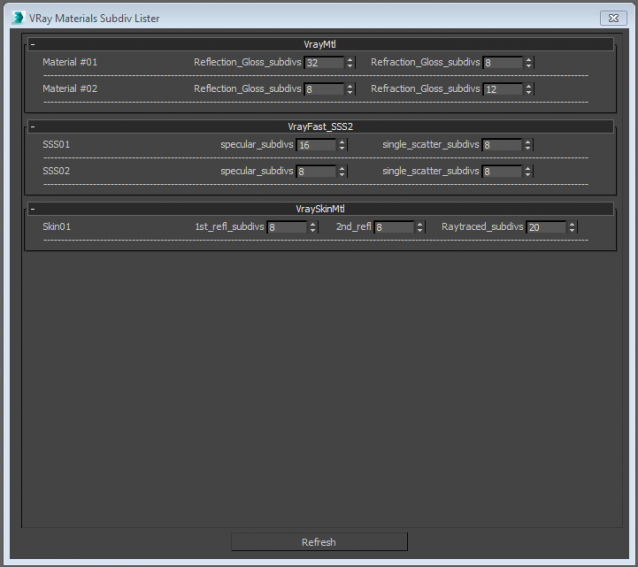
This script collects all the Vray materials of the scene and allows you to easily change theirs subdivisions parameters.
Only tested with max 2015
Any feedback is highly appreciated


Telegram Notifications

2 votes

Info

A script for 3Ds Max that allows you to send messages to Telegram using a special bot.

It is possible to send a message about the completion of the rendering process with sending the rendered image.

This is convenient when you need to move away from the workplace, drink coffee or take a break from work. A message in Telegram will notify you when you need to go to the computer. You can also see the render result in the notification!