Tagged 'Animation'

Key copier

3 votes

"Now you can use Ctrl+C/Ctrl+V to copy and paste keys in the track view. Uses Chugg_globals(see help txt)(Max4.x only)"

SecMov

26 votes

Secondary Motion Automatic Rigger

*************ENGLISH*************
this is my first script and my first contribution to this comunity. i created this script as an assignment for my animation class. feel free to use it or change it, but if u do so please post it again so i could watch the improvements. if u have any suggestions or tips for me pleas post :).

*************ESPAÑOL*************

Unreal Engine 4 - Camera Animation Exporter

5 votes

Load Multiple Bips

0 votes

I created this script to speed up my daily work with crowd animation. If you have a lot of character studios rigged bipeds and need to load the same animation (walk loops, conversation...) on all of then, so this script might help you.

It's a .mzp file that you can just drag and drop into 3ds Max or run through the MAXscript menu. After that you will find the script at: Customize > Customize User Interface > Toolbars tab > Category: MMScripts > Load Multiples Bips".

To use the script you just need to:

PhysX Painter

6 votes

Stick Locator

23 votes

Stick Locator
=============
version 1.2

written by Mayec Rancel

(macroScript)

Description:
Creates a point dummy, and parents it to the reference object's vertex/center,
using controller expressions.

This is useful to parent other objects to a specific part of a deforming
mesh, or an object whose transforms have been 'baked' (e.g. point cache).

I have found it specially useful, in FX work, for particle/fluid emitters.

Notes:
- Only the 'center' method can be used with splines.
- When using 'vertex' method, the dummy's rotation will align to the

Face Pose Saver

1 vote

A 3ds Max script to save key positons of the face witch is controlled with sliders

Video link

GitHub link

ABOUT THE SCRIPT:
It's a tool for animators to save key face poses and speed up work. It's gets the position of the selected sliders and do a snapsot on the viewport and save as a button. First you have to set the "CHR" as the charachter name and set the path where the picurates begin saved.

Sequence\Tag Manager

13 votes

The main idea - no more flying sheets and notepads for sequence ranges and stuff :)

With this tool you can save custom frameranges and quickly cycle betwen them. Also has control over the Frame tags, and lets you easily queue tag times which you need to get rendered.

Bake Objects

5 votes

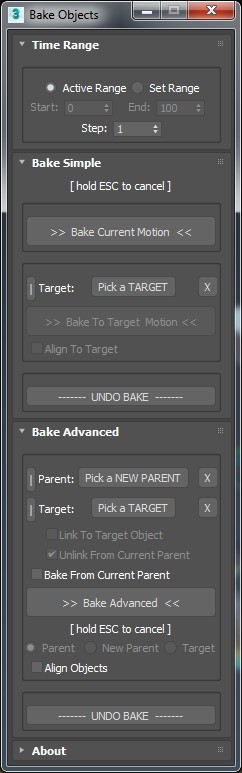
Allows baking of animation keys on the transform tracks for any selected objects.

Options include:

- Active time range or range limiting with adjustable step size.

Spring Max - dynamic bone chain animation with collision

7 votes

Spring Max is a tool that use to create bone chain animation in 3Ds Max