Tagged 'utility'

CamMapMod - Camera Map replacer and updater

38 votes

This is my first script ever, so improvements are to be made.

Doing Camera Mapping ?

Ever wished to replace and update all the Camera Map modifiers you want in one single click ?

Bored of selecting your meshes one by one and then choose your camera again and again ?

The wait is over. Because this tool may save you some great time, which you can then spend to refine you Matte Painting skills !

removeMissingPlugins

105 votes

This is a small script for completely removing all references to missing plugins from your 3ds Max scene. For more details when running the tool, make sure to also read the info printed to the MAXScript listener.

Use with care (!) and do not save the results under the same file name!

The script will replace any missing plugin object with the first usable alternative object of the same class (e.g. a missing render effect will be replaced by the first available render effect). I cannot give any guarantees this will not mess up your data, your machine or your live.

Project Manager

597 votes

After a long stretch of development, Project Manager 4 is officially out — the biggest release in the product's history, and now with full 3ds Max 2027 support.
The headline is AI Asset Classification.
Your library gets sorted automatically — by object type, material, and style — no manual tagging.

Project Manager 4 — What's New Since v3

Changelog · 3ds Max 2016–2027

AI-Powered Asset Classification

  • Automatic categorisation of 3D models and textures by object type, material, form, and style — no manual tagging required
  • Runs entirely on your machine — no cloud, no subscription, your assets never leave your computer
  • GPU-accelerated background processing at low priority — won't interfere with rendering or active work
  • Reclassify specific folders or categories on demand — no need to reprocess the entire library
  • Scale across a team: multiple workstations share the same database and classify in parallel

Colour Tools

  • Find assets by colour — pick from a palette and instantly see matching models or textures
  • Perceptual colour similarity search — finds visually related assets, not just exact hex matches
  • Find Similar by Colour in the right-click menu for models and textures

Find Similar

  • Find similar by content — AI matches 3D models by style, shape, and visual look
  • Find similar by colour palette — matches assets to a reference image or mood board by dominant colour proportions

Smarter Search & Filtering

  • Multi-keyword search: "Chair, Glass" finds a file named Chair.max described as "glass"
  • Category filter correctly includes all subcategories — filtering Furniture also returns Furniture → Chairs → Dining
  • Combine category and material filters: find glass-and-metal tables, or wooden ones, in one click
  • Categorised / Uncategorised quick filters — see which assets still need attention

Gallery & 3D File Browsing

  • Three gallery tabs for .max files: Models, Materials, and External Links
  • Drag materials directly from the gallery into your open 3ds Max scene
  • 3D viewport preview for FBX, 3DS, OBJ, and other formats — inspect geometry before importing
  • Edit external links inline — fix or replace missing textures without opening the .max file
  • Zoom & Pan for images — inspect textures at full resolution inside Project Manager

Migration & Compatibility

  • v3 and v4 share the same database format — point v4 at your existing library and go; no rebuild required
  • Run v3 and v4 side by side on the same team; supported from 3ds Max 2016 through 2027

Performance & Other Fixes

  • Significantly improved overall performance — faster navigation, filtering, search, and file/folder operations
  • Live sync in shared database mode — changes by colleagues appear automatically without reloading
More about new features   Project Manager version 4
 

Check Total Lengths SplineShape

74 votes

This simple and funny script, you can measure the total length, check the number of segments and the Knot of SplineShape. Very useful :)

ctlss

Quick Isolate Object

66 votes

With this useful and funny script, you can isolate in a ListBox, the category object in Geometry, Shape, Light, Helper, Camera and Space Warp in the viewport.  We can select, rename and count the items in the scene.  Useful in many work situation.

qio

boneStretch

71 votes

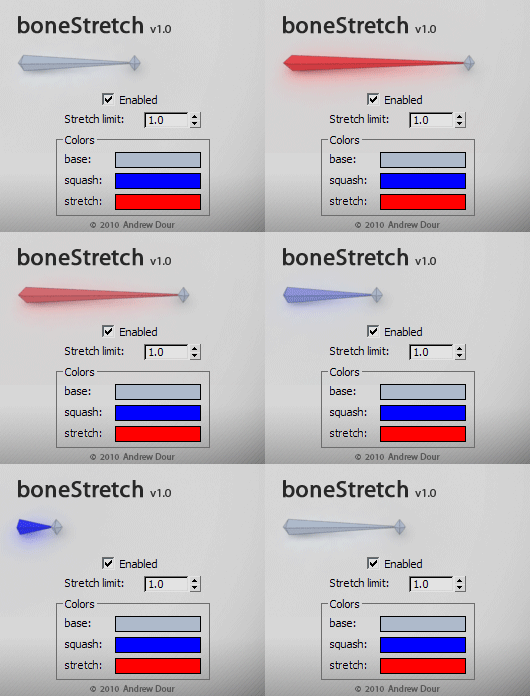
This tool will change the color of bones based on their squash/stretch amount, providing the user with feedback if they have gone beyond a desired threshold. It will live update as you move around and animate in the viewport.

Quick X-View

15 votes

This is a script utility that allows to see-throught (X-View) the objects during the work. Excellent for the stages of modeling with a reference image. Implements the function of 3dsMax of See-Through (Alt+X key).

Quick XView

Lights Grouper 2.0 (Vray UPDATE)

48 votes

"This utility allows you to define groups of lights - for easy management. You can then turn all the lights in the group On/Off and Hide/Unhide them. It is useful for task such as having the same scene with day/night light schemes, or when you have to dead with an important amount of lights.

This script is an update of Light Grouper, you can find on scriptspot. It now supports vrayShadows, and Vrayshadowmaps"

LOD Creator

64 votes

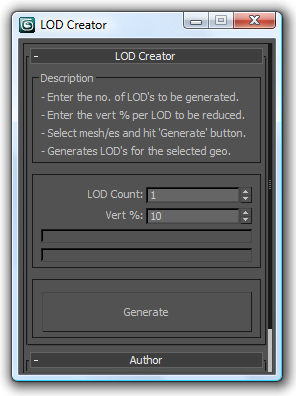
Here's my version of LOD creation script, it uses multiRes modifier. It works on multiple geometry and retains the geo type. It retains the skin modifier too, so you can run on a skinned character as well. Feel free to use this script and lemme know if you want me to add any feature to it or if it has any bugs.

Video Capture Select Viewport

33 votes

This is a Script that allows to recording and Grab the active viewport during the work. You can select any viewport during recording. Veersion 1.1

Based on 'Create a Quick Preview' by Borislav 'Bobo' Petrov (www.scriptspot.com/bobo).

New in release version 1.1:
Revision code (work in progress)
Revision the Interface
Add save path button image "Output Save Path Image"
Add save path button video "Output Save Path Video"
Add checkbox uniquename file image "Uniquename File Image"