Tagged 'spline'

Frodo's Magic Scripts Pack

74 votes

NEW UPDATE TO v4.4 RELEASED!!

Hi,
this is a small package of my latest scripts, i hope you'll find them usefull.

Includes:
Camera lister - usefull for fast navigation and selection of scene cameras
Autobackup check - you'll never forget to turn autoback on
Speed meter - measures speed of selected object
Grider - slices object by grid
Center & Reset - resets xform and centers pivot
Aligh spline to Z - flattens spline in Z direction
Object ID - assigns random g-buffer ID to whole scene

SplineTrace

43 votes

SplineTrace is a MaxScript that can be used to:

- convert a 2D Image into spline shapes, where each spline corresponds to an interior or exterior contour (outline) in the image. Works best on Black/white images but can be used on Colour images by adjusting threshold value.

- create a flat 2D object which corresponds to the "black" areas of the image. Any internal "white" areas are removed from the object.

- quickly turn a plain 2D image into a solid 3D object.

- create a flat 2D shape or 3D Object from an existing spline (not just those created by this script)

ChangeLog:

Spline Curve Control

12 votes

Conform to Spline

22 votes

This script allow you conform(snap) selected verticies to a spline

Labyrinth Maker

12 votes


Flatten_Spline_XYZ

24 votes

This script comes in 6 macros - rolled into 2 script files. The script flattens splines to an X - Y or Z snap point. You select the spline - select the verts you want affected and then use the command. The script creates 6 commands - Flatten_Spline_X - Flatten_Spline_Y... Fatten_B_Spline_X and so on. The non B version moves the verts to the proper location but will not adjust Bezier Handles.

Spline Project

17 votes

Same kinda thing as mesh project except projects spline anlong their Z axis onto the surface of an object

FiberMesh to Splines

3 votes

FiberMesh to Splines will convert the exported FiberMesh polygons from ZBrush to splines. The splines can be used to create and render 3DS Max hair either with 3DS Max default hair modifier or using a hair plugin that has a recomb from splines option.


Align Pivot To Knot | Vertex

12 votes


With this simple script you can easily place selected object pivot (Spline or Geometry) on selected knot (segment) or selected vertex (edge, poly).

Upadate v1.5: Pivot On SubSelection

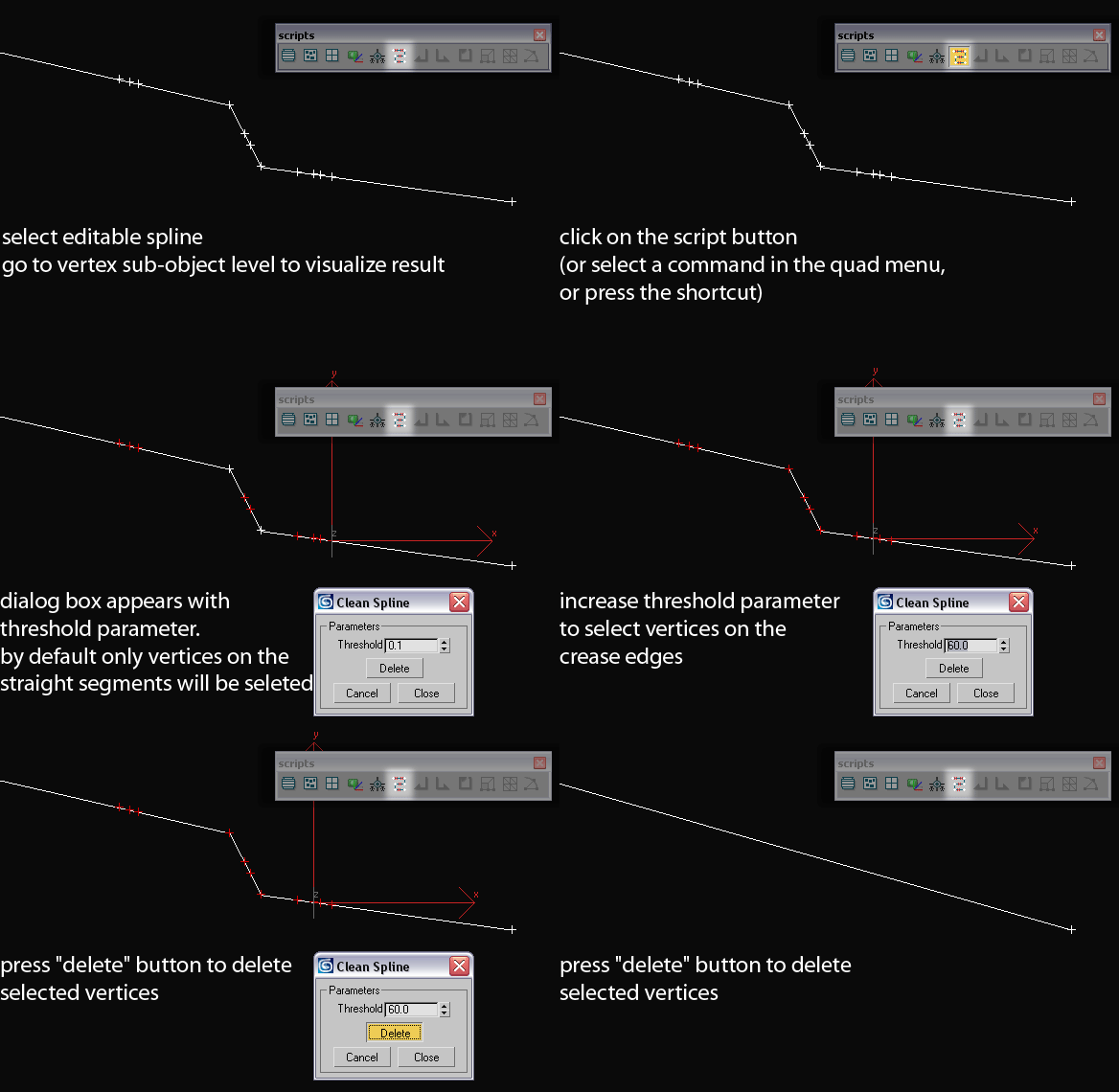
CleanSpline

11 votes

how it works

Script deletes vertex based on the angle threshold

HOWTO:

Syndicate content