Tagged 'Biped'

Crude Biped Key Reduction

0 votes

CrudeBipedKeyReducer

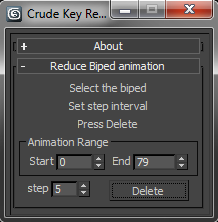
This will dismantle that wall of motion captured key frames into something more manageable. It’s not the most sophisticated of algorithms. But, it gets the job done and leaves you with nicely lined up key-poses. To use simply:

Load Multiple Bips

0 votes

I created this script to speed up my daily work with crowd animation. If you have a lot of character studios rigged bipeds and need to load the same animation (walk loops, conversation...) on all of then, so this script might help you.

It's a .mzp file that you can just drag and drop into 3ds Max or run through the MAXscript menu. After that you will find the script at: Customize > Customize User Interface > Toolbars tab > Category: MMScripts > Load Multiples Bips".

To use the script you just need to:

LinkBipedRoot

12 votes

The macroscript allows a biped to be follow another object. The
Biped's horizontal/vertical/turning keys will be modified to match the
objects'. Optionally additive or original key useage is allowed. Meant
to use motionmixed 'gameanimations' and let them follow a path.

Biped and CAT Mass Markers

2 votes

A tool for visualising the projected lower and upper masses (pelvis and base of the neck respectively) in relation to the feet of a standard Biped or CAT rig. Markers between the feet show where the masses intersect, which may help with determining where the static weight is distributed when posing. It does not take into account motion dynamics and so is intended for use when standing still. Additionally, when a foot is raised above the ground the foot line markers turn blue. Likewise if lowered below the ground they turn red.

KeyBip-Controller

19 votes

This script is alternative way
Quick enough for help you setting keys TCB control Biped - You can set manual with button one by one or automatic batch button for all keys

tips: Check out every tooltips button for help

Bip2root

1 vote

Copies horizontal position of the biped onto the root object and links the biped to the root.

Two useful uses for this script:

  1. Use it to create a root for your biped (using the Static Root option) - so you can place your biped with animation anywhere in the scene without adding extra keyframes. Simply move the root instead of the biped itself.
  2. Some game engines require a moving root to calculate biped's position in the game environment space. With a moving root the biped itself actually stays in place and only the root moves.

Lock COM Bip

14 votes

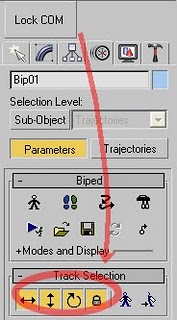
This script is actived to the 'lock COM keying' toggle, including Horizontal, Vertical and Rotation tracks at once in the selection track of the Biped root objects.


Copy the Biped&Bone to Bones

2 votes


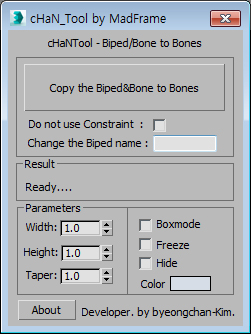
1.Select Target(Biped or Bone)

2.[Copy the Biped&Bone to Bones] pressed button

3.The target name is automatically changed to Hep001.(If you want to enter directly  Change the Biped name)

Biped Prepare MoCap

0 votes

What it will do:
- Default Biped Root = $Bip001
- Reduces the Keys of the Biped, but this will possibly not be the best
solution to reduce keys!
- On Press Start, it starts to Zero your Biped Pelvis to [0,0,z]
- If you check the Checkbox, it trys to move the Feet to [x,y,0]

BipedPrepareMoCap v1.1r
by Benedikt Rey 05/2012

Update:Fixed Bugs

Stepped Playback

16 votes

This script allows you to playback any animations in stepped mode. It simply goes through your trackbar keys one by one in real time. I use it to play my Biped animations in stepped mode since you can't change f-curves with the Biped. Enjoy!

Syndicate content