Tagged 'layer'

Quick Layer Organizer

31 votes

Simply create a layer and name it specific to what should go into the layer, for example "CHAR" for character geometry. Any character geometry you make you just need to remember to include "CHAR" in the object's name and when the Quick Layer Organizer is run it will find any objects with "CHAR" in the name and put them into the "CHAR" layer. Any objects that don't match the name a layer will remain in whatever layer they are currently in and the default layer is ignored during the organization.

CAT Pose Grabber

1 vote

A panel to support CAT rigs which allows temporary storage and retrieval of a single or muliple poses. Poses are not named and there is no management of them. The idea is that you simply want to grab a pose (or several) and use it immediately, without dealing with names or folder structures for fluid workflow. Poses saved are stored as files and are thererfore persistent unless overwritten using the script store functions.

Features include:
- Supports multiple CAT rigs in the same scene. You can even transfer poses from one rig to another.

Quad enhance

32 votes

These few scripts adds some new functions to your quad menu like hiding,selecting and isolating by objects layer or material.

Delete UnRemovable Layer

2 votes

You might encounter a situation where you want to remove an empty layer that you created earlier, but the delete option is grayed out in the layer manager. and you are unable to remove that layer. After all you have to remember that 3Ds Max never allows you to delete a layer while it contains nodes or the default layer called “0”. But in some rare situations, even an empty layer that you created and then finished with, may not be deletable in 3Ds Max. This happens because of some unclassified nodes that come with your imported models from other programs. These nodes are not visible in the viewport or the layer manager. The only way to eliminate them is to select those nodes using MaxScript and delete them manually, so the layer’s delete option becomes available again.

hide object's layer by one click

30 votes

with this script you can hide object's layer by one click like in autocad, it scans your mouse position so you simply move your mouse over the object an clik to hide appertain layer also display currently "mouse over" objects name and layer in status bar

i hope you will like it :)

p.s. excuse my bad english

Quick Manager

0 votes

This is simple script for renaming and managing objects on the go.

To install script Just
1. Unzip "Quick Manager v1.0.rar"
2. Keep "MyLibrary.mat" to that folder if you are going to keep that folder.
If you are going to delete that folder, then put "MyLibrary.mat" to following location - "C:\Program Files\Autodesk\3ds Max 2017\materiallibraries"
1. run "Quick_Manager_1.0.ms" from MAXScipt-Run Script.
2. Then go to Customize-Customize User Interface.
3. Find "Quick_Manager" Under "Sharad Tools"
4. Assign Shortcut for it.

Script will Renames objects

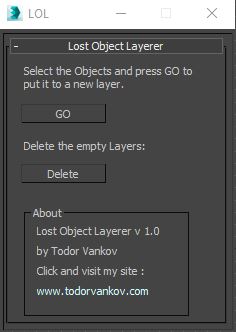
LOL – Lost Object Layerer

0 votes

This script move the selected objects in a new layer, if your object are not listed in the layer Manager. If you have some problem with your max version please text me.

Script category: “#todorScripts”.

You can see an example here, how to install my script per Drag and Drop: