Tagged 'VRay'

Gtools_Proxy_Display

19 votes

Lets you change the display of selected vrayproxy’s

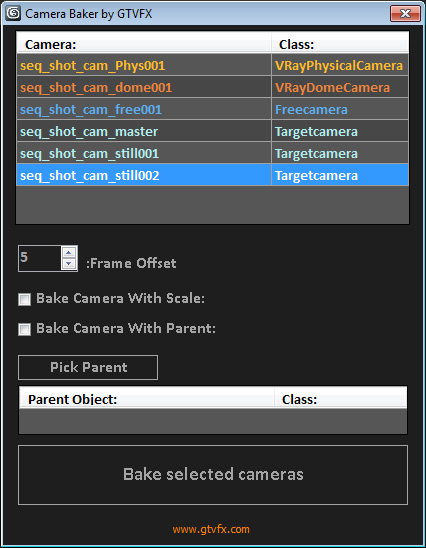
GTVFX-ANM_cameraBaker

1 vote


Bakes cameras per frame with optional transform, and optional frame range buffer.

By default this bakes the camera in World Space which is generally what you want. There is an option to bake the camera in Parent space if you check the box "Bake camera in selected objects space".


02/01/2014:

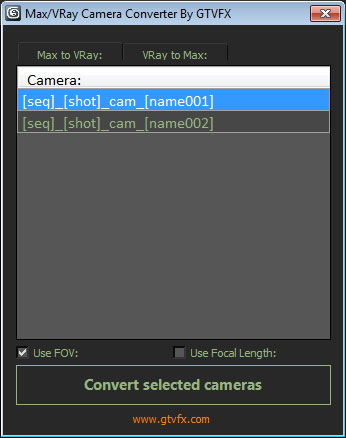
GTVFX-ANM_maxVRayCameraConverter

2 votes


Converts Standard Max cameras into VRay Physical cameras or the other way around.

When converting to Vray camera there is the option to use either FOV for Focal-Length.


 Updates:

2014-02-09:

Updated UI. Fixed a bug when converting the focal length of VRay camers to FOV for standard cams the built-in function within Max was marginally off causing a mis-match between the origianl camera and the converted camera.

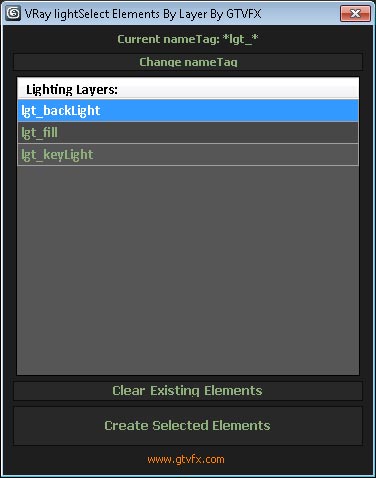
GTVFX-SCA_createLightSelectElements_ByLayer

1 vote


Manages the creation of VRay Light Select Elements based on a layer naming convention.

All lights on a layer will be included in that Light Select Element.

Layers are found by matching the pattern of the nameTag variable. You can change this variable if necessary for your pipeline by using the slender button at the top of the dialog.

Default nameTag = "*lgt_*"  (fe: lgt_sun, lgt_key, etc...)


 Updates:

GTVFX-SCA_createLightSelectElements_perLight

2 votes

Creates a VRay Light Select Element for each light in your scene.

Elements are named with prefix of the nameTag variable. You can change this variable if necessary for your pipeline. To do so you will need to open the script and modify the variable within the struct.

Default nameTag = "lgt_"

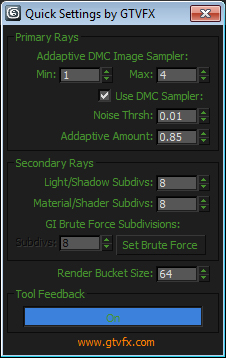
GTVFX-SCA_RenderSettingsHelper

2 votes


This tool exposes the main VRay settings that contribute to the quality of the final rendered image and puts them into one quickly accessible dialog.

I recomend using this in combination with the VRaySampleRate render element to fine tune your renders for speed and quality.


GTVFX-SCA_VRproxiesReplaceWithMesh

2 votes

Brings in the geometry mesh of the VRay Proxy at the same position and with the same hierarchy as the proxy container.

HQ Proxy Tools

0 votes

HQ Proxy Tools is a free 3dsMax script that helps you to adjust some settings of proxy objects. This script supports Vray render and Corona render.

Highlight features:

MAKE INSTANCES SIMILAR PROXIES: proxies have the same .vrmesh file or .cgeo file will be made instances. It will save memory and render faster.

INSTANCES TO VRAY/CORONA PROXIES: convert objects to vray/corona proxy and maintain their instances (The original proxy export from Vray will convert objects to proxies but also make them unique objects, which will increase your file size and render slower)

ID Birlestirici (ID Combiner)

0 votes

IES from Caustics Generator

4 votes

The script for easy render of the caustic from the lamps. Calculation of caustic takes a long time.

I have decided that you can bake a caustic in IES-files and thus make the caustic effect it deceptive for a large number of fixtures in the scene.

Syndicate content