Tagged 'VRay'

V-RayMax Converter PRO

168 votes

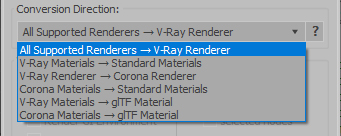
V-RayMax Converter PRO is the best tool for convert 3d scene (materials, maps, lights, cameras, proxies, modifiers, helpers, render elements, etc.) from other render engines to V-Ray and from V-Ray to Corona Renderer, and also for converting V-Ray and Corona materials to Standard/Physical/PBR/OpenPBR materials and to glTF Material.

Current version: 4.0061

Supported for conversion:

To V-Ray from:
  • Standard (Default Scanline)
  • Corona Render
  • FStorm Render
  • Octane Renderer
  • finalRender
  • Arnold
  • Brazil_Advanced (RS v 1.2) material
  • NVIDIA iray (unofficial) material.
From V-Ray to:
  • Standard / Physical / PBR / OpenPBR materials
  • Corona Renderer
  • glTF Material (3ds Max 2023 or later)
From Corona to:
  • Standard / Physical / PBR / OpenPBR materials
  • glTF Material (3ds Max 2023 or later)
Сonversion scope:

Full list of supported conversions.

Main features:

  • Converts materials, maps, lights, cameras, modifiers, helpers and GI environment from other render engines to V-Ray and from V-Ray to Corona
  • Converts clouds from CoronaSky to VRaySun and vice versa.
  • Converts Night Sky system (Moon, Stars & Milky Way) from V-Ray to Corona and vice versa
  • Converts Render Elements to V-Ray (currently supported Scanline RE, Corona RE, FStorm RE, Octane RE) and from V-Ray to Corona
  • Converts V-Ray and Corona materials to Standard (Default Scanline) materials
  • Converts VRayMtl and CoronaPhysicalMtl materials to Physical Material and OpenPBR Material
  • Converts V-Ray and Corona materials to glTF Material (which is necessary for exporting to the .glb for corresponding 3d software: Blender, Gestaltor, Babylon.JS etc).
  • Converts proxies (currently supported from Corona, FStorm, Octane) to V-Ray Proxy (static and animated)
  • Converts V-Ray Proxy to Corona Proxy (static and animated)
  • Converts standard Bitmaps to VRayBitmap and vice versa
  • Converts standard Bitmaps to CoronaBitmap and vice versa
  • Converts 3ds Max Physical cameras to V-Ray Physical cameras and vice versa
  • Automatic configure ACEScg workflow in V-Ray
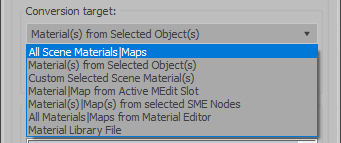
  • Batch processing for multiple 3dsMax Scene (*.max) or 3dsMax Material Library (*.mat) files
  • Programmatically interact with most converter functions using built-in maxscript methods (API), which allows you to use the converter without UI and in combination with other 3rd-party scripts.
  • ...and more additional tools for fixing and adjusting the scene.

MaxBatch - Advanced Batch Render Manager for 3ds Max

0 votes

ForestPack Manager Cover

MaxBatch is a comprehensive batch rendering utility for 3ds Max. It provides a structured interface to queue and manage multiple rendering tasks, whether you are rendering multiple cameras within your active scene or processing a list of external .max files sequentially. It is specifically optimized for V-Ray 7 and Corona 14.

One-Step Copy & Relink (Bitmap Path Manager)

0 votes

One-Step Copy & Relink is a workflow utility that consolidates two tedious texture-management tasks into a single operation. It scans your scene for all bitmap-based maps — standard BitmapTexture, VRayBitmap, and VRayHDRI — then copies the source files to a destination folder of your choice while simultaneously relinking the materials to a different target folder using a new file extension.

V-Ray to Standard Converter (Materials & HDRI Maps)

0 votes

V-Ray to Standard Converter is a lightweight scene-migration script that strips V-Ray dependencies out of a 3ds Max file in a single pass. It scans the scene for every VRayHDRI map and VRayMtl material, then replaces them with their native 3ds Max equivalents — BitmapTexture and Standard material — while preserving names, file paths, and the most common texture slot assignments.

CineMove

0 votes

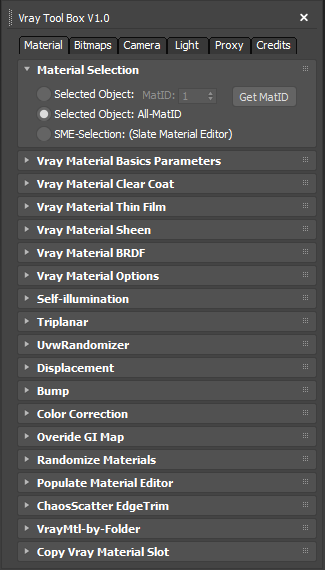
Vray ToolBox

6 votes

It is a Vray version of my script "Corona Automator" It has a lot of features for materials, bitmaps ,cameras, lights and proxies.

Its main goal is to automate property tweaking, and save time on repetitive tasks.

for now the material part is focused on Vray Materials , it won't work on other kind of materials like fastSSS or other materials.

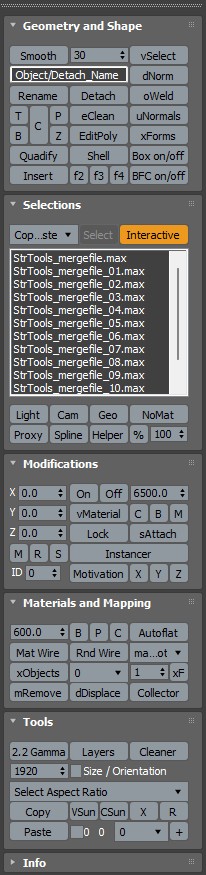
StrTools

14 votes

Quick tools in one place. Dockbar!

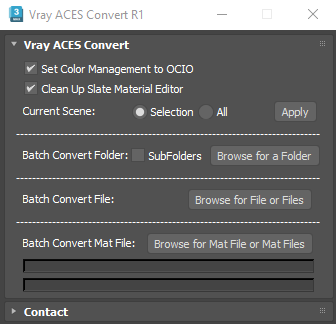
Vray ACES Convert

1 vote

This Script is intended to convert Gamma Workflow scene to ACES OCIO. It will convert any kind of Vray materials, and also VrayLight, Vraydiplacement Modifiers, VrayFur, Chaos Scatter, and Forestpack bitmaps.

it does everything automatically,first it will convert any 3dsmax bitmap to vraybitmap, then it will set diffuse, reflect, translucent, self illum, fog color, environement bitmaps to "srgb-srgb", or to "none-raw" if bitmaps are .exr or .hdr, while other bitmaps are set to "none-raw"


FS Scene Converter (FStorm)

6 votes

FS Converter is a scene convertor to come back from FStorm renderer or to only convert some objects.

This converter allow to convert all the Fstorm renderer feature to Vray or Corona and Redshift.

It's not a simplicity converter, it's keep all the compatible settings...
Compatible: Fstorm Camera, Fstorm materials, Fstorm proxie, Fstorm Lights (including SunLight), Fstorm Displacement...

Convert all the scene or only selected Object... See how many instance it's necessary to convert...

Real time informations for the convertion state.

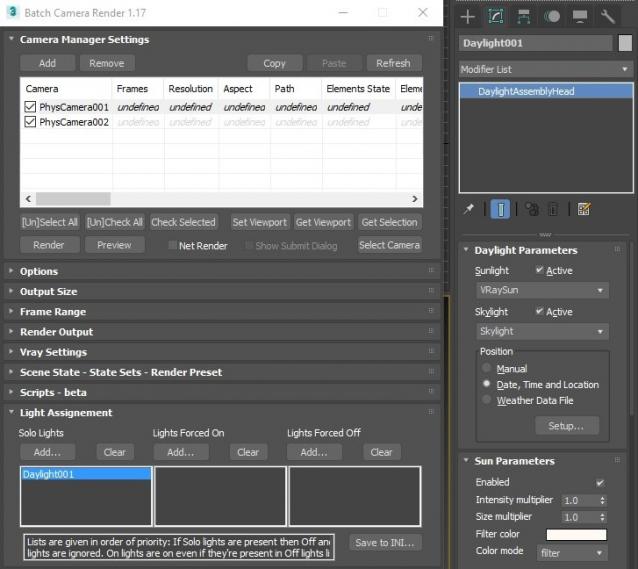
Batch Camera Render

274 votes

This script aims to replace standard 3dsmax's Batch Render and imitates Houdini Output Node workflow. Using it you can specify rendering parameters - frame size, frame number, output path - directly to camera object, so every camera in scene 'knows' what it intended to render. Additional functionality is Lighting Assignment - you can specify which light will be turn on or off for selected camera during the rendering.

1.19:

  • Support 3ds max 2026

1.18:

  • Support for 3ds max 2023 Update fixed

1.17:

  • Corona and Vray Sun inside Daylight System fixed (thanks to busseynova for reporting)

1.16:

  • CoronaSun supported inside Daylight System

1.15:

  • Don't Save Render Elements Checkbox (Thanks to antomor)
  • Limited support for camera objects in xref scene files (Only root objects in first level xrefs. Cameras in nested xrefs not supported)

1.13 Bugfix:

  • Deadline submission should work now

1.12 New Feature:

  • Deadline support.
    Very basic imlementation, it allows you to submit your jobs on a deadline server. Enter deadline repository address and check "Use Deadline" checkbox. Other checkbox doesn't matter in this case ("Net render", "Show Submit Dialog").
    Probably it requires Deadline 3ds max Submitter installed. I didn't have a chance to check it on a clean machine.

1.11 Features and fixes:

  • State sets support added
  • "projectname" keyword added which resolves to project's folder name
  • other fixes and improvements

1.10.3b Fixes:

  • Crash when vray ir/lcache maps are set to auto-save
  • Region render was not set properly during the rendering

This is major update of the script, so it may not be as stable as before. Backup scenes or cameras at least before running this version. More information can be found here - 1.10b Multiple presets for each camera

Previous updates:

1.10.2b Fixes:

  • Problems with render elements paths
  • Copy/paste of render region settings
  • Properly convert render region values when change resolution

New features:

  • Multiple presets for each camera
  • New keyword %presetname% to support multiple presets
  • Distributed rendering checkbox added to vray common settings
  • Bugfix - Net render not starting after cancelling during local rendering.
  • Improved performance with scenes with lots of cameras
  • Added support of Vray RT as a production renderer
  • Added support of using MFRender script to render scenes through BatchCamera script.
  • Bugfix - Error was popping up sometimes during drag-n-drop
  • Bugfix - Render elements didn't render in certain conditions
  • Bugfix - Pre-render/post-render scripts didn't work on network rendering
  • Bugfix - Select All and Toggle All buttons didn't work properly

Here are some details: http://usakhelo.github.io/batchcam/batchcam-1.9.20.html

Syndicate content