Tagged 'VRay'

V-Ray to Standard Converter (Materials & HDRI Maps)

0 votes

V-Ray to Standard Converter is a lightweight scene-migration script that strips V-Ray dependencies out of a 3ds Max file in a single pass. It scans the scene for every VRayHDRI map and VRayMtl material, then replaces them with their native 3ds Max equivalents — BitmapTexture and Standard material — while preserving names, file paths, and the most common texture slot assignments.

One-Step Copy & Relink (Bitmap Path Manager)

0 votes

One-Step Copy & Relink is a workflow utility that consolidates two tedious texture-management tasks into a single operation. It scans your scene for all bitmap-based maps — standard BitmapTexture, VRayBitmap, and VRayHDRI — then copies the source files to a destination folder of your choice while simultaneously relinking the materials to a different target folder using a new file extension.

MaxBatch - Advanced Batch Render Manager for 3ds Max

0 votes

ForestPack Manager Cover

MaxBatch is a comprehensive batch rendering utility for 3ds Max. It provides a structured interface to queue and manage multiple rendering tasks, whether you are rendering multiple cameras within your active scene or processing a list of external .max files sequentially. It is specifically optimized for V-Ray 7 and Corona 14.

CineMove

0 votes

Vray ACES Convert

1 vote

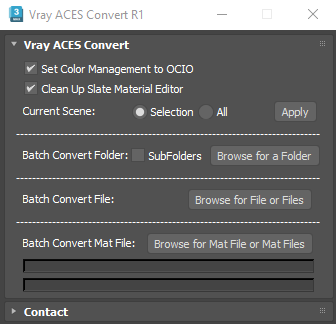
This Script is intended to convert Gamma Workflow scene to ACES OCIO. It will convert any kind of Vray materials, and also VrayLight, Vraydiplacement Modifiers, VrayFur, Chaos Scatter, and Forestpack bitmaps.

it does everything automatically,first it will convert any 3dsmax bitmap to vraybitmap, then it will set diffuse, reflect, translucent, self illum, fog color, environement bitmaps to "srgb-srgb", or to "none-raw" if bitmaps are .exr or .hdr, while other bitmaps are set to "none-raw"

Vray ToolBox

6 votes

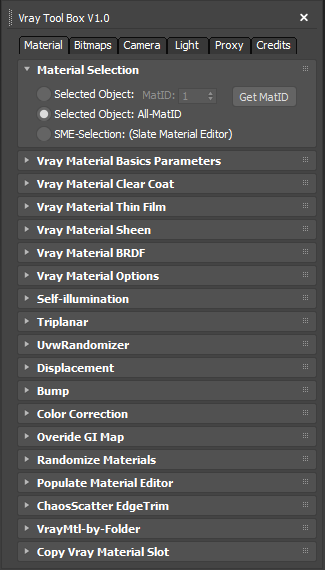
It is a Vray version of my script "Corona Automator" It has a lot of features for materials, bitmaps ,cameras, lights and proxies.

Its main goal is to automate property tweaking, and save time on repetitive tasks.

for now the material part is focused on Vray Materials , it won't work on other kind of materials like fastSSS or other materials.

Content Browser

2 votes

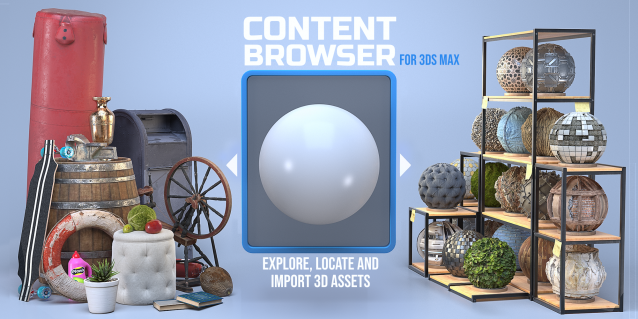
The Content Browser helps you quickly browse and import 3D assets on your computer.

Load any folder accessible on your machine and the Content Browser will find any materials, hdri’s, models, and max files. It will group, organize and display these files as assets, recognizing previews, LODs, mapping channels, resolutions and other important information automatically. 

It simplifies the importing and merging process for 3d models, max files, material creation and hdri environment maps by allowing you to directly browse, filter and drag all of your 3D assets from sources like MegaScans, PolyHaven, gameTextures, Poliigon, Arroway into 3ds max viewport or material editor. 

Main Features

  • Load any folder and find 3D models, max files, materials and hdri’s.
  • Show grouped files as assets, group matching assets and find preview images.
  • Drag and Drop asset into the 3ds max viewport or the Slate Material Editor
  • Import assets to Slate and Compact Material Editors
  • Default Merge and Import 3d files and max scenes, with automatic relinking filepaths
  • Choose LODs/resolution/variations and Import multiple assets at once
  • Folder hierarchy, File list and Preview Gallery

Vray To Unity OneClick Converter

1 vote

Script for automatic conversion 3ds Max scene with V-ray renderer to Unity Engine (HDRP and URP).

Documentation: https://docs.google.com/document/d/19XJjX2VO_rHNIj4ZDcKPlwhYR0FFi8a77FyG...

Скрипт по автоматической конвертации сцены из 3ds Max V-ray в Unity (HDRP и URP)

Документация на русском : https://docs.google.com/document/d/122-TyKZj-STQIXhajocWSvXzTZeeRxgscq3P...

https://u3d.gumroad.com/l/3dsmaxVray2unityPRO PRO version without texture size limit.

Telegram Support Channel https://t.me/OneClickExporter

Quick Clouds Generator

1 vote

QUICK CLOUDS GENERATOR is a script that is efficient in automatically creating sun/ sky & clouds in 3dsMax. It can be applied flexibly in Archviz projects while saving a lot of time for 3D Artist.

.: Compatible with 3dsMax 2018 & higher

.: Compatible with V-Ray 6 & Corona Renderer 9 & higher

.: Compatible with System Units: Millimeters, Centimeters, Meters, Inches & Feet

.: Version: 2.0

.: Author: Wuan Hyu

If you have any comments or questions, please don't hesitate to contact us via email: [email protected]

We will respond as soon as possible.

---

VrayMtl Color Correction

2 votes

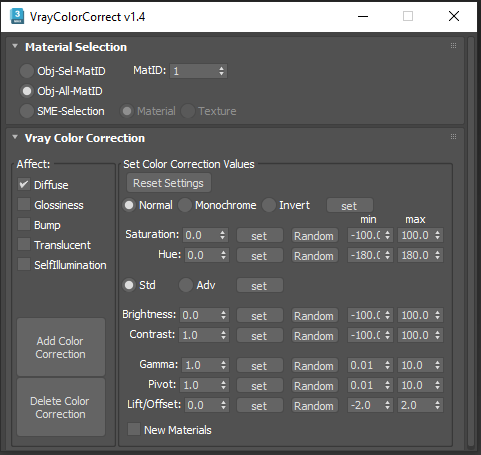
This script is intended to add and tweak settings of Color correction nodes for VrayMtl.

You can add some Color correction with any specified values on any selected material slot (Diffuse, Bump, Glossiness, Translucent, Self Illumination), the existing bitmaps will be kept inside the color correct.

You can change any parameter afterward.

i've added some randomization to each parameter.