Tagged 'VRay'

MultyConvertor

288 votes

MultyConvertor - allow to convert any materials, lights (objects) of any renders to any materials, lights (objects) and renders!!! It is all in one.

You can simple create *.mct (edit text file in any text editors and change extension) file for new render and facilities that support this type of rendering. See any *.mct in archive

Now you start the script and setup link properties from one render type to other. You can also use expression for translate value to other value or execute any max script expression.

Object Properties 2.0

6 votes

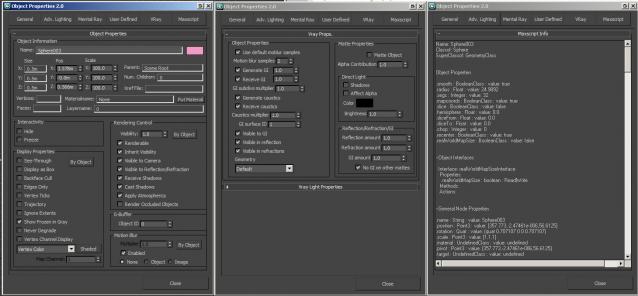
A non-modal Object Properties window, very simliar to the original one in 3dsmax but this allows you to change selection with the dialog open!  It also has the VRayProperties window included so you don't have to switch dialogs when setting up passes. (Needs updating for VRay 3.0+) There is also a MaxScript tab which shows you loads of information about the object you have select and this is really powerful for learning to script!

One Click Albedo for Corona render and V-ray

6 votes

Script Description:

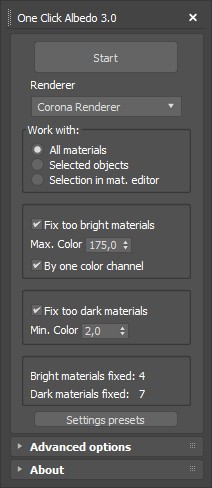
This script is made to automatically adjust the albedo of materials in the scene. Too high albedo may slow rendering process down and make the materials look unrealistic. Especially when an object with a high albedo occupies the most part of frame area. Corona Render developers recommend to keep albedo of your materials under RGB 180 (For diffuse color or texture).

One-Step Copy & Relink (Bitmap Path Manager)

0 votes

One-Step Copy & Relink is a workflow utility that consolidates two tedious texture-management tasks into a single operation. It scans your scene for all bitmap-based maps — standard BitmapTexture, VRayBitmap, and VRayHDRI — then copies the source files to a destination folder of your choice while simultaneously relinking the materials to a different target folder using a new file extension.

PBR Material Importer

1 vote

postimage
A script i made during production that requiring importing a lot of PBR map into Vray.
This script require at least 4 map to run: Diffuse,reflection(specular),glossiness and normal.
It will create a Vray material with setting to look indentical to Quixel 3DO or substance viewport.
If your map have Mixed Dielectric and Metal , you will need to export Metalness Map.

Photo Studio Pro+ for Vray

44 votes

Photo Studio


Photo Studio Pro (PS Pro) is a photographic exposure control tool for computer generated images. Since 3dsmax2016 physical camera is supported and new perspektive and DOF functions. The interface is designed to manage your exposure output. PSPro has some very special features like: realtime exposure or the simulation of the Av/Tv mode of a SLR camera. 


Pictor ver 2.0.0

6 votes

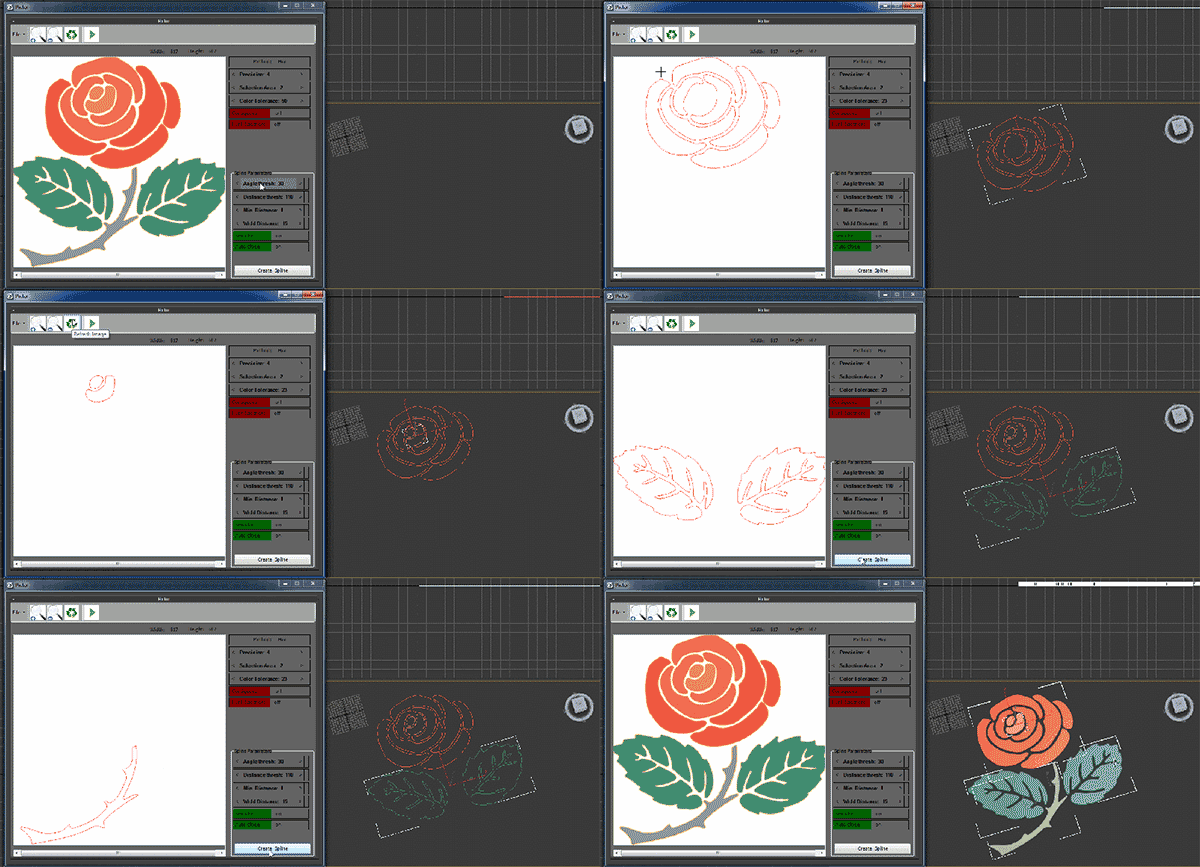
Pictor plugin is creating three-dimensional objects from two dimensional images. This plug-in works with Max and has the ability to read and convert images to three-dimensional files. General features of the software are as follows

Proxif - Vray proxy "fixer"

1 vote

This is very simple script I did for "fixing" proxies in 3ds max 2014 and up.
When working with a lot of proxies in 3ds Max 2014, viewport gets very very buggy. The problem is when "preview from file" in VRayProxys display option is checked. So this script finds all the proxies in the scene and changes then to "preview from file (faces)" which seems to fix this viewport problem!
Script will not make any changes if some proxies are grouped.

Quick Clouds Generator

1 vote

QUICK CLOUDS GENERATOR is a script that is efficient in automatically creating sun/ sky & clouds in 3dsMax. It can be applied flexibly in Archviz projects while saving a lot of time for 3D Artist.

.: Compatible with 3dsMax 2018 & higher

.: Compatible with V-Ray 6 & Corona Renderer 9 & higher

.: Compatible with System Units: Millimeters, Centimeters, Meters, Inches & Feet

.: Version: 2.0

.: Author: Wuan Hyu

If you have any comments or questions, please don't hesitate to contact us via email: [email protected]

We will respond as soon as possible.

---

Quick Vray Camera for 3dsMax2016 and Vray 3.xx

4 votes

Very simply script which allows the creation of  "hidden" Vray Physical Camera in 3dsMax2016 with Vray 3.xx

qvc

In the last release of Vray 3.2 for 3dsMax, the Vray Camera does not appear; VRay uses the physical camera of 3dsmax. If you write in maxscript: " vrayCreateVRayPhysicalCamera() " we can create the "hidden" Vray physical camera.

Quick Vray Camera, facilitates the work for us.

Syndicate content