Tagged 'maxscript'

3DS Max - Plugin - [UPDATE] - CopyPaste V1.5

1 vote

This is an update for the CopyPaste plugin. This plugin allows you to copy and paste geometry between opened 3DS Max files, of course, in the same file too. This version includes a few additional features. The most important one is the ability to copy and paste using a base point. Also, there is a button that allows you to clear the cache file to save space on the hard drive. And, lastly, a Status section that gives you feedback whenever you perform an action. Please check the demo video for an in-depth explanation.

3DS Max - Plugin - ZoomExtSelFix

1 vote

In this update, the script will work on sub-object selections. Also, a bug in the first version is fixed, when you switch to another mode other than the Modify Panel, the first version gives an error, this is fixed now in this 1.5 version.
To recap on why this plugin:
The default Zoom Extents Selected tool in Max has an issue when you're in a sub-object level but no sub-object element is selected, pressing Z(the default shortcut) causes Max to Zoom Extents on the whole scene instead of the selected object.

3DS Max - Plugin - ZoomExtSelFix

0 votes

This plugin is intended to replace the built-in Zoom Extents Selected. The reason is that the built-in feature doesn't work the way it should in many cases as you'll see in the video and instead of zooming in on the selected object, it zooms out to show the whole scene.

Script Box

3 votes

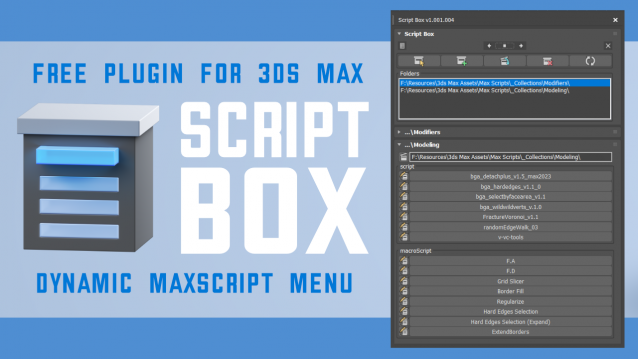
Script Box optimizes your scripting workflow by creating a dynamic dialog menu for Maxscript files.

Simplify installation and execution of Maxscripts by selecting any folder and get a menu that can launch external MaxScripts without adding custom buttons. Freely organize and integrate macroScripts, plugins, utilies and regular scripts inside 3ds max without going through a set of complicated steps.

The current version is free with no limitations, offering the same functionality as the paid version. Future updates are exclusive to paid users.

Main Features

  • Dynamic dialog menu 
  • Execute MaxScripts from any folder
  • Multi-threaded file loading
  • Organized by macroScript, plugin, utility and regular scripts
  • Configure buttons and minimize UI
  • Custom tooltips with aditional information
  • Create, archive and open MaxScripts
  • Dock, resize, and collapse dialogs
  • Launch on start-up

Delete UnRemovable Layer

2 votes

You might encounter a situation where you want to remove an empty layer that you created earlier, but the delete option is grayed out in the layer manager. and you are unable to remove that layer. After all you have to remember that 3Ds Max never allows you to delete a layer while it contains nodes or the default layer called “0”. But in some rare situations, even an empty layer that you created and then finished with, may not be deletable in 3Ds Max. This happens because of some unclassified nodes that come with your imported models from other programs. These nodes are not visible in the viewport or the layer manager. The only way to eliminate them is to select those nodes using MaxScript and delete them manually, so the layer’s delete option becomes available again.

3DS Max - Plugin - MatchMaterialAndUVs v2 0

0 votes

This script I created allows the user to match a source's material, UVW Maps, and Unwrap UVW(you can choose what you like to apply from those 3), with the possibility of preserving the targets existent similar modifiers or replacing those with the source's ones.
Please whatch the video to see all the features present in the dialog box that opens up, and how to use the script.

Note: This script is a major upgrade for a script I've done before: https://youtu.be/_Cl0L-6iyIs?si=ZoMj4x-qSSykWDmI

SplineSkin

1 vote

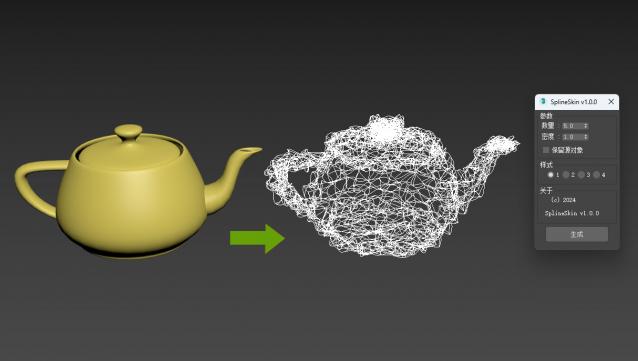
3DsMAX Spline Skin plugin, a plugin that converts 3D objects into spline wrapped shapes with just one click.

Update later

Doom Spline Resizer - draw line with precise lenght

3 votes

This simple script will let you draw precise lines quickly almost as a CAD software!
It will Set the pivot to the first vertex of a shape object and align it to the first segment. A window will show up allowing to set the Lengh of a spline scaling from the first vertex.

You can find the mcr script in the Category:"_Scripts"
The .ms script will just load on RUN

USAGE:
For best use associate the script to a Key button (es. D that is free by default)
You can add a toolbar button found in "# Scripts" category
Use the key or press the toolbar button to start drawing a line

UniAttach-Detacher

21 votes

v3.07 Added fix for detached detach geometry if the source object had incorrect mesh issues.
Добавлено исправление отсоединённой detach-геометрии, если в исходном объекте были проблемы некорректной сетки.

Using single hotkey for Attach/Detach
Используя единственную горячую кнопку для Attach/Detach

Contrast Pro

2 votes

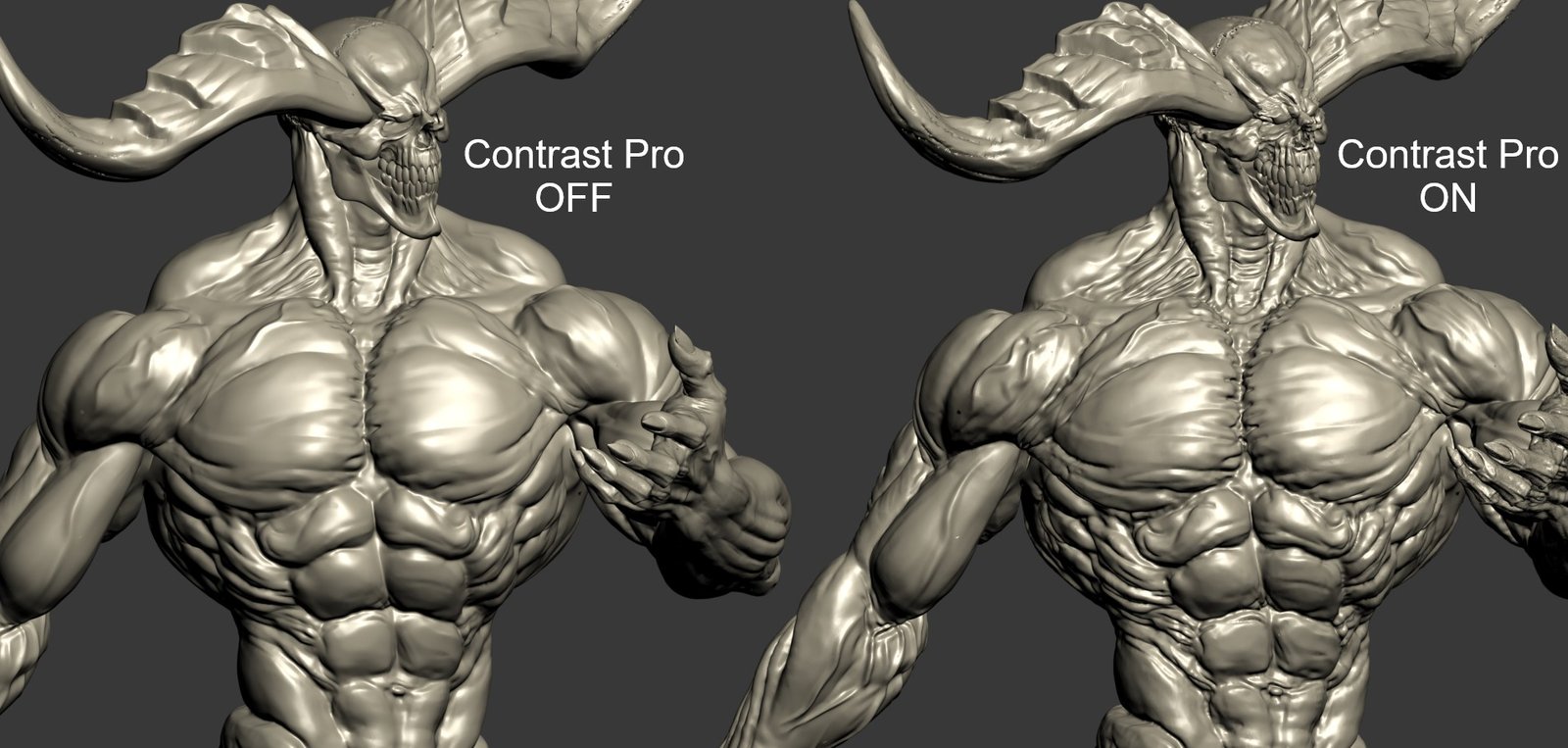
Contrast Pro is a modifier for 3ds Max that enhances the details of 3d models. It allows you to quickly add contrast to whole models or to highlight only some specific areas. Areas with large and small polygons can be set to receive the same amount of contrast with the "Uniform" option. Get it from https://mariussilaghi.com/products/contrast-pro

Syndicate content