Tagged 'maxscript'

MaxScript Navigator

6 votes

This tool simply helps organize, run, and edit your maxScripts more quickly. Quickly create a menu of your favorite scripts. Then place this menu anywhere you choose in the max. To change the currently selected name in the list. Just type in the top text box and press enter. Note that the .ms file name remains unchanged if you do this.

See my site for installation details

EcoCloud-Get your 3d asset in an instant!

1 vote

EcoCloud-Get your 3d asset in an instant!

1)EcoCloud is a 3d asset management tool for 3d artists.It Works on Windows 7 & 8 and is fully compatible with 3dsMax 7 and above.

2)The EcoCloud app is free to download -yet is the world's most advanced, user-friendly file organizer created specifically for 3D designers and artists.

3)Fully integrated with 3DXY
Get your 3dxy.com 3d models on your desktop!Automatic synchronisation of your downloaded files.

4)Works seamlessly with Autodesk 3ds Max

Time slider

2 votes

You can easily modify the frame rate in 3DMax, the start and end frames of time.

Simple and practical gadgets, hope you like

Updated:

   1.3 made a small modification to make it look more reasonable, real-time update rate and the number of frames

   Installation:

  Copy the script to the root directory of the largest

  For example:

   C: \ Program Files Files \ Autodesk \ 3ds Max 2014 \ scripts \ startup \

Object info [free]

2 votes

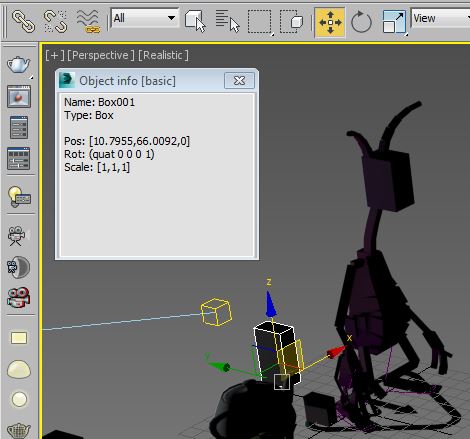
A little free utility which shows information about selected objects. The field is editable so you can copy information to the clipboard.

Oblong and Oblong Void Primitives

2 votes

Oblong and Oblong Void is a pack of two primitives for 3DS Max.
Change parameters in real time. Map coordinates. Separated materials ID.

Holex

-9 votes

Holex is a scripted modifier plugin for 3ds Max which allows users to create various types of holes in polygon meshes. You can create multiple holes or rivets at the same time or individually across multiple objects.

holex_grate

Model: Same Named Copies

0 votes

Title: "Model: Same Named Copies"

Description:
-- This script creates multiple copies with same object name
-- This script works on all geometry types but it may also work on other types like lights, helpers, etc.

How to use this script:
-- First select a single object
-- Set the relative position with respect to this object in "Enter relative positions" options
-- In "No. of copies" option set the number of copies required
-- Then, press "Create copies" button

Here's the screenshot of the script -

3DS MaxTrackBar Markers Script

3 votes

This script marks specific frames in an animation, adds a note to each marked frame and save the list as xml.
The script is quite useful when juggling scenes and need to keep track of requiered changes, or team members need to share info among them.
The list will not be saved with the scene, it needs to be saved externally as xml to be used when re-opening the scene.

TrackBarMarkers XML AE v2.1.6 :

  • New AfterEffects script which imports and exports xml.
  • Light Table

    7 votes

    Tool for animators to display ghosts/onionskin of selected objects, like in 2d animation software

    (Inspired by TVPaint's light table)

    3DS Max Multi/Sub-Object Material Browser Script

    2 votes

    When dealing with various bitmaps to be applied on multiple objects (i.e large video walls), this script comes really handy. The purpose is to scroll through the Multi/Sub-Object Material diffuse bitmaps and apply on one or several objects.

    Change Log:
    v0.9b :

  • Bug Fix.
  • Added icons and macroscript.
  • v0.9a :

  • SubObject Support.
  • Preview before applying.
  • Improved Code and functionality.
  • New features added.
  • Syndicate content