Tagged 'maxscript'

3DS Max Multi/Sub-Object Material Browser Script

2 votes

When dealing with various bitmaps to be applied on multiple objects (i.e large video walls), this script comes really handy. The purpose is to scroll through the Multi/Sub-Object Material diffuse bitmaps and apply on one or several objects.

Change Log:
v0.9b :

  • Bug Fix.
  • Added icons and macroscript.
  • v0.9a :

  • SubObject Support.
  • Preview before applying.
  • Improved Code and functionality.
  • New features added.
  • Memento

    1 vote

    New MaxScript. Simple and handy as aways. Free.
    It's very useful for my use. You can quickly save and recall up to 5 groups of selections. You can increment memories adding objects to them (Which is SO useful in some situations (to help in the process of organizing big and messy scenes)...
    Hide and Un-Hide from Memory buttons. Isolate groups, etc.

    BTW, the video says QuickSelect, but i changed the script name to Memento.;)

    3DS Max Plugin Update - Lights Switch V2.0

    1 vote

    This is an update for the plugin I wrote 6 years ago, called Lights Switch.
    The reason behind the update was an e-mail from a user who had a small issue with a scene full of Cororna lights, where the script managed to turn all lights OFF, but for some reason failed to turn them ON again.
    After inspecting the script, I recognized the bug and fixed it.

    Basically, the script, when clicked, will go through all lights in the scene, and if any light is ON it will turn it OFF. On the other hand, if the script sees that all lights are OFF it will turn them all ON again.

    Connect Edges

    1 vote

    Just a simple modifier to connect edges selected with the previous "edit poly" "editable poly" or "poly select" modifier. Currently I tested my script on 3dsmax 2020, I will try to test it on older version of 3ds max and update this page if I can. If you have any question or any requirement, don't hesitate to ask me or to contact me. I will be happy to answer you.

    SplineSkin

    1 vote

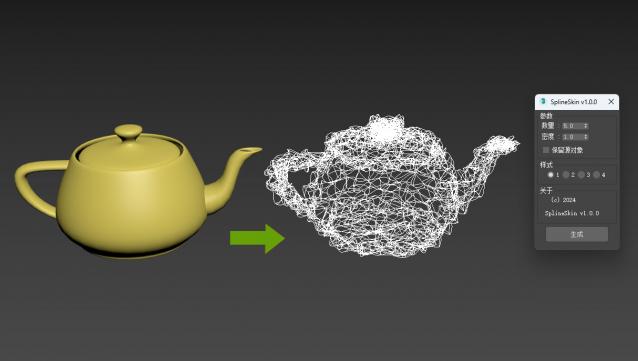
    3DsMAX Spline Skin plugin, a plugin that converts 3D objects into spline wrapped shapes with just one click.

    Update later

    Easy Spring Controller Tool

    1 vote

    I made this script last year , but Now i made it more usable for everyone as (Spring Controller Tool)
    features:
    1) Add Spring Controller to hierarchy of bones,Objects or etc...
    2) Add Spring To Selection Objects (its Require The Object Hierarchy Links)
    3) Add A Modifier Controller For Each Spring Controller
    4) Change The Spring Values One By One
    5) Change Spring Values Of Massive Group Of Objects In Hierarchy At Once , Using Offset
    6) 2 Default Presets To Change Spring Values Quikly
    7) Run Timeline After Every Change To Spring Value (For Catch Spring And Play Fast After)

    3DS Max - Plugin - ZoomExtSelFix

    1 vote

    In this update, the script will work on sub-object selections. Also, a bug in the first version is fixed, when you switch to another mode other than the Modify Panel, the first version gives an error, this is fixed now in this 1.5 version.
    To recap on why this plugin:
    The default Zoom Extents Selected tool in Max has an issue when you're in a sub-object level but no sub-object element is selected, pressing Z(the default shortcut) causes Max to Zoom Extents on the whole scene instead of the selected object.

    3DS Max - Plugin - [UPDATE] - CopyPaste V1.5

    1 vote

    This is an update for the CopyPaste plugin. This plugin allows you to copy and paste geometry between opened 3DS Max files, of course, in the same file too. This version includes a few additional features. The most important one is the ability to copy and paste using a base point. Also, there is a button that allows you to clear the cache file to save space on the hard drive. And, lastly, a Status section that gives you feedback whenever you perform an action. Please check the demo video for an in-depth explanation.

    TP autojoint script

    1 vote

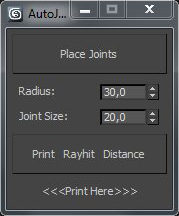
    Script for placing cebas TP joint helpers(Shape collision only) between objects.

    It's a fast and "dirty" way to make lot of joint helpers with auto linking to objects.

    The good idea is to check distance between objects BEFORE press button "Place joints".

    In other case it can freeze and create a thousand of joints.

    Require a "TP easy joint script" to work with joint properties after approval placing.

     
    .

    Encrypt Script Utility

    1 vote

    Scripted Utility to quickly encrypt a maxscript using the following method:

    Syndicate content