Tagged 'Proxy'

MCloth Animator [MassFX]

0 votes

MCloth Animator

MCloth Animator allows you to simulate mCloth on any animated mesh directly, including the 'Skin' modifier of your character! Your mesh will stay original and not being simplified (as 'convex'). No more headache with proxy objects or exporting to other software. MCloth Animator will simulate selected objects automatically with only 1 button! Don't waste your time for routine.
Third party plugins are natively supported.

mental ray Proxy Manipulator

3 votes


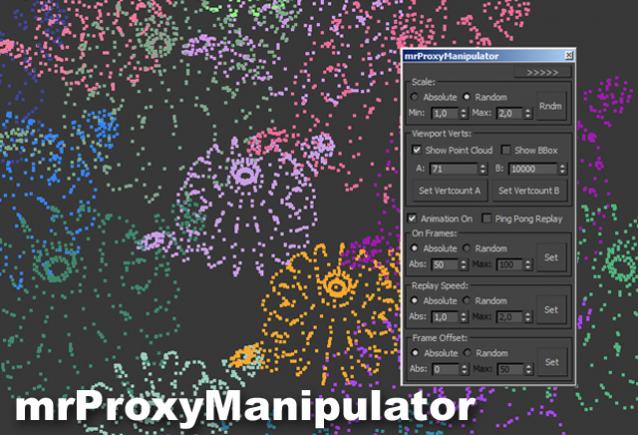
Working with mental ray proxies can be very tedious. As they are used for vegetation alot, the need for variation is there, to make it look believable. This script gives you options to vary scale and all animations aspects of all selected mr proxies. It also has a minimized version where you can quickly change the viewport resolution of your proxies, helping to speed up the viewport alot.

Tutorial video:

miauu's Drag&Drop Pro

1 vote

mrProxy Generator v1.0

22 votes

mrProxy Generator v1.0 is a helpful script for creating multiple proxies of selected objects. It automatically names the output files from the selection and can also replace your geometry. The script is free of charge and available for download.
Works with versions 9.x and above. There’s also a video tutorial describing the usage of the script on youtube.

MR_Proxy_BakeAll

27 votes

This scripts enable you to change selected objects(with animation) to mr_Proxy objects.
And you can change some parameters of selected objects all at once.
Caution: If you wanna use property "AnimOffset", you have to apply Skin modifier or
other deformation modifier to an object, whose animation is just drived by linked hierarchy.

How to use: Just put this script to \3ds max root\ui\macroscripts\. Then, start up 3ds max,
and go to "Customize"->"Customize User Interface". You can find this script in a category "DSTRUEVISION".

Project Manager

597 votes

After a long stretch of development, Project Manager 4 is officially out — the biggest release in the product's history, and now with full 3ds Max 2027 support.
The headline is AI Asset Classification.
Your library gets sorted automatically — by object type, material, and style — no manual tagging.

Project Manager 4 — What's New Since v3

Changelog · 3ds Max 2016–2027

AI-Powered Asset Classification

  • Automatic categorisation of 3D models and textures by object type, material, form, and style — no manual tagging required
  • Runs entirely on your machine — no cloud, no subscription, your assets never leave your computer
  • GPU-accelerated background processing at low priority — won't interfere with rendering or active work
  • Reclassify specific folders or categories on demand — no need to reprocess the entire library
  • Scale across a team: multiple workstations share the same database and classify in parallel

Colour Tools

  • Find assets by colour — pick from a palette and instantly see matching models or textures
  • Perceptual colour similarity search — finds visually related assets, not just exact hex matches
  • Find Similar by Colour in the right-click menu for models and textures

Find Similar

  • Find similar by content — AI matches 3D models by style, shape, and visual look
  • Find similar by colour palette — matches assets to a reference image or mood board by dominant colour proportions

Smarter Search & Filtering

  • Multi-keyword search: "Chair, Glass" finds a file named Chair.max described as "glass"
  • Category filter correctly includes all subcategories — filtering Furniture also returns Furniture → Chairs → Dining
  • Combine category and material filters: find glass-and-metal tables, or wooden ones, in one click
  • Categorised / Uncategorised quick filters — see which assets still need attention

Gallery & 3D File Browsing

  • Three gallery tabs for .max files: Models, Materials, and External Links
  • Drag materials directly from the gallery into your open 3ds Max scene
  • 3D viewport preview for FBX, 3DS, OBJ, and other formats — inspect geometry before importing
  • Edit external links inline — fix or replace missing textures without opening the .max file
  • Zoom & Pan for images — inspect textures at full resolution inside Project Manager

Migration & Compatibility

  • v3 and v4 share the same database format — point v4 at your existing library and go; no rebuild required
  • Run v3 and v4 side by side on the same team; supported from 3ds Max 2016 through 2027

Performance & Other Fixes

  • Significantly improved overall performance — faster navigation, filtering, search, and file/folder operations
  • Live sync in shared database mode — changes by colleagues appear automatically without reloading
More about new features   Project Manager version 4
 

Proxif - Vray proxy "fixer"

1 vote

This is very simple script I did for "fixing" proxies in 3ds max 2014 and up.
When working with a lot of proxies in 3ds Max 2014, viewport gets very very buggy. The problem is when "preview from file" in VRayProxys display option is checked. So this script finds all the proxies in the scene and changes then to "preview from file (faces)" which seems to fix this viewport problem!
Script will not make any changes if some proxies are grouped.

Q-Proxies

1 vote

Q-Proxies 3dsmax plugin - banner

Instant Proxy Meshes for Scene Optimization


Description

Automatically create multiple proxy objects that replace your high-poly meshes to speed up your work on heavy scenes.

Relink Bitmaps

501 votes

Relink Bitmaps is a script to easily relink all missing files (Bitmaps, VRayMeshes, Mental Ray Proxies, VRayHDRI, IES, etc) when they change directories or when you move computers, check out the short video tutorial below for more detailed information.

Unlike some other scripts of its kind, this is free!  There is a small donation link within the script if you choose to donate, I will remove the nag.  It is a simple licensing system, that does not force you to transfer network cards or be connected to the internet and will work with all versions of Max that are supported by the script.  If you choose to donate I'll be more than happy to license multiple computers as well.

Features:

[*] All 3dsmax supported Bitmap Texture types
[*] (new) Relinks Mental Ray Proxy files
[*] (new) Relinks VRay Proxies (.vrmesh)
[*] (new) Relinks VRayHDRI files
[*] (new) Relinks IES files (including VRayIES files)
[*] (new) Automatically checks for script updates and new versions
[*] 250% speed increase from previous versions
[*] Command-line mode available for automating repetative tasks (see documentation on the website)
[*] Configurable default user options saving button clicks and wasted time

Relink Bitmaps webpage:

https://colinsenner.com/relink-bitmaps/

Supported Max versions: Max 2018+
(Older versions should work, but are not supported moving forward)

Strip Paths

0 votes

A FAST Script for Stripping All Paths (Bitmaps, IES, Proxies ....) Without Changing Render Paths .

Syndicate content