Tagged 'export'

UDK FBXporter

2 votes

This is a script the keeps track of "ExportSets" for UDK. It stores what object should be exported, and with what settings. It greatly speeds up the process of exporting to FBX for UDK, as you don't have to select anything and there's no export dialog anymore!
Right now it only supports Static Meshes and SkeletalMeshes, I might add animation in the future.

This is a macroscript that appears in the "FBX Export Sets" category. It should already have an icon if you place it on a toolbar.

Multi Exporter

2 votes


Extractor

2 votes

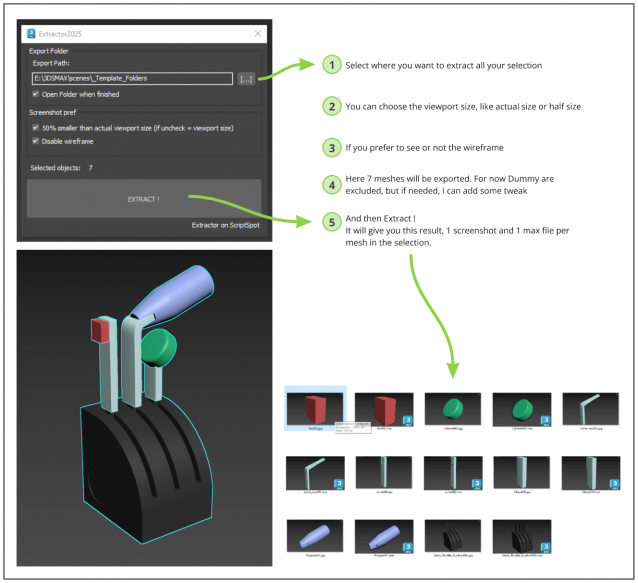
Script allowing you to extract into separate Max file and Screenshot all selected meshes in your Max scene.

Just Select, and Extract.

Milyan's object cleaner

1 vote

Boujou2Max

1 vote

Boujou2max plug-in poster

Boujou2max imports raw markers from Boujou as an animated cubes or dummies. This is a good solution for raw motion tracking without camera solve.

I/O Morpher

1 vote

Exports or imports morpher data to or from a morpher.

Useful for copying morpher information from one file to another or from one head to another.

Bip2root

1 vote

Copies horizontal position of the biped onto the root object and links the biped to the root.

Two useful uses for this script:

  1. Use it to create a root for your biped (using the Static Root option) - so you can place your biped with animation anywhere in the scene without adding extra keyframes. Simply move the root instead of the biped itself.
  2. Some game engines require a moving root to calculate biped's position in the game environment space. With a moving root the biped itself actually stays in place and only the root moves.

3dmax Vray To Unreal Engine Converter and Vertex Color Baker

1 vote


This script can convert Vray to Unreal engine Materials and geomerty, Bake AO/GI/CustomShader to vertex Color/alpha or to texture. Also you can place All scene objects in Unreal like in 3ds max Scene in one click.

Batch Export Any Format

1 vote

To Batch export use it script with "Batch It Max" script. "Batch It Max" can run any script on multiple files with single click.

Link for Batch It Max : http://paulneale.com/scripts/batchItMax/batchItMax.htm

Material Manager

1 vote

Material Manager gives users a one-click solution for saving out materials and also reapplying them. Users can choose to save the selected objects materials, or the entire scenes materials.

Syndicate content