3ds Max | All

3DS Max - Scene States - Multiple Rendering Scenarios In One Scene

0 votes

In this video, you will learn how to create different scene states for different rendering scenarios without having to save multiple Max files. After creating those states you can toggle between them in one click.

sc_toggleMaxView

23 votes

toggles into a mode comparable to Expert mode but without the timeslider.

3DS Max - Unhide By Pick - Plugin

5 votes

This new script I created will allow the user to unhide objects using the mouse button, by temporarily hiding the current scene and unhiding all hidden objects so you can pick the objects you like to unhide. After picking the objects you can right-click and your original scene is back again plus the objects you've picked.

dotnet Quicktime Movie Player

2 votes

A simple maxscript quicktime movie player. I only have 1 monitor, so switching between max and quicktime was annoying. Just click the button and pick your movie. It's based on the 3DS max dotnet tutorials. Install into the 3dsmax\UI\Macroscripts folder.

3DS Max - FBX Export Warning: Non-orthogonal matrix support - Fix

0 votes

When exporting from 3DS Max to FBX sometimes we get this Warning: Non-Orthogonal matrix support. In this video, we will learn how to fix this problem, we also learn what that warning means and how it happens by reproducing it using various scenarios.

Accelerate

-2 votes

This script is here to speed up our workflow. A combination of scripts put together to quickly access animation, rendering, lighting, fumefx, frost, vray, Krakatoa and other utilities. more info coming soon

Interactive Rollout Builder

13 votes

The visual maxscript editor has issues... doesn't make nice code and is generally useless.  So instead I made this...

Visit my facebook page for more info

Run the mcr file and find it in your customise user interface windows under 'DW Tools'

Version 1_0 - Release
Version 1_1 - Bug fixed which could allow nested groups, which maxscript doesn't like and would therefore crash.
Version 1_2 - Released unencrypted so that it works in 3dsmax 2017 and well... because who doesn't like to learn (judge) from other people's code....

Light Detictive

2 votes

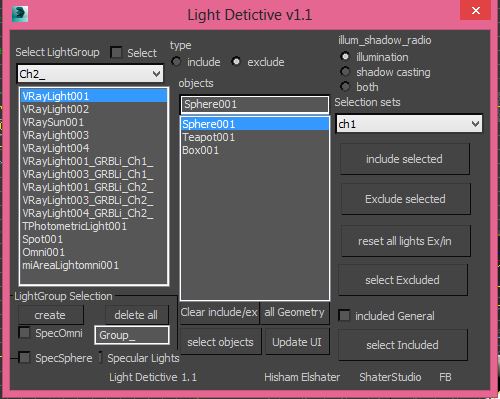
Light Detictive is a Tool designed to mange complex lighting setups. --not only control include and exclude by selection or sets fast , but olso investigate the lights on the scene see exclude and include lists , --olso investigate objects which light affect them of not. -- fast Group Lighting specific objects .
support Vray.


Create-Modify switcher

4 votes

The only one hotkey toggles Create mode and Modify mode. Works as cycle.

Convenient to exit / enter the edit mode of the object.

Только одной кнопкой переключает Create mode и Modify mode. Работает как цикл.

Удобно для того чтобы выйти/зайти в режим редактирования объекта.

3DS Max - Easy Modeling - FreeForm Geometry

0 votes

In this video, we will learn a quick and flexible technique for modeling freeform shapes. We will use a Surface modifier, Shell modifier, and Turbosmooth for that purpose. You can use this approach to model a wide range of geometries like roads going up and down, ribbons, etc,...

Syndicate content