3ds Max | All

Cobwebs (Modifier)

6 votes

Updated on April of 2013. There is now a new rewrite of the tool. It now is built as a modifier that supports realtime updating. Check it out on my website at jokermartini.com

https://vimeo.com/63669318

Now comes with help file.

ATTENTION: Anyone who uses this script feel free to email me your renders at "jokermartini(at)hotmail(dot)com" and I'll put your renders up on my website along with the appropriate credits. Thanks

Another Maxscript Encripter

-13 votes

There's many maxscript encrypter out there or here ....I try to make it to support many files at once...just try it....
1. Browse ms file and select many of ms file (right click to append new files)
2. Choose version encoder
3. NF : Make new "Encrypted" folder in current folder and move encrypted files to this new location. You can set it "on" or "off".
4.press "Encrypt" button

Done

Medit Extender

0 votes

a simple script with 2 main function :
- save current materials in medit to library
- load material from library to medit

tested in 3dsmax 2018 , vray next

Framer Modifier

4 votes

3dsMax topology based frame modeling modifier. Procedural tool for frame like structure creating. Useful for creating facades, structures, grids, furniture, patterns and more.

FumeFX to Redshift Volume script

0 votes

Fumefx 2 RedshiftVolumeGrid -FFX2RedshiftVolume miniscript v0.1 -- 8/9/2019
Created by David Aviles. [email protected] .

FFX2RedshiftVolume is a small script that creates Redshift volumegrid/s from two or more, selected and already simmed FumeFX grids.
It will align the created Redshift Volume objects to FumeFx grids and rename them accordingly as well as loading the cache files from the master FumeFx grids.

It was inspired by Fumefx VZim v1.4 script -- 8/5/2019 .
Created by Ronnee Swenton and Property of White Wizard Entertainment, LLC.

Move to Surface - Updated

0 votes

I didn't create this script from scratch, this is an updated version of the script you can find in the maxscript documentation in the section called: How To - Practical Examples.
http://docs.autodesk.com/3DSMAX/16/ENU/MAXScript-Help/

I added two lines of code to that script to fix the problem of pivot points location
for the objects that going to be dropped. Those two lines will shift the pivot point
to the center of each object's lower part.

Tertium Organum CollectoREX

25 votes

TOCollectoREX is utility replacing and supplementing standard Resource Collector.

**IMPORTANT**
After more than 10 years I've finally decided to turn collectorex from internal utility to a public open source project. In the beginning it was paid utility, now it's completely free and not binded to hardware. Please feel free to edit code and commit here, use it as you like, distribute it freely, I just don't allow to sell my software as your own. That's it.

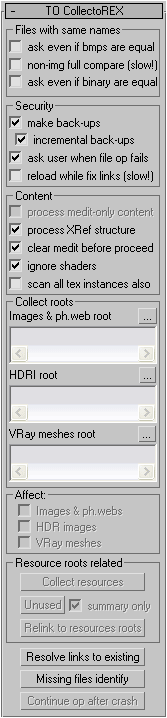
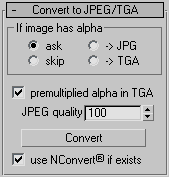
It allows gather all scene resources together, put them in specified place, find where all missing files are used (exactly in which objects). It can find which files in specified place are no longer used by scene. It also allows convert bitmaps to jpg, etc.
Utility supports XRefs of all types and processes all scenes linked to current.
Unlike all other such scripts, it really finds all resources (images, HDR-images, Vray meshes, IES-files, shaders), not only some bitmaps (Relink Bitmaps, Resource Collector). Below there is full description.
Interface:
Teamwork

13 votes

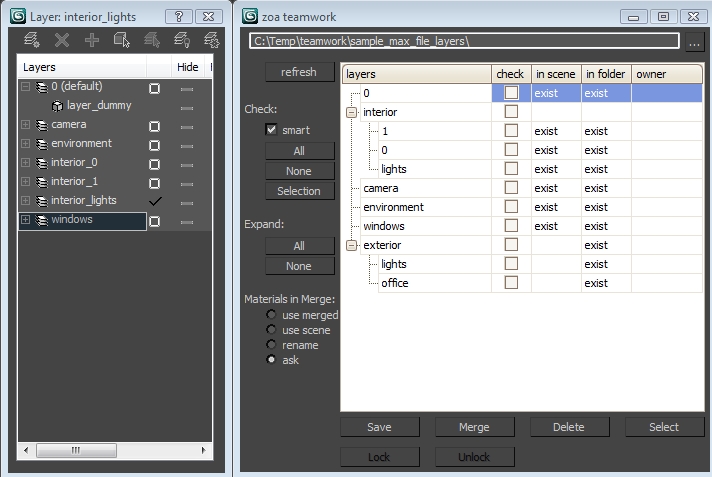
Teamwork Script User Interface

Scale Move Tool

14 votes

So basically what this tool allows you to do is to move a bunch of objects using Max's scale tool, in a similar way that can be done with vertices in sub-object mode, whilst not affecting the scale of the objects.

Easy Spring Controller Tool

1 vote

I made this script last year , but Now i made it more usable for everyone as (Spring Controller Tool)
features:
1) Add Spring Controller to hierarchy of bones,Objects or etc...
2) Add Spring To Selection Objects (its Require The Object Hierarchy Links)
3) Add A Modifier Controller For Each Spring Controller
4) Change The Spring Values One By One
5) Change Spring Values Of Massive Group Of Objects In Hierarchy At Once , Using Offset
6) 2 Default Presets To Change Spring Values Quikly
7) Run Timeline After Every Change To Spring Value (For Catch Spring And Play Fast After)

Syndicate content