Tagged 'selection'

UniRing-Loop Tools [URLT]

8 votes

The Ring-Loop selection and the edges and vertices of a single hotkey.

Universal Ring-Loop selector, works with Edges and vertex (on vertex works with bugs)

Выделение Ring-Loop и рёбер и вершин единой кнопкой

Универсальный Ring-Loop селектор работает с рёбрами и вершинами (на вершинах работает с ошибками)

SubSpline

1 vote

SubSpline 3dsmax script - banner

Total Control of Spline Subobjects


Description

SubSpline is an Advanced Subobject Selector & Material IDs Editor for spline shapes in Autodesk 3dsMax.

Easily expose on screen the vertex numbers and material IDs for all your selected shapes, with a simple toggle button.

selectionHighlighter

9 votes

This script simulates the Selection Highlighting mode from Silo in max. The idea is if you hover over an object, the object is selected, if you hover over a vertex, it selects the vertex, if you hover over an edge, the edge is selected, etc. No need for extra mouseclicks. Autodesk has half added this feature, this script goes all the way to adding full silo style selection highlighting. Note: This only works in max 2008.

QuickSelection

9 votes

"Assigned to a hotkey - this will allow you to quickly select and unhide any named selections through shortcuts based on the first character of each selection.New: Alphabetical sorting and memory optimization."

instanceTrimmer

9 votes

Takes a selection and reduces the selection to include only a single instance from each set of instances.

Tutorial:

Make a sphere and instance it once. Make a 3rd sphere, copy it once. Select all 4 spheres. Run the script in UI mode. Hit Do. Now your 3rd, 4th and either the 1st or 2nd sphere is selected.

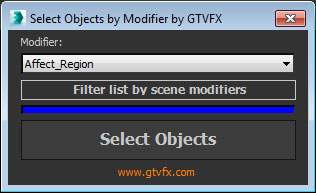
GTVFX-SEL_selectByModifierClass

0 votes


Selects objects that have the chosen modifier in their stack

At startup the list populates with all available modifiers in your session of Max. Use the button below the list to filter it down to only the modifiers currently present in your scene. This can take a few seconds for large scenes.


Selection-Switch

1 vote

Switches quickly between two selections (objects or sets).

Useful for any type of jumping back and forth between two objects - like in alignments.

Self Intersection Selection

7 votes

The macroscript performs a selfintersection test on editable mesh
objects and selects all faces that have intersection and all edges that
are the cause of it. tested in max5 but should work on higher too.

Select By Name V3

4 votes

This script will create a rollout very similar to the default 'Select By Name' tool however with a few key features:
1) Non-Modal - so it can be left open and will update/sync with the selection.
2) Added Hide - Freeze and Delete to the rollout.

Select by Color and Move objects to Layer

1 vote

This simple script lets you choose a wirecolor by an object (like "Select by Color") and select all objects with the same color. You can move the selection to levels we have chosen.