Tagged 'render'

Sprite Tools

4 votes

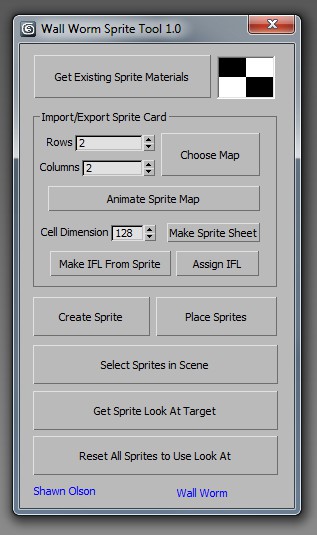
Sprite Tools is a free MAXScript that you can run inside 3ds Max. I primarily wrote this to accomodate some features I will be adding to Wall Worm in the near future.

What Are Sprite Tools

Sprite Tools consist of several functions:

◦ Convert sprite card bitmaps to animated bitmap nodes
◦ Convert animated bitmap nodes into IFL files
◦ Convert animated textures or IFL files into sprite cards
◦ Place Sprites into a 3ds Max scene which are always facing a look at target

sprite tools

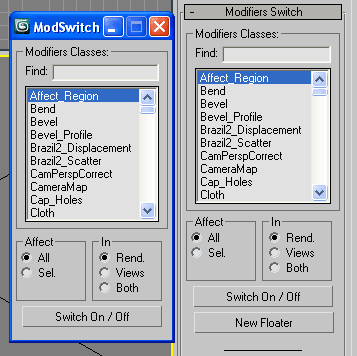
Modifiers Switch

30 votes

Turn On/Off in Renderer, Views or both, all or selected modifiers by class.
Modifiers Switch 2

Version 2.0

  • added option to switch both (in rend. + views)
  • also added a button to launch the tool in a new floatable dialog

Quick Z-Depth (mental ray)

1 vote

With this useful and simple script, you can create a non-destructive quick map Z-Depth in mental ray.

rollout Quick Z-depth

Enjoy!!


Render Still Cameras

1 vote

VERY QUICK & SIMPLE BATCH RENDERER for STILL IMAGES. Just 2 clicks and ready to go!

This script is very useful to render many views from a single model or scene when you have already placed still cameras.

It combines many still cameras into one single animated camera that shows all those views sequentially, one per frame.

Then you just need to render the new camera to a sequence of images.


HOW IT WORKS:

The script lets you first select the still cameras to combine into one.

Octane CamTools

3 votes

Red&Cyan Octane Tools

What do they do?

- Create free Octane cam:

Obviously creates a free octane cam. You can decide wether you want to use a focus plane or not.
the focus plane affects the focal depth and vice versa.

- Create octane cam from view:

Works exactly as the usual "create camera from view".
You can also add a focus plane, wich is linked to the focalDepth.

- Replace with octane cam:

Select the camera/s that you want to replace and run the script. for each selected camera an octane cam will be created.

Little Batch Render

33 votes

Vray - LittleBatchRender
Version 0.84

Description:
with the "LittleBatchRender"-script you can easily render multiple cameras in your scene with one Click
Features:


• correct autonaming for Render Elements
• NetRenderSupport
• Spawning can be disabled when rednering with NetRender
• consistent Naming for local and NetRender - no relinking in Compositing necessary
• Turning of and on individual Xrefs for individual Cameras

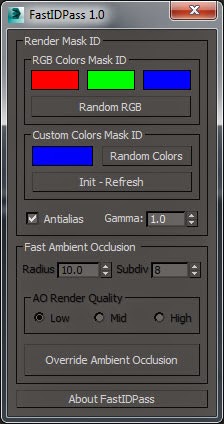
FastIDPass 1.0 - Released for free!

1 vote

Quick Batch Render

0 votes

A simple and powerful script to quickly render multiple ready '.max' files successively on a single computer.

Options: set a percentage of the file’s render resolution (width/height); ignore/suppress warning dialogs; render First frame only (to test render files with animated sequences).

Velocity Channel Output

10 votes

This is a scripted render effect for creating motion vector images for use
with ReelSmart Motion Blur from RE:Vision Effects, Inc. I wrote it because I wasn't happy with the velocity channel in Render Elements.

Tweaker

31 votes

Download tweaker on my website: http://www.colinsenner.com  (click "Scripts" at the top)

Changelog from version .08:
- Now includes support for tweaking any property controller applied to an object
- Includes support for tweaking the sun/sky system hours and days, to select the entire assembly you need to use the "Pick List" button.
- Includes minor UI tweaks, like the ability to not display all of the images after the renders are done, thanks for the suggestion Br0t.

Syndicate content