Tagged 'Animation'

Playback Tools

6 votes

This script offers easy to access tools for controlling animation time and playback, as well as the ability to save a few ranges to jump to.

It is a highly modified version of Jim Jagger's original Playback Tools and uses his icons.


Features:

- Player controls

- Playback speed controls

- UI hide toggle

- Time scrubber

- Compact and wider time scrubber mode (accessed via the thin bar below the small time scrubber)

- A separate rollout for storing up to four named time ranges


360 MultiCubeMap BatchRender

0 votes

360 MultiCubeMap BatchRender is a script for Generate a 6-cameraRig and render individual Cubemaps automatically with Full VRAY Support including Render Elements.

It can be very useful to render several cubemaps in 360 in one single scene. Both Single frame or animation.

Supports VRAY only.

 Update 1.5.0

FIX Equilateral Render
ADD Project Name Folder
ADD File Render Extension - JPEG / Tiff / PNG / EXR / TGA

 Update 1.3.2

Spring Max - dynamic bone chain animation with collision

7 votes

Spring Max is a tool that use to create bone chain animation in 3Ds Max

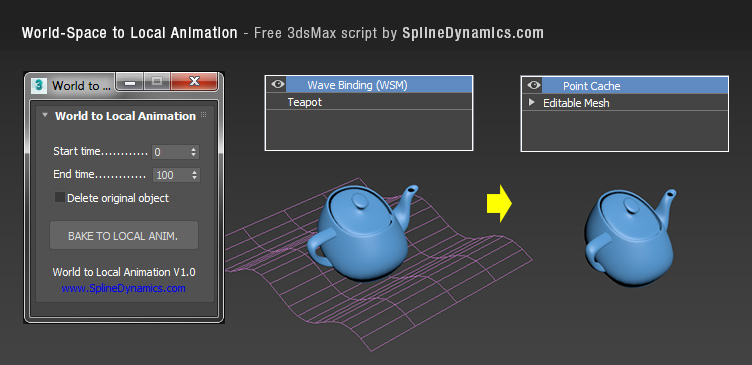
World-Space to Local Animation

1 vote

Bakes an objest's World-Space/Space Warp animation to a copy, using local Point Cache modifier. Then you can apply local modifers on top to continue animating the object's deformation locally.

Note: this is a preliminary version. It saves always a temporary .xml file for the Point Cache, wich you can rename, relocate and reload, to preserve it. In future versions, this could be set at the script’s UI by the user.

Compatible with 3dsMax 2012 and higher.
Apply Increment

3 votes

Allows you to store a single object's initial position and rotation values, then store the new values after moving and/or rotating and apply the calculated difference between these values (as a relative offset) to any selected objects with existing keys. Offsets can be applied to either position or rotations controllers or both. The offsets applied can also be inverted.

Usage:

1. Select a single object and click Get Initial Values to record it's position and orientation values at that time.

Biped and CAT Mass Markers

2 votes

A tool for visualising the projected lower and upper masses (pelvis and base of the neck respectively) in relation to the feet of a standard Biped or CAT rig. Markers between the feet show where the masses intersect, which may help with determining where the static weight is distributed when posing. It does not take into account motion dynamics and so is intended for use when standing still. Additionally, when a foot is raised above the ground the foot line markers turn blue. Likewise if lowered below the ground they turn red.

Bake Splines Animation

0 votes

Bakes the animation of one or more selected shapes to vertex animation, with a series of options.

Set: animation range (start/end), sample rate, action over original shapes (hide/delete/none).

Support for: modifiers animation / hierarchy animation / transform (position/rotation/scale) animation.
Pending support for space warp animation.

Compatible with 3dsMax 2012 and higher.

Trackview Filters For 3ds max

0 votes

speed up the filtering process in the Trackview windows and save a lot of time for animators

Noise Manager

2 votes

A tool used for setting noise controller values on a selection of objects containing position and/or rotation noise animation tracks.


General Notes:

- Noise controllers must be added either directly to the main Position or Rotation tracks or setup as a list controller with a single noise in any available list track.

- Does not support multiple noise controllers on a single object. Does not support nested list controllers. Does not support noise float tracks on XYZ controllers.

TronoTools: Animated Gravity Helper / Projection Path

0 votes

How would your object be projected with gravity? Nothing is more annoying than to see basic physics being broken!

This little helper creates a help path for your object to show you the most realistic path it will follow when falling from it's initial path. Keep your objects to the right scale and speed, and this script should be 99% correct for almost any object. (Feathers excluded ;))

Syndicate content