Tagged '3dsmax'

ColorsForCGArtists

1 vote

paint cloner

16 votes

the purpose of this script is to place objects by painting with mouse. like advanced painter, but advanced painter uses max's paint interface which is somewhat slow on complex models. my script paints objects over the active grid. after you place objects, you can put them down to ground, apply random transforms, apply random materials (all these things with other scripts). so you can quickly make landscapes.

Change Renderer

34 votes

This is the updated version of my First Script which u can use to change Render Engines. Am planning to add more render engines if i get their RenderClass.names. I would like to add other renderers too but i need their rendererclass names. You can see how to get that at the end of the video. Hope you enjoy this simple script.

UPDATE:

Version 4 Available HERE

OLD VERSIONS:

v3.00b screenshot:

Easy Spring Controller Tool

1 vote

I made this script last year , but Now i made it more usable for everyone as (Spring Controller Tool)
features:
1) Add Spring Controller to hierarchy of bones,Objects or etc...
2) Add Spring To Selection Objects (its Require The Object Hierarchy Links)
3) Add A Modifier Controller For Each Spring Controller
4) Change The Spring Values One By One
5) Change Spring Values Of Massive Group Of Objects In Hierarchy At Once , Using Offset
6) 2 Default Presets To Change Spring Values Quikly
7) Run Timeline After Every Change To Spring Value (For Catch Spring And Play Fast After)

DoGravity

13 votes

A utility for placing objects at the right height on complicate grounds.
Especially usefull when placing quickly great numbers of peoples, plants and cars on a big area with streets,parks and trottoirs at different heights.
Simply place them on a plan view and then run this utility.

Quite similar to the Drop script for Sketchup, but with some more control.

Proxy Textures

1 vote

Proxy Textures 3dsMax plugin - banner

Quickly optimize your textures for viewport performance and fast rendering!


Description

Proxy Textures is a 3dsMax plugin to automatically create low resolution versions of your textures, to speed up your work on heavily loaded scenes.

3DS Max - 2D - Create Parametric Lines

4 votes

In this video, I will present you with a new script I created to help the User creating 2D lines with specific length and angles. The script Allows you to modify the length of the last created line at any time.
This is a feature I always wanted to have in Max and for some reason, The developers are neglecting this simple feature.
I will try to update it as much as possible to add more features to it,
And if you have any suggestions, please leave them in the comment
Area. If you like the script please press the like button and Subscribe to the channel. Thank you! :)

Hose

3 votes

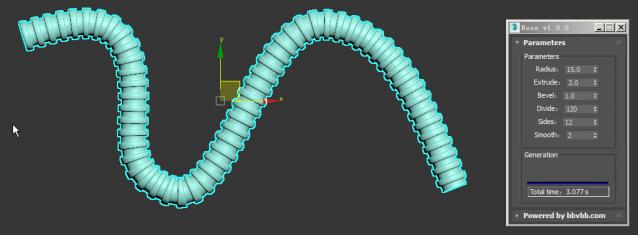
MAXScript for build hose model.

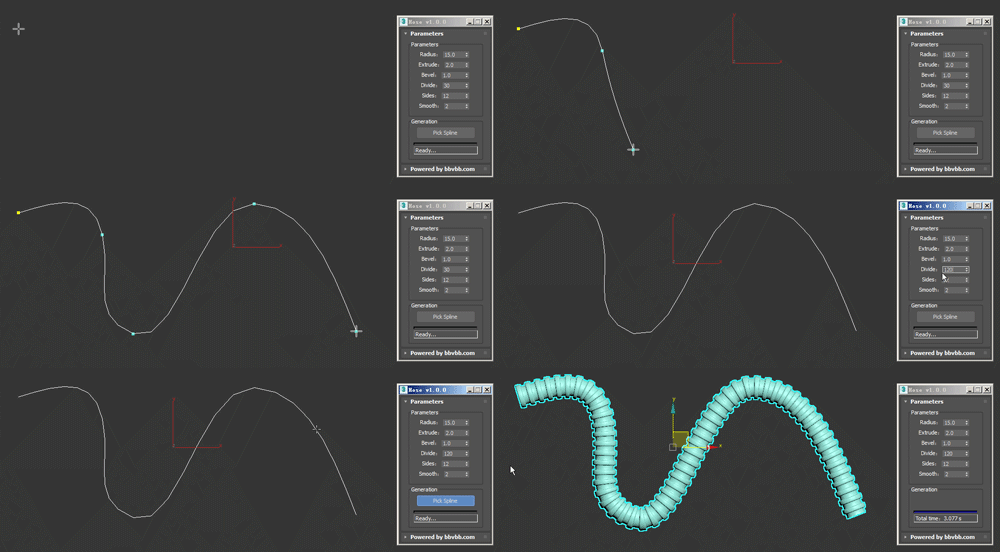
Usage method: 

1 run Hose-1.0.0-en_US.mse.

2 create a spline in the Max view.

3 Click the "Pick Spline" button, and then pick the Spline. 

RH Map Node Renamer

27 votes

It takes the material assigned to the selected object and assigns the name of the object to it. Then it checks if there is a bitmap texture assigned to "Diffuse", "Specular Level", "Opacity" and "Bump". If it finds a bitmap texture in the slot it renames the bitmap texture node to "Color", "Specular", "Opacity", "Normal". Then it also renames the textures asigned using the pattern "NameOfTheObject_NameOfSlot.*" ex. SmallBox_Color.bmp

3DS Max - Remove Objects From Isolate Mode

1 vote

This little script will help the user in removing objects from the isolate mode.
After selecting one or more objects and choosing isolate, sometimes you want to remove one or more objects from the isolated objects group. So select one or more objects that you want to remove and click the script.
Another benefit is that when the script is grayed out and not available, the user will know
That 3DS Max is not in the Isolate Mode

Syndicate content