Tagged '3dsmax'

PolySnow by PolyDesign3D

0 votes

PolySnow is a 3DSMax plugin that creates realistic snow with a click. You just select your objects in scene and PolySnow does the snow for you! Let the snow fall on your 3D objects and scenes with a click of a button. A variety of parameters lets you get the desired results in every situation.
It's a macroscript so please read the Instructions for setting up the plugin. (It's just a few easy steps)
Make your 3d assets' winter versions with a click
Easy to use

Features:
User friendly user interface with some explanation tooltips on buttons.

World-Space to Local Animation

1 vote

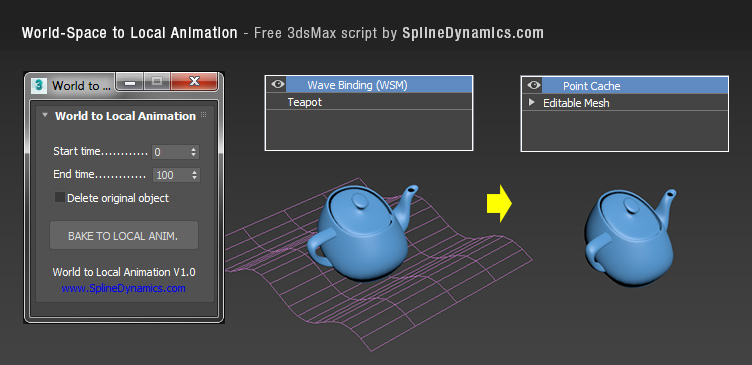
Bakes an objest's World-Space/Space Warp animation to a copy, using local Point Cache modifier. Then you can apply local modifers on top to continue animating the object's deformation locally.

Note: this is a preliminary version. It saves always a temporary .xml file for the Point Cache, wich you can rename, relocate and reload, to preserve it. In future versions, this could be set at the script’s UI by the user.

Compatible with 3dsMax 2012 and higher.
Spline Refiner

0 votes

Spline Refiner 3dsmax script - banner

Smart Spline Subdivision


Description

Spline Refiner is a 3dsMax productivity tool to fine-tune your spline shapes incredibly fast, in a simple and efficient way.

3DS Max - 2D - Create Parametric Lines

4 votes

In this video, I will present you with a new script I created to help the User creating 2D lines with specific length and angles. The script Allows you to modify the length of the last created line at any time.
This is a feature I always wanted to have in Max and for some reason, The developers are neglecting this simple feature.
I will try to update it as much as possible to add more features to it,
And if you have any suggestions, please leave them in the comment
Area. If you like the script please press the like button and Subscribe to the channel. Thank you! :)

Randomize Spline Material IDs

0 votes

Randomize the material IDs for the segments in your spline shapes.

Set random material IDs for the selected splines, either using the existing IDs or specifying a range of IDs.

Compatible with 3dsMax 2012 and higher.

Bake Splines Animation

0 votes

Bakes the animation of one or more selected shapes to vertex animation, with a series of options.

Set: animation range (start/end), sample rate, action over original shapes (hide/delete/none).

Support for: modifiers animation / hierarchy animation / transform (position/rotation/scale) animation.
Pending support for space warp animation.

Compatible with 3dsMax 2012 and higher.

Dynamax

4 votes

Dynamax allows Dynamesh like workflow in 3dsmax.

This is the second release of Dynamax.
DynaMax is a perfect solution for free-form sculpting because it removes all need for focusing on topological constraints. It’s possible to change the overall shape of any DynaMax by pushing or pulling, adding various pieces of geometry to combine into one, or even removing geometry in a manner similar to what you can do with Boolean operations.
It's usefull for sculpting in 3dsmax.

Dynamax V2 is out !

Whats new:

--Mspheres:

Mesh Insert

5 votes

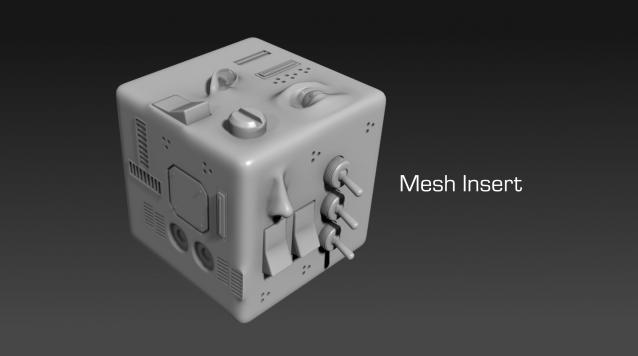
Mesh Insert is a new 3dsmax plugin inspired from Polystein for Modo ( http://pushingpoints.com/v2/the-pushing-points-polystein-kit-for-modo/ ). It speeds up your modeling process by replacing face selections by an asset from your library.

Features :

Spline Data

1 vote

Spline Data 3dsmax script - banner

Splines overview instantly


3DS Max - Match Materials and Mapping - Plugin

3 votes

This script will help the user match the material of a source object to a target object
First, you need to select the source object then click the script, now start picking your target objects
When you finish picking just right-click, or press Enter, and the picked Objects will have the same material as the source
Object plus any UVW Map modifier or Unwrap UVW modifier applied to it.

Syndicate content