Tagged 'Material'

Strip Paths from Bitmaps

3 votes

Removes current paths from all bitmaps in the scene. Primarily for getting rid of irrelevant paths on files recieved from users on other systems.

This functions in a similar way to stripping paths manually in asset tracking, but when doing that I've found that it can lag a lot and sometimes fail to strip some of the paths until you do it multiple times.

Bad paths can cause lag when Max tries to search for the missing textures, especially when they're pointing to a nonexistent network location.

Cryengine 3 export preparation

0 votes

This script is specific for use with Cryengine 3. So if you don't intend to use this with Cryengine 3, this script will not work and be of no use for you.

It creates all the appropriate layers for the lods and main object, creates the dummy and linking the mesh to the dummy. Creating the proper material, submaterials (4 by default) for the model and the proxies, assigning the crytek shader and the physicalize (no draw) to the proxies.

Left for you is assigning the proper IDs manually to the correct submaterials (if needed).

Motion Graphics Tools

29 votes

A Max Script with a bunch of commonly used tools for working with motion
graphics and standard materials in Max.


FinalToons Converter

13 votes

Convert Vray or Standard materials to finaltoon materials, also changes global lineweights and shading.

Mattransmitter

10 votes

Script transports the material from one object to another without materialeditor. Скрипт передаёт материал от одного объекта другому без материалэдитора.


Automaterial

4 votes

Material your scene in ONE click!

AK-bitmap search by name

13 votes

how many times you wish for a search like windows for your bitmaps inside max? so that's it! now you gut one, it goes throw all your materials and founds maps with specified characters; you can type bitmaps exact name or use * sign like windows.

3ds max 9 Ambient/Reflective Occlusion Assigner

8 votes

This script will only work when the scene renderer is set to Mentalray.The script assigns mentalray Ambient/Reflective occlusion map to ambient channel of the selected objets material. The selected object's material can be multimaterial or standart material other material types are not supported yet.

.timo - Renamer

1 vote


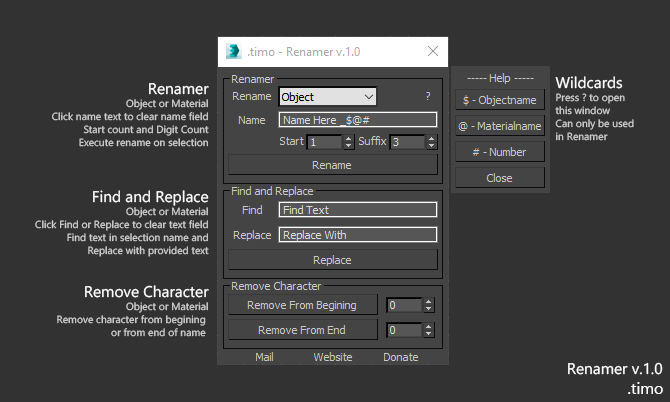
Renamer for 3dsMax

Renamer allow you to quick Rename one or multiple object using custom settings that is provided

How to use:

1. Select Object\s

2. Fill in requred text

3. Execute

Installation: Drop The file in max viewport and go to Customize ==> Customize User Interface ==> Category: .timo ==> .timo Renamer

Tested on 3ds Max 2015

Material Toolbox

1 vote

Manage the Material assignment, Material ID number, and Wirecolor of scene objects.

Feature List:

+ Easily Select all objects with shared Material, Mat ID, or Wirecolor

+ Interactive Clipboard to store Materials, Mat ID's, or Wirecolors

Syndicate content