Tagged 'copy'

NukeOps

39 votes

A set of functions wrapped into a minimalist single-click button to help 3ds Max and Nuke artists to bring the 3ds Max 3d scene assets into Nuke's powerful 3d compositing scene.

This tool allows:

1) Copy cameras and any other objects (as points) and their animation into clipboard for an easy Copy+Paste action inside Nuke.

2) Generate .chan files from selected cameras and any other objects (as points) and save them either many at once or one at a time to selected destination.

Macro Snippets

26 votes

Show Vert Nums
Quick Z Direction
Distance to Clipboard
Angle to Clipboard

Key Transfer

171 votes

Materials to Editor

65 votes

Copy 2 Vert

37 votes


While i was modeling a cinema i needed a quick way to place instances of a seat all over the place so i wrote this little script.
It aligns Copys/Instances of an object to another objects vertexes, that way i only had to pull a few splines and was done with the seats.

As its only a small tool i dont plan to include it into my ToolSet but for its usefulness i thought others could use it too to save some time so i upload it here.

Material Copier

9 votes

Simple script that will copy a material from object to another, even if the material is undefined.

Just drag and drop into 3ds max. The script can accessed be under the "Toke Scripts" category.

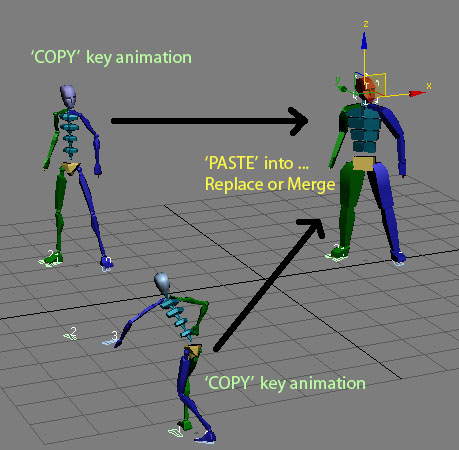
Copy \ Paste Biped animation

63 votes

Quick copy and paste Biped animation to another biped from one instance of max and paste them into another.

History:
Copy/Paste Biped Animation V 1.0
- Main idea Tools.
- macroscript file.

Updated :
Copy/Paste Biped Animation V 2.0
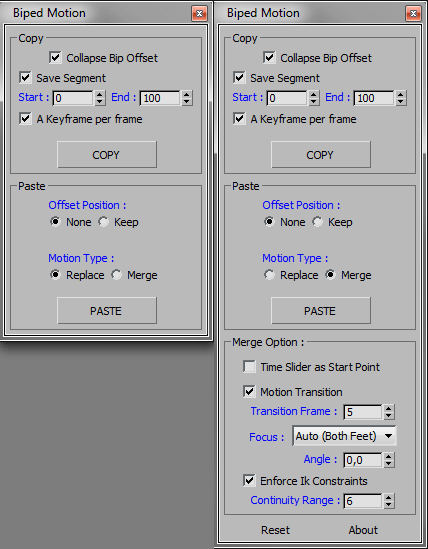
- Added some option for copy or paste.
- Added paste replace or merge bip motion as option.

CopyClick

12 votes

-- Copy by Click
-- V1.0

-- How it works?
-- 1. Select objects
-- 2. Execute CopybyClick
-- 3. Click to make a instance of selection
-- 4. ESC or rightclick to cancel

------------------------ THE CODE ------------------------

macroScript CopybyClick
category:"AGGTools"
buttonText:"CopybyClick"
tooltip:"Copy by Click"

(

fn CopyClick =
try
(
maxOps.cloneNodes $ cloneType:#instance newNodes:&nnl
select nnl
Sel=selection
p = point pos:Sel.center
p.pos.z = 0
ClickPos = pickPoint snap:#2D ()
ArrayFiltroGroupHead = #()

Quick Mask

72 votes

Quick black and white mask from the selected objects

Quick Mask

Now support XRef Scenes

Snapshot To Shape

23 votes

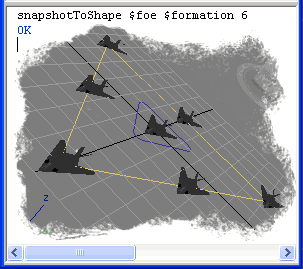
Clone object by equal distances on the shape length.

Snapshot To Shape