ScriptSpot is a diverse online community of artists and developers who come together to find and share scripts that empower their creativity with 3ds Max. Our users come from all parts of the world and work in everything from visual effects to gaming, architecture, students or hobbyists.
Submitted by andrasmiklos on Wed, 2010-11-10 05:55
39
votes
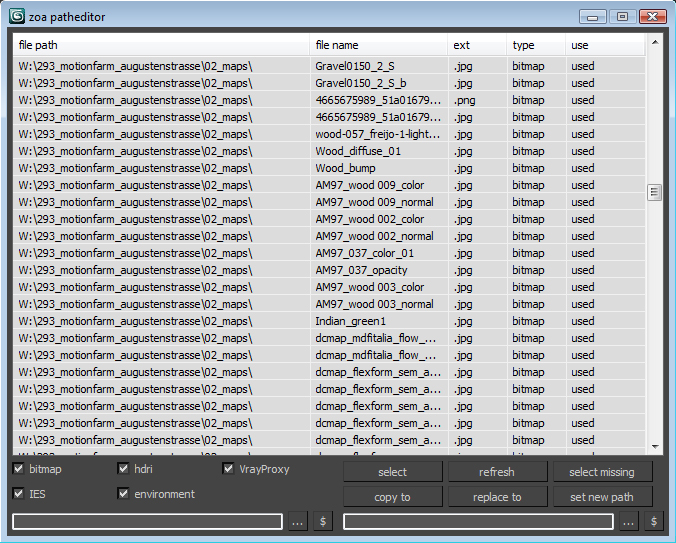
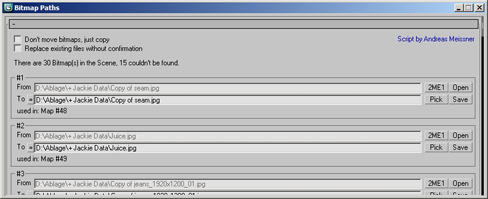
Simple Path relinker application for maps, ies, hdri corona proxy and vrayproxy objects. Features are: path text replacing and copy functions. The two text fields below each section are for "original" and for "future" paths. $ stand for string. Use it to copy a map path of a selected map to the desired text field.
After a long stretch of development, Project Manager 4 is officially out — the biggest release in the product's history, and now with full 3ds Max 2027 support. The headline is AI Asset Classification. Your library gets sorted automatically — by object type, material, and style — no manual tagging.
Project Manager 4 — What's New Since v3
Changelog · 3ds Max 2016–2027
AI-Powered Asset Classification
Automatic categorisation of 3D models by object type, material, form, and style — no manual tagging required
Runs entirely on your machine — no cloud, no subscription, your assets never leave your computer
GPU-accelerated background processing at low priority — won't interfere with rendering or active work
Reclassify specific folders or categories on demand — no need to reprocess the entire library
Scale across a team: multiple workstations share the same database and classify in parallel
Colour Tools
Find assets by colour — pick from a palette and instantly see matching models or textures
Perceptual colour similarity search — finds visually related assets, not just exact hex matches
Find Similar by Colour in the right-click menu for models and textures
Find Similar
Find similar by content — AI matches 3D models by style, shape, and visual look
Find similar by colour palette — matches assets to a reference image or mood board by dominant colour proportions
Smarter Search & Filtering
Multi-keyword search: "Chair, Glass" finds a file named Chair.max described as "glass"
Category filter correctly includes all subcategories — filtering Furniture also returns Furniture → Chairs → Dining
Combine category and material filters: find glass-and-metal tables, or wooden ones, in one click
Categorised / Uncategorised quick filters — see which assets still need attention
Gallery & 3D File Browsing
Three gallery tabs for .max files: Models, Materials, and External Links
Drag materials directly from the gallery into your open 3ds Max scene
3D viewport preview for FBX, 3DS, OBJ, and other formats — inspect geometry before importing
Edit external links inline — fix or replace missing textures without opening the .max file
Zoom & Pan for images — inspect textures at full resolution inside Project Manager
Migration & Compatibility
v3 and v4 share the same database format — point v4 at your existing library and go; no rebuild required
Run v3 and v4 side by side on the same team; supported from 3ds Max 2016 through 2027
Helps you to transfer texture coordinates from one objects to another with identical topology. The feature of this script is that they can transfer UV`s from multiple objects and correct some errors arising with importing .obj files, like vertex reordering or removing mid-edge vertexes when you export objects to .obj.
Updated to version 1.2 - rewritten vertex order sync, must work much better!
hi, this simple script converts PSD maps to JPG and saves them in the same path of original one and replaces old path with jpg one..
I hope it be useful