Tagged 'Rendering'

RIBit

13 votes

This is a free Renderman exporter for 3DSMax. It enables you to render your scenes using any Renderman complient renderer. For now - it doesn't do very much. It is after all a first alpha version - but it is usable to some extent. It exports you camera - lights and geometry (currenty - all geometry is exported using either polygons or subdivision meshes.) It does not export particles - though I would like to add them at some point. A lot of max attributes are not supported yet.

Delete Bad Frames on Backburner

12 votes

This script allows you to delete bad frames that were rendered by a given
node on backburner. This happens if the render farm is heterogeneous
(= different software or hardware configuration on the render nodes). Instead
of manually deleting the frames, it will delete all frames that were rendered
by a certain machine for a certain job. To find out which frames need to be
deleted it connects to the manager and fetches information about every
rendered frame. If the frame was rendered by the machine that has the name

Copy To Clipboard

11 votes

CopyToClipboard - 3DS MAX Render Effect allows you to copy the rendered image to the Windows clipboard.

- v1.0.1 (20.10.2007) added support for MAX 2008.

RenderGuy

1 vote

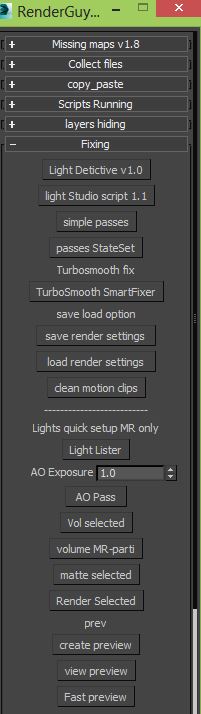
RenderGuy is Rendering/lighting/fixing tools you can Fix your missing maps ,collect your maps or archive it ,copy paste objects materials lights between different files , mange complex lighting setups with Light detictive ,quick mr studio and quick passes.
IF you do alot of rendering you will need this, All in one.

Batch Studio Renderer

0 votes

Overall functionality and advantages

FFX-Render-Manager

9 votes

Big scale effects require usually more than one FFX. Having a lot of FFX and holdout objects asks for a lot of memory. Limited memory means rendering in passes. Different lights and shaders per pass multiply the renderpasses again.

To setup a render, it takes some steps and usually you forget one and need to resubmit. That's why I wrote this script, that overviews everything and gives the ability to set it up fast.

I avoided using .NET intentionally, because in big scenes it sometimes takes a long time just to open a scripted tool.

FreeSceneBitmaps

14 votes

A Macroscript that just executes the FreeSceneBitmaps() function in MAXScript. Very useful for freeing up memory after a render.

Reindeer

1 vote

Reindeer 2018 Released!

The friendly node based Render Manager and Scene Automator for 3dsMax just got an update.


Easily create multiple versions of your renders using the all new Selector workflow. Perfect for product configurators and much more. Reindeer 2018 introduces new nodes, more script templates, Redshift support, VRay VFB support, more callback options, and more. With Reindeer it's all just one push of a button. Keep it simple or build advanced setups, it's your choice. Reindeer let's you automate the boring stuff so you can focus on what matters, Animation, Shading and Lighting.

What's New?
Selectors



Render Tuning Floater

13 votes

This tool is my solution for artists who needs to compare different render settings in short time with no need to save bitmaps.This tool is renderer independent.

VolumePreview

14 votes

"VolumePreview generates a preview of environment effects in the viewport including volumetrics - lens effects and shadows. It requires a camera view to generate a preview. After generating the preview data - the viewport displays the volumetric effects - shadows and lens flares in realtime.

Syndicate content