Tagged 'script'

Align Multiple Objects

2 votes

Align Multiple Objects - 3dsmax script

Description

Face Pose Saver

1 vote

A 3ds Max script to save key positons of the face witch is controlled with sliders

Video link

GitHub link

ABOUT THE SCRIPT:
It's a tool for animators to save key face poses and speed up work. It's gets the position of the selected sliders and do a snapsot on the viewport and save as a button. First you have to set the "CHR" as the charachter name and set the path where the picurates begin saved.

Attaching objects to particles

25 votes

Tutorial on attaching objects to particles. Essentially using physical objects, but having particles drive their animation.

Change Render Engines

4 votes

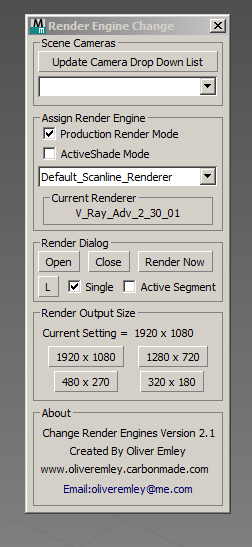
Change Render Enging ScreenshotV2.1 

Change Render Engines V2.1

The script allows you to do the following:

 - Select any cameras that are in the scene and automatically switch to that view

 - Update the camera list at the touch of a button

 - Assign Production or ActiveShade rendering mode

 - Assign a Render Engine to the Render mode that you are in

RoomBuilder

2 votes


Script makes simple room from rectangular or custom spline. It's designed for 1-sided walls and the same shape is used for floor, ceiling, plinth and cornice.

Script 3ds max V-ray material library

2 votes

Hello!

Brought to mind this script VrayMatLib (V-ray material library)

Now works in all versions of 3ds max.

Checked for serviceability in version 2014, 2016, 2017.

There are instructions in written and video instruction.

Use your health!

Load Multiple Bips

0 votes

I created this script to speed up my daily work with crowd animation. If you have a lot of character studios rigged bipeds and need to load the same animation (walk loops, conversation...) on all of then, so this script might help you.

It's a .mzp file that you can just drag and drop into 3ds Max or run through the MAXscript menu. After that you will find the script at: Customize > Customize User Interface > Toolbars tab > Category: MMScripts > Load Multiples Bips".

To use the script you just need to:

SubSpline

1 vote

SubSpline 3dsmax script - banner

Total Control of Spline Subobjects


Description

SubSpline is an Advanced Subobject Selector & Material IDs Editor for spline shapes in Autodesk 3dsMax.

Easily expose on screen the vertex numbers and material IDs for all your selected shapes, with a simple toggle button.

Ccom Map Baker-Auto Render To Texture

0 votes

If you have high polygon file and low polygon file finished UV mapping process before,
this tool can  extract Normal, Diffuse, Ambient Occlusion, Lighting map in one single image within 3DS Max.
So you don't  need to use Photoshop to collaborate all these map images in a single image file.
Baking process will be easily done in a minuite by using this tool.

feature
=========================================
1. Easy hide unhide delete low poly object, high poly object
2. Auto Import highpolygon
3. Single Import highpolygon
4.

Quick Batch Render

0 votes

A simple and powerful script to quickly render multiple ready '.max' files successively on a single computer.

Options: set a percentage of the file’s render resolution (width/height); ignore/suppress warning dialogs; render First frame only (to test render files with animated sequences).

Syndicate content